Unlock a world of possibilities! Login now and discover the exclusive benefits awaiting you.

- Qlik Community
- :
- Forums
- :
- Analytics & AI
- :
- Products & Topics
- :
- Visualization and Usability
- :
- RangeSum(Above())
- Subscribe to RSS Feed
- Mark Topic as New
- Mark Topic as Read
- Float this Topic for Current User
- Bookmark
- Subscribe
- Mute
- Printer Friendly Page

 timpoismans
- Mark as New
- Bookmark
- Subscribe
- Mute
- Subscribe to RSS Feed
- Permalink
- Report Inappropriate Content
RangeSum(Above())
Hi all
I got the following problem:
I have a calculated value per week. Now I need to sum that value up per week,
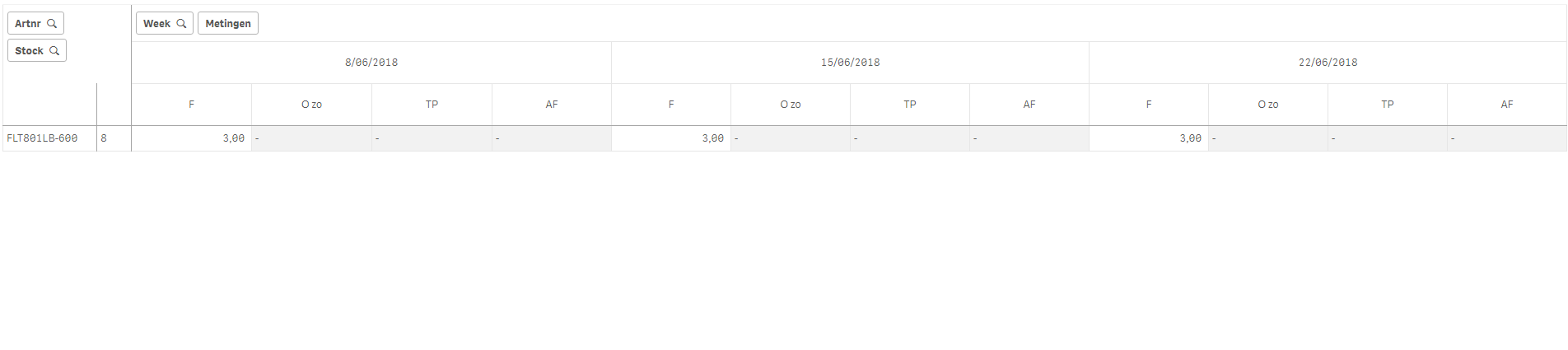
So F is the calculated value. In the current week (noted by date of the Friday of that week), it has a value of 3. The week after, it has a value of 3 as well, but I want to see the sum of both, so 6. In the 3rd week, another 3 is calculated, so I want to see the total of 9.
I tried using the RangeSum(Above()) function, but it only takes the first week into account and doesn't add the following:
RangeSum(Above(Sum({<Date={"<=$(=$(vToDate))"}, DateType={'Forecast'}>}Forecastaantal),0,1000))
Any help is appreciated and thanks in advance!
Kind regards,
Tim P.
Accepted Solutions

 sunny_talwar
- Mark as New
- Bookmark
- Subscribe
- Mute
- Subscribe to RSS Feed
- Permalink
- Report Inappropriate Content
Since this is a pivot table, try with Before/After instead of Above/Below
RangeSum(Before(Sum({<Date = {"<=$(=$(vToDate))"}, DateType = {'Forecast'}>} Forecastaantal), 0, 1000))
sunny_talwar
- Mark as New
- Bookmark
- Subscribe
- Mute
- Subscribe to RSS Feed
- Permalink
- Report Inappropriate Content
Since this is a pivot table, try with Before/After instead of Above/Below
RangeSum(Before(Sum({<Date = {"<=$(=$(vToDate))"}, DateType = {'Forecast'}>} Forecastaantal), 0, 1000))
timpoismans
- Mark as New
- Bookmark
- Subscribe
- Mute
- Subscribe to RSS Feed
- Permalink
- Report Inappropriate Content
Thanks again, Sunny!
I keep learning more and more from you!
