Unlock a world of possibilities! Login now and discover the exclusive benefits awaiting you.

- Qlik Community
- :
- Forums
- :
- Analytics & AI
- :
- Products & Topics
- :
- Visualization and Usability
- :
- Re:Qliksense Maps
- Subscribe to RSS Feed
- Mark Topic as New
- Mark Topic as Read
- Float this Topic for Current User
- Bookmark
- Subscribe
- Mute
- Printer Friendly Page

 t_vijay_qlik
- Mark as New
- Bookmark
- Subscribe
- Mute
- Subscribe to RSS Feed
- Permalink
- Report Inappropriate Content
Re:Qliksense Maps
Hi all,
While creating maps not able find the dimesnsions
Can any one help me how to create maps in qliksense
Accepted Solutions

 MK9885
- Mark as New
- Bookmark
- Subscribe
- Mute
- Subscribe to RSS Feed
- Permalink
- Report Inappropriate Content
I think this is the updated version of Qlik Sense out of box maps.
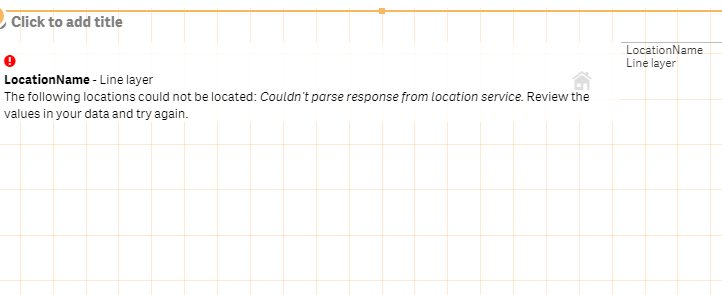
For line layer maps you'd need 2 dimensions...
To location and From location
Check this video below
@ 02:24 mins
https://www.youtube.com/watch?v=CSPCNfnIMp8
If still doesn;t work, provide us with a sample xl file data and we can try..
MK9885
- Mark as New
- Bookmark
- Subscribe
- Mute
- Subscribe to RSS Feed
- Permalink
- Report Inappropriate Content
Can you post your map script?
t_vijay_qlik
- Mark as New
- Bookmark
- Subscribe
- Mute
- Subscribe to RSS Feed
- Permalink
- Report Inappropriate Content
hi,
[StoreLocations]:
LOAD
[LocationId] AS [ProductId-LocationId],
[LocationType],
[LocationName],
GeoMakePoint([Latitude],[Longitude]) as [Location],
[City],
[StateProvince],
[Country]
FROM [lib://Section 4 - Sales Analysis/SalesDimensions.xlsx]
(ooxml, embedded labels, table is StoreLocations);
this one is the script
Thanks,
vijay
t_vijay_qlik
- Mark as New
- Bookmark
- Subscribe
- Mute
- Subscribe to RSS Feed
- Permalink
- Report Inappropriate Content
hi,
[Products]:
LOAD
//[ProductId] AS [ProductId-LocationId],
[ProductId],
[ProductName],
[ProductDescription],
[ProductSubcategoryId],
[Manufacturer],
[BrandName],
[Colour],
[Cost],
[RetailPrice]
FROM [lib://Section 4 - Sales Analysis/SalesDimensions.xlsx]
(ooxml, embedded labels, table is Products);
[ProductCategory]:
LOAD
[ProductCategoryId],
[ProductCategoryName]
FROM [lib://Section 4 - Sales Analysis/SalesDimensions.xlsx]
(ooxml, embedded labels, table is ProductCategory);
[ProductSubCategory]:
LOAD
[ProductCategoryId],
[ProductSubcategoryId],
[ProductSubcategoryName]
FROM [lib://Section 4 - Sales Analysis/SalesDimensions.xlsx]
(ooxml, embedded labels, table is ProductSubCategory);
[StoreLocations]:
LOAD
[LocationId] AS [ProductId-LocationId],
[LocationType],
[LocationName],
GeoMakePoint([Latitude],[Longitude]) as [Location],
[City],
[StateProvince],
[Country]
FROM [lib://Section 4 - Sales Analysis/SalesDimensions.xlsx]
(ooxml, embedded labels, table is StoreLocations);
MK9885
- Mark as New
- Bookmark
- Subscribe
- Mute
- Subscribe to RSS Feed
- Permalink
- Report Inappropriate Content
I think this is the updated version of Qlik Sense out of box maps.
For line layer maps you'd need 2 dimensions...
To location and From location
Check this video below
@ 02:24 mins
https://www.youtube.com/watch?v=CSPCNfnIMp8
If still doesn;t work, provide us with a sample xl file data and we can try..
