Unlock a world of possibilities! Login now and discover the exclusive benefits awaiting you.

- Qlik Community
- :
- Forums
- :
- Analytics & AI
- :
- Products & Topics
- :
- Visualization and Usability
- :
- Return a specific Break Even Date from Table
- Subscribe to RSS Feed
- Mark Topic as New
- Mark Topic as Read
- Float this Topic for Current User
- Bookmark
- Subscribe
- Mute
- Printer Friendly Page

 mikecherry
- Mark as New
- Bookmark
- Subscribe
- Mute
- Subscribe to RSS Feed
- Permalink
- Report Inappropriate Content
Return a specific Break Even Date from Table
Hi guys,
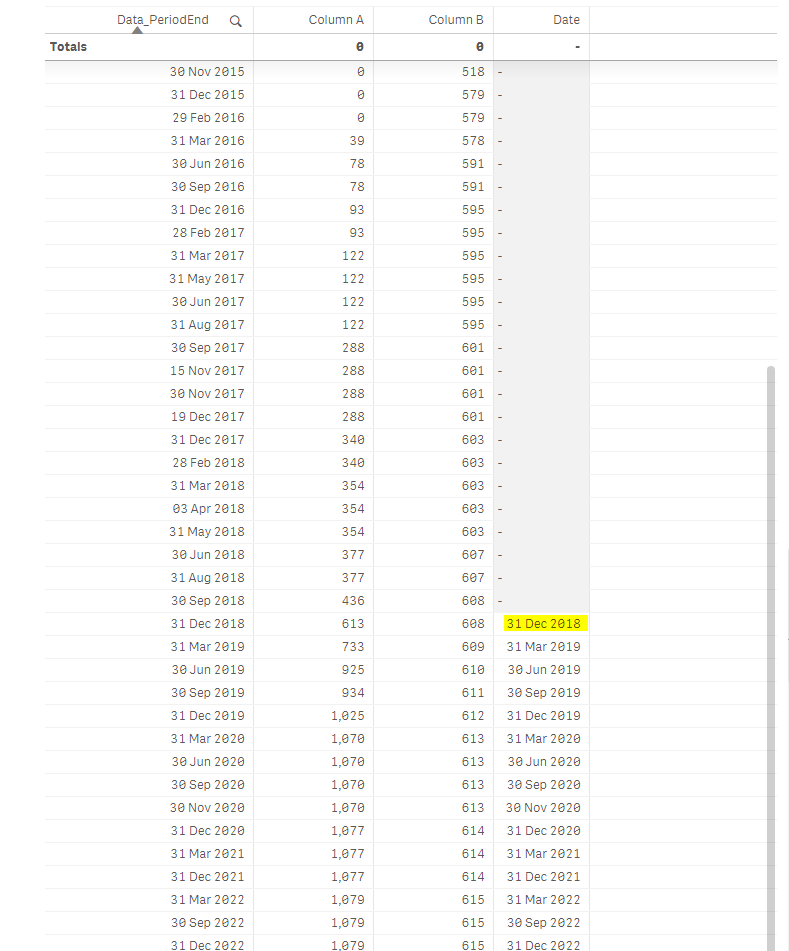
I am trying to calculate break even in a chart and I want to return just the first value when my Column A > Column B.
if(if(Rangesum(above($(vRDERDist),0,rowno()))>Rangesum(above($(vRDERCost),0,rowno())),1,0)=1,Date(min(Data_PeriodEnd)),null())
This is the expression I have in the chart at the moment that gives me every date if Column A > Column B.
How do I change the formula if I want to return the first data where Column A > Column B ?
- « Previous Replies
-
- 1
- 2
- Next Replies »
 erikbalunis
- Mark as New
- Bookmark
- Subscribe
- Mute
- Subscribe to RSS Feed
- Permalink
- Report Inappropriate Content
Although I don't completely understand the formula, I recognized a critical difference between the sample/example data and my data. The sample/example "costs" were positive values and my costs were negative values. In creating a new variable that negated my cost values, the calculation returned the expected values

- « Previous Replies
-
- 1
- 2
- Next Replies »