Unlock a world of possibilities! Login now and discover the exclusive benefits awaiting you.

- Qlik Community
- :
- Forums
- :
- Analytics & AI
- :
- Products & Topics
- :
- Visualization and Usability
- :
- Rolling Cumulative 5-Day return
- Subscribe to RSS Feed
- Mark Topic as New
- Mark Topic as Read
- Float this Topic for Current User
- Bookmark
- Subscribe
- Mute
- Printer Friendly Page

 odassier
- Mark as New
- Bookmark
- Subscribe
- Mute
- Subscribe to RSS Feed
- Permalink
- Report Inappropriate Content
Rolling Cumulative 5-Day return
Hi all,
I'm struggling with a cumulative return expression for my dashboard.
I've tried a few variants below:
1) RangeSum(Above(Sum(MS.WW4),0,Rowno()),0,5)
2) RangeSum(Above(Sum({<[Date]={'$(=max(Date))'},{<[Date]={'$(=max(Date)-5)'}>}[MS.WW4],0,Rowno()))
3) RangeSum(Above(Sum(MS.WW4),0,5))
4) Rangesum(Above(sum({<Date={'$(=max(Date))'}>}MS.WW4),0,5)
None seem to give me the right answer (or any answer at all). I am attaching the .qvf app here. I need an expression for both the table and a KPI. To complicate things, I've got some filters so there are if statements in there too (see table).
My goal is to use 5-Day cumulative returns from whatever data is selected by the user. The data is daily since Jan 2015 so I need them to be able to go back in time and see if this indicator was predictive.
Thank you for your help.
Olivier
Accepted Solutions

 OmarBenSalem
- Mark as New
- Bookmark
- Subscribe
- Mute
- Subscribe to RSS Feed
- Permalink
- Report Inappropriate Content
Use the Date field not the autocalendar.Date
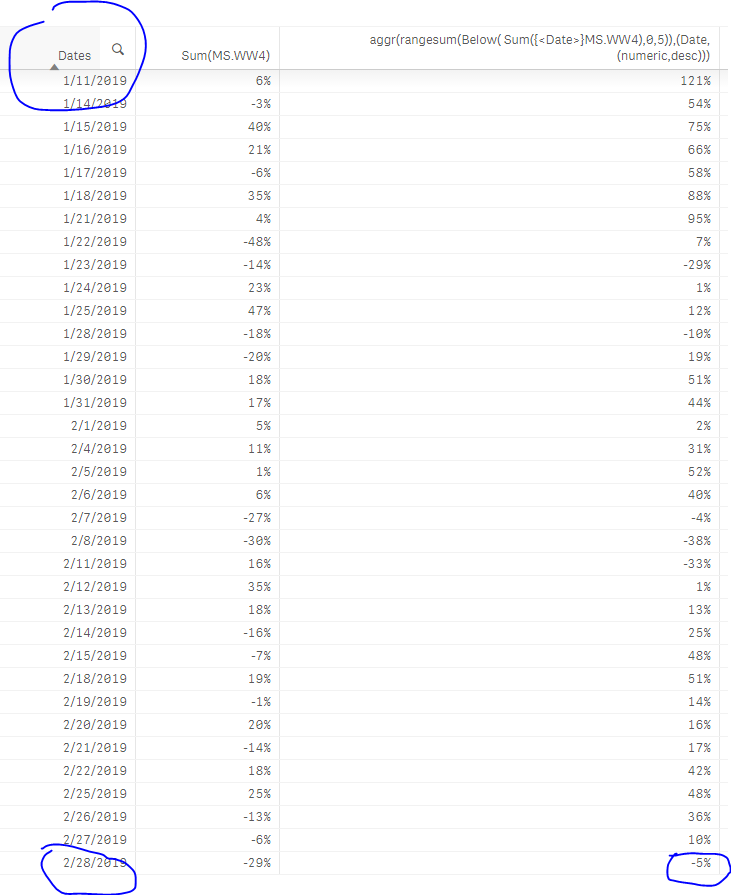
as a measure: aggr(rangesum(Below( Sum({<Date>}MS.WW4),0,5)),(Date,(numeric,desc)))
Result:

Thanks to the aggr part, even if u alter the sorting order of ur dates, Qlik will always know how to calculate the rolling 5 days sum:
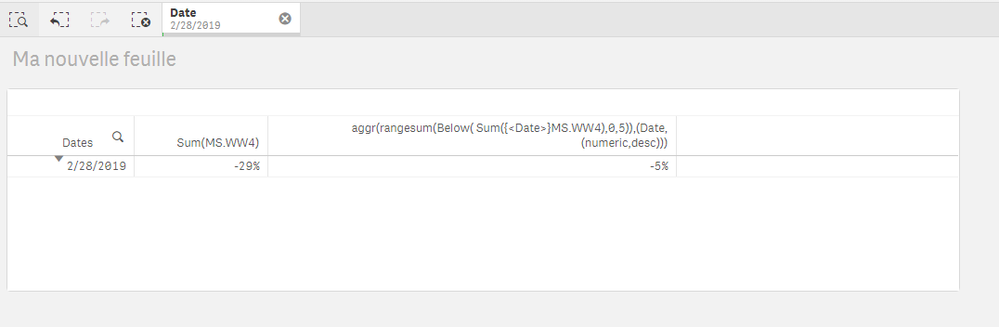
And thanks to the {<Date>} part, when u select a date, Qlik will return its rolling sum:
 OmarBenSalem
- Mark as New
- Bookmark
- Subscribe
- Mute
- Subscribe to RSS Feed
- Permalink
- Report Inappropriate Content
Use the Date field not the autocalendar.Date
as a measure: aggr(rangesum(Below( Sum({<Date>}MS.WW4),0,5)),(Date,(numeric,desc)))
Result:
Thanks to the aggr part, even if u alter the sorting order of ur dates, Qlik will always know how to calculate the rolling 5 days sum:
And thanks to the {<Date>} part, when u select a date, Qlik will return its rolling sum:
odassier
- Mark as New
- Bookmark
- Subscribe
- Mute
- Subscribe to RSS Feed
- Permalink
- Report Inappropriate Content
Hi Omar,
This is perfect, thank you so much. I must remember this one for the future. I deal with investment risk and returns so I'm always in need of cumulative values.
Cheers,
Olivier
OmarBenSalem
- Mark as New
- Bookmark
- Subscribe
- Mute
- Subscribe to RSS Feed
- Permalink
- Report Inappropriate Content
Omar BEN SALEM.
odassier
- Mark as New
- Bookmark
- Subscribe
- Mute
- Subscribe to RSS Feed
- Permalink
- Report Inappropriate Content
A quick follow-up. Now the users want to be able to calculate cumulative return based on their choice of start and end dates (i.e. via a date filter).
Using the standard rangesum expression below I don't get the same results as the cumulative sum I calculate in excel.
RangeSum(Above(Sum([FTSE Dev_RT-RA Return]),0,Rowno(Total)))
Do you know how to modify this expression to get the cumulative return to match what you get in excel? This is just a cumulative return so it should not require complicated set analysis expressions right?
Cheers,
Olivier
