Unlock a world of possibilities! Login now and discover the exclusive benefits awaiting you.

- Qlik Community
- :
- Forums
- :
- Analytics & AI
- :
- Products & Topics
- :
- Visualization and Usability
- :
- Re: SUM a Value Distinct Orders Today + Yesterday
- Subscribe to RSS Feed
- Mark Topic as New
- Mark Topic as Read
- Float this Topic for Current User
- Bookmark
- Subscribe
- Mute
- Printer Friendly Page

 marygrace
- Mark as New
- Bookmark
- Subscribe
- Mute
- Subscribe to RSS Feed
- Permalink
- Report Inappropriate Content
SUM a Value Distinct Orders Today + Yesterday
Hello,
I want to SUM the distict Orders Packeges Today and Yesterday, It already works for today not for yesterday.
Somebody can let me know what is wrong
//SUM Distinct Packeges Today------ is good
SUM(aggr(Sum(distinct{<Date={"$(=Date(max(Date),'DD/MM/YYYY'))"}, _Id_Flag={0},Estatus_Cobranza= {'EN SURTIDO','FACTURADO','ENTREGADO','CONSOLIDADO'}, Liberado={0},
TipoDeEntrega -= {'SOLO FACTURA','NO INVENTARIABLE'},Año={$(vAñoActual)},Mes=,Semana=>}Cant_Cajas),Numero_OrdenVenta))
+
//SUM Distinct Packeges Yesterday----- is wrong
SUM(aggr(Sum(distinct{<Date={"$(=Date(max(Date)-1,'DD/MM/YYYY'))"}, _Id_Flag={0},Estatus_Cobranza= {'EN SURTIDO','FACTURADO','ENTREGADO','CONSOLIDADO'}, Liberado={0},
TipoDeEntrega -= {'SOLO FACTURA','NO INVENTARIABLE'},Año={$(vAñoActual)},Mes=,Semana=>}Cant_Cajas),Numero_OrdenVenta))
Thank you!
marygrace
- Mark as New
- Bookmark
- Subscribe
- Mute
- Subscribe to RSS Feed
- Permalink
- Report Inappropriate Content
_05.JPG)


- Mark as New
- Bookmark
- Subscribe
- Mute
- Subscribe to RSS Feed
- Permalink
- Report Inappropriate Content
Haha, this case for sure it should work
SUM(aggr(Sum(distinct{<_Id_Flag={0},Date = {'$(=Date(Max(Date-1),'DD/MM/YYYY))'}, Estatus_Cobranza= {'EN SURTIDO','FACTURADO','ENTREGADO','CONSOLIDADO'}, Liberado={0},
TipoDeEntrega -= {'SOLO FACTURA','NO INVENTARIABLE'},Año={$(vAñoActual)},Mes=,Semana=>}Cant_Cajas),Numero_OrdenVenta))
marygrace
- Mark as New
- Bookmark
- Subscribe
- Mute
- Subscribe to RSS Feed
- Permalink
- Report Inappropriate Content
Do you miss something ?
comilla simple or double
- Mark as New
- Bookmark
- Subscribe
- Mute
- Subscribe to RSS Feed
- Permalink
- Report Inappropriate Content
I believe single / double should work. Even, Without that may works. Try different way and let us know because i can ask to share sample fortunately i can't work with your file 
 adj29block
- Mark as New
- Bookmark
- Subscribe
- Mute
- Subscribe to RSS Feed
- Permalink
- Report Inappropriate Content
Bonjour,
You can translate with Google translation :
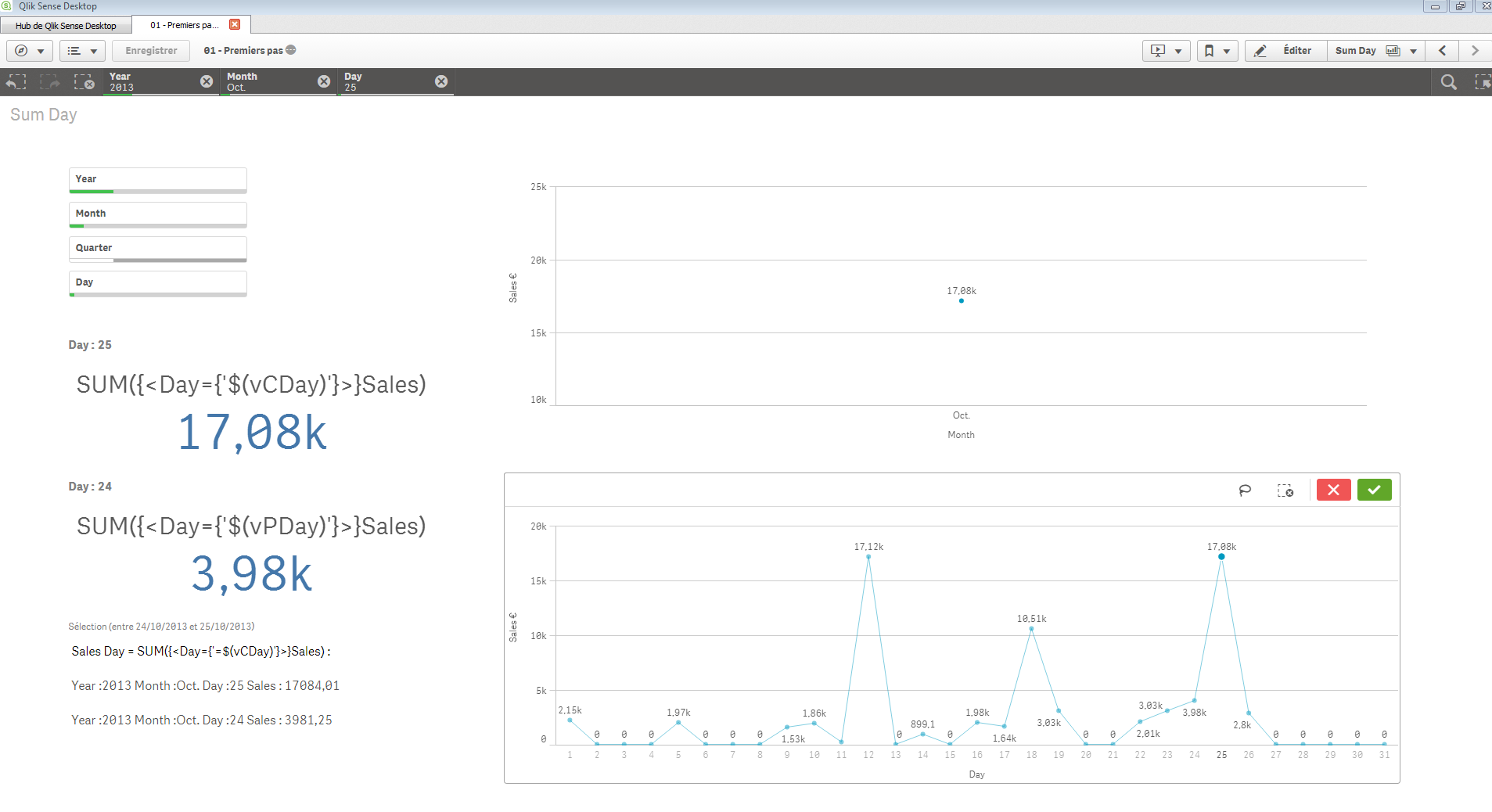
Je cré des variables dans le Script MAIN
/*Variables*/
LET vMinDate = Num(Makedate(2011,1,1));
LET vMaxDate = Num(Makedate(2014,6,29));
/*CurrentDate*/
let vCYear = '=Max(Year)';
let vCDate = '=Max(OrderDate)';
Let vToday = '=vCDate'; /*vToday = vCDate = Max(OrderDate) = Max Date Table Sales, Field OrderDate 26/06/2014*/
let vCMonth = '=Month(Max(OrderDate))';
let vCDay = '=Day(Max(OrderDate))';
/*PreviousDate*/
let vPYear = '=(Max(Year)-1)'; // '=vCYear-1';
let vPDate = '=Date(AddYears(Max(OrderDate),-1))';
let vPMonth = '=Month(AddMonths(Max(OrderDate),-1))';
Let vPDay = '=Day(Max(OrderDate)-1)';
Let vMonthCourant = '=Max({1<Year={$(=Max({1} Year ))}>} Month)';
Pour Sum
Dans Text Box :
Expression Current Day, CurrentYear, CurrentMonth
='Year :' & vCYear & Chr(160) & 'Month :' & vCMonth & Chr(160) & 'Day :' & vCDay & Chr(160) & 'Sales :' &Chr(160) & SUM({<Day={'$(vCDay)'}>}Sales)
Expression Previous Day, Current Year, Current Month
='Year :' & vCYear & Chr(160) & 'Month :' & vCMonth & Chr(160) & 'Day :' & vPDay & Chr(160) & 'Sales :' &Chr(160) & SUM({<Day={'$(vPDay)'}>}Sales)
Titre
='Sélection (entre ' & Date(('$(vCDate)')-1) & ' et ' & Date('$(vCDate)') & ')'
Dans KPI
Expression : SUM({<Day={'$(vCDay)'}>}Sales)
Titre : ='Day :' & Chr(160) & vCDay
SUM({<Day={'$(vPDay)'}>}Sales)
Titre : ='Day :' & Chr(160) & vPDay
Vous pouvez ajouter des conditions (Changement d’année) ou une agrégation, un décompte...
marygrace
- Mark as New
- Bookmark
- Subscribe
- Mute
- Subscribe to RSS Feed
- Permalink
- Report Inappropriate Content
Anil,
I tried many ways, it does not works, looks like the problem is the aggr(Sum expression... between Date-1
- Mark as New
- Bookmark
- Subscribe
- Mute
- Subscribe to RSS Feed
- Permalink
- Report Inappropriate Content
Will you attach application?
marygrace
- Mark as New
- Bookmark
- Subscribe
- Mute
- Subscribe to RSS Feed
- Permalink
- Report Inappropriate Content
Can I send you by wetransfer the file size is 30MB, can you share me your email address?
marygrace
- Mark as New
- Bookmark
- Subscribe
- Mute
- Subscribe to RSS Feed
- Permalink
- Report Inappropriate Content
I did the same example and works, but the problem is when I add AGGR + SUM into expression
marygrace
- Mark as New
- Bookmark
- Subscribe
- Mute
- Subscribe to RSS Feed
- Permalink
- Report Inappropriate Content
Looks like my problem became from AGGR function, because if I remove Aggr the expression works but I need to SUM Cant_Cajas distinct Orders any other idea how do it?
Sum(
{$
<Date={"$(=Date(max(Date)-1,'DD/MM/YYYY'))"}, _Id_Flag={0},Estatus_Cobranza= {'EN SURTIDO','FACTURADO','ENTREGADO','CONSOLIDADO'}, Liberado={0},
TipoDeEntrega -= {'SOLO FACTURA','NO INVENTARIABLE'},Año={$(vAñoActual)},Mes=,Dia=>
}
Cant_Cajas)
