Unlock a world of possibilities! Login now and discover the exclusive benefits awaiting you.

- Qlik Community
- :
- Forums
- :
- Analytics & AI
- :
- Products & Topics
- :
- Visualization and Usability
- :
- Re: Searching option for variables?
- Subscribe to RSS Feed
- Mark Topic as New
- Mark Topic as Read
- Float this Topic for Current User
- Bookmark
- Subscribe
- Mute
- Printer Friendly Page

- Mark as New
- Bookmark
- Subscribe
- Mute
- Subscribe to RSS Feed
- Permalink
- Report Inappropriate Content
Searching option for variables?
Is there any way to search for variables?
I have a lot of variables defined in the window as below:
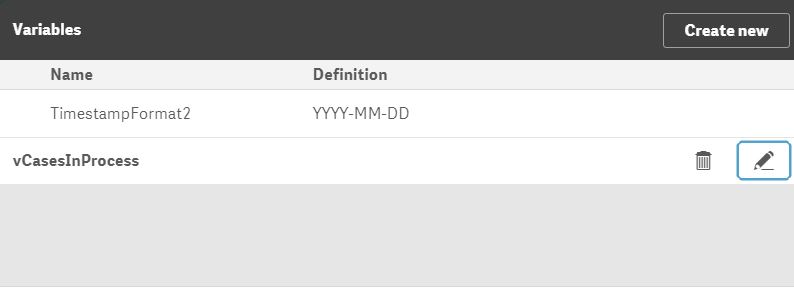
Is there any way to search e.g. for variables with "process" in their names?
If I have to change something in definition of a variable - it's really annoying to scroll down to find the correct variable.
I mean something like this:

- Tags:
- qlik sense
- variable
- « Previous Replies
-
- 1
- 2
- Next Replies »
Accepted Solutions

 gsbeaton
- Mark as New
- Bookmark
- Subscribe
- Mute
- Subscribe to RSS Feed
- Permalink
- Report Inappropriate Content
Hi Grzegorz,
No, not using the Sense UI but there are some workarounds that might help if you are managing a lot.
First of all, you can set up variables in the Script. You could create a new section in the data load editor and set up all your variables there, eg LET TimeStampFormat2 = 'YYYY-MM-DD';
Or, manage them all in a CSV or Excel document and auto create them using script like this one on my Gist:
A QlikView and QlikSense script to generate variables from a CSV include. · GitHub
gsbeaton
- Mark as New
- Bookmark
- Subscribe
- Mute
- Subscribe to RSS Feed
- Permalink
- Report Inappropriate Content
Hi Grzegorz,
No, not using the Sense UI but there are some workarounds that might help if you are managing a lot.
First of all, you can set up variables in the Script. You could create a new section in the data load editor and set up all your variables there, eg LET TimeStampFormat2 = 'YYYY-MM-DD';
Or, manage them all in a CSV or Excel document and auto create them using script like this one on my Gist:
A QlikView and QlikSense script to generate variables from a CSV include. · GitHub
- Mark as New
- Bookmark
- Subscribe
- Mute
- Subscribe to RSS Feed
- Permalink
- Report Inappropriate Content
Hi George,
Thanks. I was surprised that there is no searching for variables.. and still I am 😕
Unfortunately, I have to define variables in the Qlik UI as I need to create dynamic dashboards (using extensions which store data under variables).
Nevertheless, your script is really interesting. I saved it in my favorites 
Btw, have you a script that works the other way round? (save variables to csv?)
gsbeaton
- Mark as New
- Bookmark
- Subscribe
- Mute
- Subscribe to RSS Feed
- Permalink
- Report Inappropriate Content
Hey Grzegorz
A variable defined in the UI is absolutely no different to one created in the script.
Getting the variables back out is not quite as straight forward
I've pulled together a script to extract your variables from your QVF. Have a look at this:A quick and dirty Node.js script to dump QlikSense variables out to a file. · GitHub
It uses Node.JS along with 3 libraries written by Qlik staffers. Tested locally and created a nice CSV file for me with all the app variables. Hope you can get it to work.
Best regards
George
- Mark as New
- Bookmark
- Subscribe
- Mute
- Subscribe to RSS Feed
- Permalink
- Report Inappropriate Content
Hi George,
Thanks
How to run this script in QS?
gsbeaton
- Mark as New
- Bookmark
- Subscribe
- Mute
- Subscribe to RSS Feed
- Permalink
- Report Inappropriate Content
Hi Grzegorz,
It's a Node.js application so you'll have to learn a wee bit about Node. I only started playing with it 2 months ago, it's not difficult t pick up if you have a coding background. Node is a very popular way of connecting to QlikSense's many APIs.
Basically, once you have all the dependencies installed , you would just call it by typing >node dumpVariables.js. There are lots of beginners tutorials on the web for node.
Here is also a link to Qlik's enigma.js api's documentation, specifically showing how you can use enigma.js directly to list your apps variables.
Hope this helps
George
- Mark as New
- Bookmark
- Subscribe
- Mute
- Subscribe to RSS Feed
- Permalink
- Report Inappropriate Content
Thanks, I will try it.
So it's time to learn Node
gsbeaton
- Mark as New
- Bookmark
- Subscribe
- Mute
- Subscribe to RSS Feed
- Permalink
- Report Inappropriate Content
You won't regret it

 Ken_T
Ken_T
- Mark as New
- Bookmark
- Subscribe
- Mute
- Subscribe to RSS Feed
- Permalink
- Report Inappropriate Content
there is a product enhancement request for this, the feature request ID is 3085. The request is to ask for search in the variables list and a sort option, too. I do not think there is a public article about the request.

 DatinexPeyman
- Mark as New
- Bookmark
- Subscribe
- Mute
- Subscribe to RSS Feed
- Permalink
- Report Inappropriate Content
If you mean this request:
https://community.qlik.com/t5/Suggest-an-Idea/Search-variables/idi-p/1613974#comment-on-this
it has been declined trough "Steven_Pressland (Employee)" on 2020-07-06 06:10 AM, after 11 Months!
If you have developed an Qlik-App, you know, how important is that, to search for variables. It took a very long time to have the feature in QV, now it seems we have to wait another long time, to get such a simple to develope, useful feature in QS.
Best Regards
Pey
- « Previous Replies
-
- 1
- 2
- Next Replies »