Unlock a world of possibilities! Login now and discover the exclusive benefits awaiting you.

- Qlik Community
- :
- Forums
- :
- Analytics & AI
- :
- Products & Topics
- :
- Visualization and Usability
- :
- Section Access
- Subscribe to RSS Feed
- Mark Topic as New
- Mark Topic as Read
- Float this Topic for Current User
- Bookmark
- Subscribe
- Mute
- Printer Friendly Page

- Mark as New
- Bookmark
- Subscribe
- Mute
- Subscribe to RSS Feed
- Permalink
- Report Inappropriate Content
Section Access
Hi,
I want user A to not see the field 'MATERIAL' in the app. This is the source for my section access.
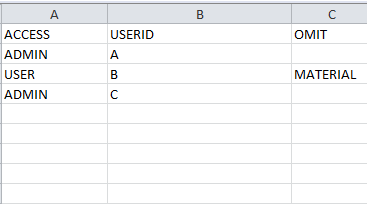
This is my section access code:
Section Access;
LOAD
"ACCESS",
upper( "USERID"),
OMIT
FROM [lib://Access/test1.xlsx]
(ooxml, embedded labels, table is Sheet1);
Section Application;
Welcome:
LOAD
Upper("USERID")as userid,
NAME,
OMIT
FROM [lib://Access)/test1.xlsx]
(ooxml, embedded labels, table is Sheet1);
However, the user is still able to see the field MATERIAL.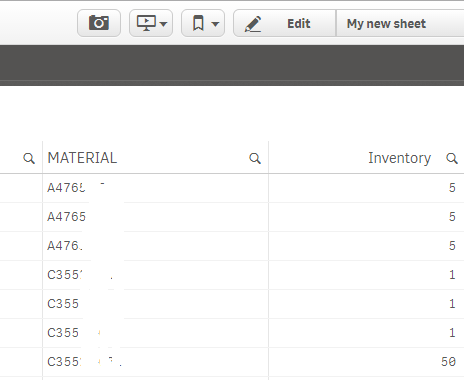
What am I doing wrrong?

 Gysbert_Wassena
- Mark as New
- Bookmark
- Subscribe
- Mute
- Subscribe to RSS Feed
- Permalink
- Report Inappropriate Content
Then don't make user A an Admin. Admin will see all the data. See this blog post: Tips and tricks for section access in Qlik Sense (2.0+)
talk is cheap, supply exceeds demand
- Mark as New
- Bookmark
- Subscribe
- Mute
- Subscribe to RSS Feed
- Permalink
- Report Inappropriate Content
User B is seeing the data.

 Vegar
Vegar
- Mark as New
- Bookmark
- Subscribe
- Mute
- Subscribe to RSS Feed
- Permalink
- Report Inappropriate Content
 jagan
jagan
- Mark as New
- Bookmark
- Subscribe
- Mute
- Subscribe to RSS Feed
- Permalink
- Report Inappropriate Content
Hi,
Try thsi
Section Access;
LOAD
"ACCESS",
upper( "USERID") AS USERID,
OMIT
FROM [lib://Access/test1.xlsx]
(ooxml, embedded labels, table is Sheet1);
Section Application;
Welcome:
LOAD
Upper("USERID")as USERID,
NAME,
OMIT
FROM [lib://Access)/test1.xlsx]
(ooxml, embedded labels, table is Sheet1);
Also check this link below.
Column level access using Section Access
Various levels of security implementation using Section Access
Regards,
Jagan.