Unlock a world of possibilities! Login now and discover the exclusive benefits awaiting you.

- Qlik Community
- :
- Forums
- :
- Analytics & AI
- :
- Products & Topics
- :
- Visualization and Usability
- :
- Re: Selecting "not" values via a button
- Subscribe to RSS Feed
- Mark Topic as New
- Mark Topic as Read
- Float this Topic for Current User
- Bookmark
- Subscribe
- Mute
- Printer Friendly Page

 QlikSensor
- Mark as New
- Bookmark
- Subscribe
- Mute
- Subscribe to RSS Feed
- Permalink
- Report Inappropriate Content
Selecting "not" values via a button
Hi,
today I have learned how to setup a QlikSense Button which selects more than one value by just writing
(String1|String2)
Now I want to setup a button which selects the alternatives which means everything except String1 and String2. Is this possible in QlikSense?
- « Previous Replies
-
- 1
- 2
- Next Replies »
 JordyWegman
- Mark as New
- Bookmark
- Subscribe
- Mute
- Subscribe to RSS Feed
- Permalink
- Report Inappropriate Content
Hi,
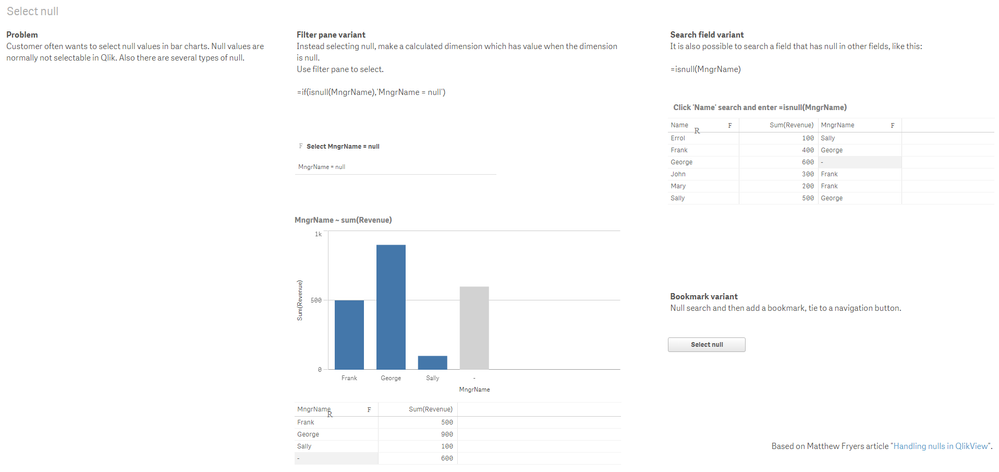
You can select nulls in you want this:
Jordy
Climber
QlikSensor
- Mark as New
- Bookmark
- Subscribe
- Mute
- Subscribe to RSS Feed
- Permalink
- Report Inappropriate Content
Hi, thanks for the quick answer. I don't want to filter out null values but if I would take your example I want to filter out just Sally. Therefore I need a button which filters NOT Sally.
 bramkn
- Mark as New
- Bookmark
- Subscribe
- Mute
- Subscribe to RSS Feed
- Permalink
- Report Inappropriate Content
QlikSensor
- Mark as New
- Bookmark
- Subscribe
- Mute
- Subscribe to RSS Feed
- Permalink
- Report Inappropriate Content
Hm, could you explain this in detail? I don't know how to use "set analysis"...
bramkn
- Mark as New
- Bookmark
- Subscribe
- Mute
- Subscribe to RSS Feed
- Permalink
- Report Inappropriate Content
in your calculation/measure you can use this:
sum({<Name={'$(VariableofVariablebutton)'}>}YourFieldNameToSum)
QlikSensor
- Mark as New
- Bookmark
- Subscribe
- Mute
- Subscribe to RSS Feed
- Permalink
- Report Inappropriate Content
--> Do you know how to use the buttons to fill a variable?
Unfortunately not 😞
I thought it's as easy as write (George|Sally)

 rwunderlich
- Mark as New
- Bookmark
- Subscribe
- Mute
- Subscribe to RSS Feed
- Permalink
- Report Inappropriate Content
You can accomplish the "not" selection with 2 actions: First, select the values, second action "select excluded".
It's also possible to do it with a single compound selection like this:
(* ^ (String1|String2))
I use this doc https://community.qlik.com/t5/QlikView-Documents/Compound-Search-demystified/ta-p/1494410 as the definitive guide to compound search.
-Rob
http://masterssummit.com
http://qlikviewcookbook.com
http://www.easyqlik.com
QlikSensor
- Mark as New
- Bookmark
- Subscribe
- Mute
- Subscribe to RSS Feed
- Permalink
- Report Inappropriate Content
Thanks for sharing. This works really great. It doesn't select exactly the alternatives but it's something I can live with.
rwunderlich
- Mark as New
- Bookmark
- Subscribe
- Mute
- Subscribe to RSS Feed
- Permalink
- Report Inappropriate Content
It's a NOT selection, so yes, it's not the same as selecting alternatives. If you want a true alternatives selection, use the "Select Alternatives" action in the button.
-Rob

- « Previous Replies
-
- 1
- 2
- Next Replies »