Unlock a world of possibilities! Login now and discover the exclusive benefits awaiting you.

- Qlik Community
- :
- Forums
- :
- Analytics & AI
- :
- Products & Topics
- :
- Visualization and Usability
- :
- Sense: Different Filters on different Items on one...
- Subscribe to RSS Feed
- Mark Topic as New
- Mark Topic as Read
- Float this Topic for Current User
- Bookmark
- Subscribe
- Mute
- Printer Friendly Page

- Mark as New
- Bookmark
- Subscribe
- Mute
- Subscribe to RSS Feed
- Permalink
- Report Inappropriate Content
Sense: Different Filters on different Items on one sheet
Hi all
Is it possible to have 2 tables (but same data source) on a sheet and each table shows a different set? Lets say we have a table of cars and the first table shows all german cars and the second the rest?
Thanx for your help!
Chris
Accepted Solutions
- Mark as New
- Bookmark
- Subscribe
- Mute
- Subscribe to RSS Feed
- Permalink
- Report Inappropriate Content
Set analysis can be tricky 
Here are the correct ones:
sum({$<country={"germany"}>}stock) to dispatch only the brand stock for germany end then
sum({$<country-={"germany"}>}stock) to dispatch the brand stock for other countries
Further reading: Set analysis and set expressions
Regards,
Bas.

 datanibbler
- Mark as New
- Bookmark
- Subscribe
- Mute
- Subscribe to RSS Feed
- Permalink
- Report Inappropriate Content
Hi Christian,
I don't know about QlikSense, I am only working with QlikView, but two potential solutions to this come to my mind: You could use SET_analysis on the GUI or, if the user should have the possibility of editing the two tables independently of one another, you could use the alternate_states method.
HTH
Best regards,
DataNibbler
- Mark as New
- Bookmark
- Subscribe
- Mute
- Subscribe to RSS Feed
- Permalink
- Report Inappropriate Content
Hi Christian,
Can you elaborate on what you want to achieve? What should happen when a user clicks on list 1 (german cars) and the other (non-german cars)? and do you have a field in your data to make that distinction on?
Regards,
Bas
- Mark as New
- Bookmark
- Subscribe
- Mute
- Subscribe to RSS Feed
- Permalink
- Report Inappropriate Content
Hi DataNibbler, Hi Bas
First of all, Thanx!
@DataNibbler
unfortunately, alternate state seems no to be included in Sense. and as for the set analysis suggestion, please see my comment aimed at bas. thanx!
@Bas
here's an example:
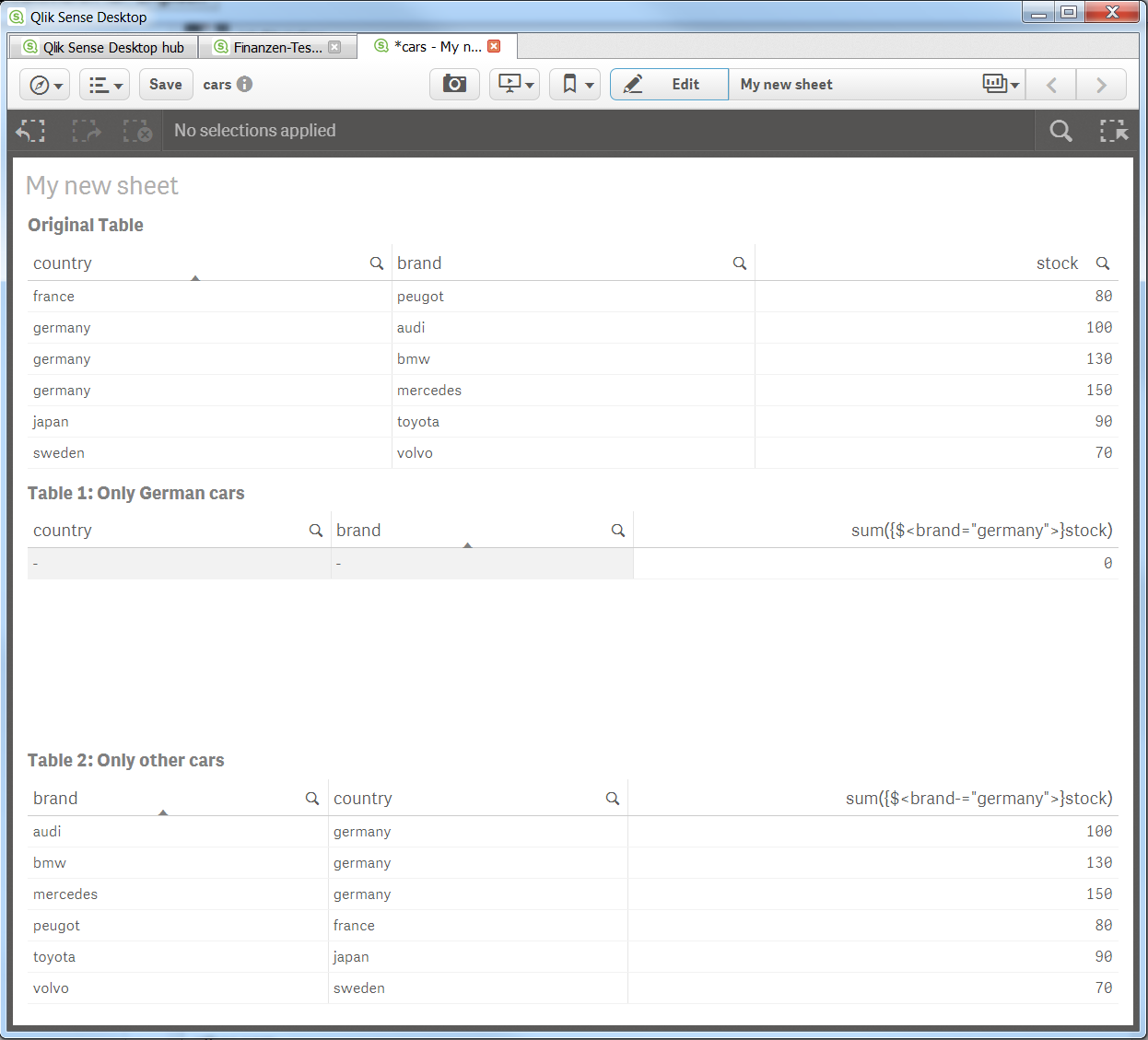
the first table show the original data. in table 1 i'd like to show only german cars, while in table two i'd like to show other cars. the way i tried to solve the problem, does not work. for my understanding, for every table i need a separate filter. is this possible in qlik sense?
thanx again!
chris

 brunobertels
- Mark as New
- Bookmark
- Subscribe
- Mute
- Subscribe to RSS Feed
- Permalink
- Report Inappropriate Content
Hi Christian
It's seems that you make a mistake in you set analysis :

you should take country and not "brand"
sum({$<country="germany">}stock) to dispatch only the brand stock for germany end then
sum({$<country-="germany">}stock) to dispatch the brand stock for other countries
Another way to achieve what you need will be to create a new dimension using flag to isolate countries ( Germany vs others)
Qlik Sense does'nt support alternate state , nevertheless it's possible to simulate alternate state using variable new features in Qlik Sense 2.2
In conclusion may i advise you to post a sample of your data with your requirments so the community will help you easily
Hope it will help you
Bruno
- Mark as New
- Bookmark
- Subscribe
- Mute
- Subscribe to RSS Feed
- Permalink
- Report Inappropriate Content
uff, thank you bruno. thats embarassing. you're completely right, i used the wrong set modifier... but still, not working, even with the correct feield name 😞
i attached the app. would be veeeery nice if you could help me out!
thanx!
chris
- Mark as New
- Bookmark
- Subscribe
- Mute
- Subscribe to RSS Feed
- Permalink
- Report Inappropriate Content
Set analysis can be tricky
Here are the correct ones:
sum({$<country={"germany"}>}stock) to dispatch only the brand stock for germany end then
sum({$<country-={"germany"}>}stock) to dispatch the brand stock for other countries
Further reading: Set analysis and set expressions
Regards,
Bas.
- Mark as New
- Bookmark
- Subscribe
- Mute
- Subscribe to RSS Feed
- Permalink
- Report Inappropriate Content
Thank you very much, Bas! That made the trick (and you my day 🙂
And thanx for the link too. i'll go back to school...
cool community, i like...
christian
brunobertels
- Mark as New
- Bookmark
- Subscribe
- Mute
- Subscribe to RSS Feed
- Permalink
- Report Inappropriate Content
Hi
Bas is right the correct syntax is
sum({$<country={"germany"}>}stock)
sum({$<country-={"germany"}>}stock)
Find attached your app with correct syntax
Once advise , because set analysis are prety difficult, i use this fantastic tools to built my set analysis syntax cause in fact as a end user and new to KQlik Sense i do not understand all.
http://tools.qlikblog.at/SetAnalysisWizard/QlikView-SetAnalysis_Wizard_and_Generator.aspx?sa=
Regards
Bruno
- Mark as New
- Bookmark
- Subscribe
- Mute
- Subscribe to RSS Feed
- Permalink
- Report Inappropriate Content
thank you bruno! i'll test that wizard out. seems to be very helpful...
chris