Unlock a world of possibilities! Login now and discover the exclusive benefits awaiting you.

- Qlik Community
- :
- Forums
- :
- Analytics & AI
- :
- Products & Topics
- :
- Visualization and Usability
- :
- Set Analysis Issue
- Subscribe to RSS Feed
- Mark Topic as New
- Mark Topic as Read
- Float this Topic for Current User
- Bookmark
- Subscribe
- Mute
- Printer Friendly Page

 eduardo_dimperi
- Mark as New
- Bookmark
- Subscribe
- Mute
- Subscribe to RSS Feed
- Permalink
- Report Inappropriate Content
Set Analysis Issue
Hi,
I need to count all [DATA_LIMITE] that >= Today(), but my field are not in Date Format, so i tried with a more simple equacition (just equal), with "If "condition.
If (FLOOR([DATA_LIMITE])=FLOOR(TODAY()), TRUE,FALSE)
With this i got 'true' where need to be 'true', so i tried the same logic to set analysis and did not work like i expected.
I tried use that
COUNT(${<FLOOR(DATA_LIMITE)={"$(=FLOOR(TODAY()))"}>}DISTINCT OID_SYSTEM)
Thank you
- « Previous Replies
-
- 1
- 2
- Next Replies »

 stigchel
- Mark as New
- Bookmark
- Subscribe
- Mute
- Subscribe to RSS Feed
- Permalink
- Report Inappropriate Content
If you want to limit the results to today and no future dates then
Count({<DATA_LIMITE={">=$(=FLOOR(TODAY()))<$(=FLOOR(TODAY()+1))"}>} DISTINCT OID_SYSTEM)
 zebhashmi
- Mark as New
- Bookmark
- Subscribe
- Mute
- Subscribe to RSS Feed
- Permalink
- Report Inappropriate Content
you are right but it will be inside of curly braces
eduardo_dimperi- Mark as New
- Bookmark
- Subscribe
- Mute
- Subscribe to RSS Feed
- Permalink
- Report Inappropriate Content
I change my code to DATE_LIMITE be in Date Format, but still not working
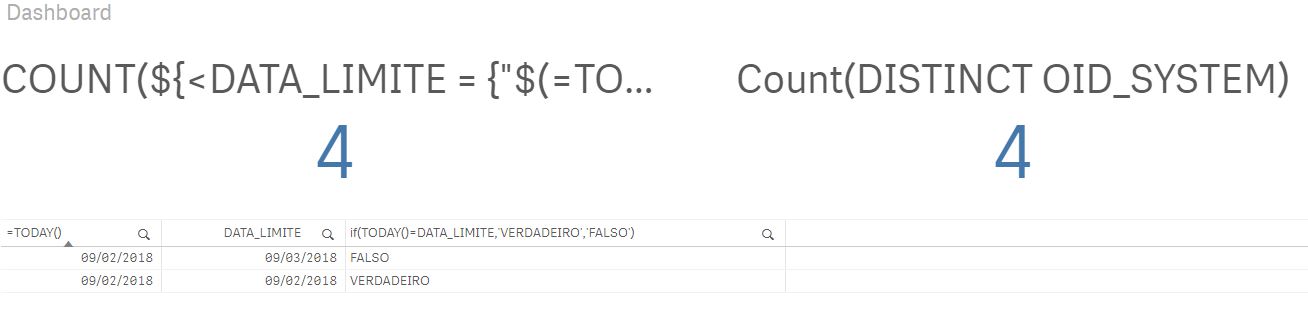
COUNT(${<DATA_LIMITE = {"$(=TODAY())"}>} DISTINCT OID_SYSTEM)
eduardo_dimperi- Mark as New
- Bookmark
- Subscribe
- Mute
- Subscribe to RSS Feed
- Permalink
- Report Inappropriate Content
hahaha thats right! You solve!
Thank you.
COUNT({$<DATA_LIMITE = {"$(=TODAY())"}>} DISTINCT OID_SYSTEM)
zebhashmi
- Mark as New
- Bookmark
- Subscribe
- Mute
- Subscribe to RSS Feed
- Permalink
- Report Inappropriate Content
Great Thank you, it was nice to talk to you!

- « Previous Replies
-
- 1
- 2
- Next Replies »