Unlock a world of possibilities! Login now and discover the exclusive benefits awaiting you.

- Qlik Community
- :
- Forums
- :
- Analytics & AI
- :
- Products & Topics
- :
- Visualization and Usability
- :
- Re: Set Analysis Row level
- Subscribe to RSS Feed
- Mark Topic as New
- Mark Topic as Read
- Float this Topic for Current User
- Bookmark
- Subscribe
- Mute
- Printer Friendly Page

 qlik4asif
- Mark as New
- Bookmark
- Subscribe
- Mute
- Subscribe to RSS Feed
- Permalink
- Report Inappropriate Content
Set Analysis Row level
Hello Guys,
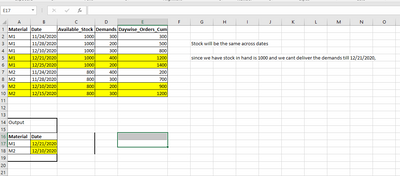
Please help me in fixing the below set expression.
Min({<Daywise_Orders_Cum={">=$(=Sum(Available_Stock))"}>}Belege_Date)
The above expression is used in straight table where it is calculating all the stock and comparing with daywise orders,
but i have Material as dimension in table, and i want to check the stock of each parts with their demands,
which means the above set expression should calculate at row level.
please help me out

 Taoufiq_Zarra
- Mark as New
- Bookmark
- Subscribe
- Mute
- Subscribe to RSS Feed
- Permalink
- Report Inappropriate Content
@qlik4asif can you share a sample data and the expected output ?
Taoufiq ZARRA
"Please LIKE posts and "Accept as Solution" if the provided solution is helpful "
(you can mark up to 3 "solutions") 😉
qlik4asif
- Mark as New
- Bookmark
- Subscribe
- Mute
- Subscribe to RSS Feed
- Permalink
- Report Inappropriate Content
 marcus_sommer
- Mark as New
- Bookmark
- Subscribe
- Mute
- Subscribe to RSS Feed
- Permalink
- Report Inappropriate Content
You could try it in this way:
Min({<Daywise_Orders_Cum={"=Daywise_Orders_Cum>=Sum(Available_Stock)"}>}Belege_Date)
whereby it's in this way no real set analysis anymore else it behaved now like an if-loop.
- Marcus
qlik4asif
- Mark as New
- Bookmark
- Subscribe
- Mute
- Subscribe to RSS Feed
- Permalink
- Report Inappropriate Content
Thanks alot.
Solution worked
So i believe for Row wise calculation in front end we need to write this kind of expression.
Is it true, normal set expression( which i wrote above ) will calculate only once per chart?
Once again thanks alot
marcus_sommer
- Mark as New
- Bookmark
- Subscribe
- Mute
- Subscribe to RSS Feed
- Permalink
- Report Inappropriate Content
Normal set expressions work like a selection globally on the dataset and values are included or excluded without any furher dimensionality.
- Marcus
