Unlock a world of possibilities! Login now and discover the exclusive benefits awaiting you.

- Qlik Community
- :
- Forums
- :
- Analytics & AI
- :
- Products & Topics
- :
- Visualization and Usability
- :
- Set Analysis- Sum of values based on several field...
- Subscribe to RSS Feed
- Mark Topic as New
- Mark Topic as Read
- Float this Topic for Current User
- Bookmark
- Subscribe
- Mute
- Printer Friendly Page

 AnnaEKinch
- Mark as New
- Bookmark
- Subscribe
- Mute
- Subscribe to RSS Feed
- Permalink
- Report Inappropriate Content
Set Analysis- Sum of values based on several fields
Hi!
I want a column in a table only showing sum of costs after an employee has terminated his/her employment.
My three fields:
[Costs]
[Period] ( formatted YYYYMM)
[Period Last Day of Employment] (formatted YYYYMM)
So I want to show just one total sum for sum[Costs] for all costs where [Period]>[Period Last Day of Employment] ie excluding all costs in periods before the employment terminated.
Grateful for help 🙂 /Anna
Accepted Solutions

 gkhetan
- Mark as New
- Bookmark
- Subscribe
- Mute
- Subscribe to RSS Feed
- Permalink
- Report Inappropriate Content
Hi Anna,
You can try using an expression as below
SUM(IF([Period]>[Period Last Day of Employment], Costs))
Thanks,
GKhetan

 manoranjan_d
- Mark as New
- Bookmark
- Subscribe
- Mute
- Subscribe to RSS Feed
- Permalink
- Report Inappropriate Content
to do this in set analysis , you need to create flag in the script example as below
if(date(date#(Period,'YYYYMM'),'YYYYMM')>date(date#([Period Last Day of Employment],'YYYYMM'),'YYYYMM'),'Y','N') as Flag
Text box expression
=sum({<Flag={'Y'}>}Sales)
gkhetan
- Mark as New
- Bookmark
- Subscribe
- Mute
- Subscribe to RSS Feed
- Permalink
- Report Inappropriate Content
Hi Anna,
You can try using an expression as below
SUM(IF([Period]>[Period Last Day of Employment], Costs))
Thanks,
GKhetan
AnnaEKinch
- Mark as New
- Bookmark
- Subscribe
- Mute
- Subscribe to RSS Feed
- Permalink
- Report Inappropriate Content
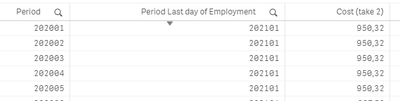
Thanks, I tried that, but I get all periods both before and after 😞
AnnaEKinch
- Mark as New
- Bookmark
- Subscribe
- Mute
- Subscribe to RSS Feed
- Permalink
- Report Inappropriate Content
I changed the Period formatting and it seems to work now! Thanks 🙂
manoranjan_d
- Mark as New
- Bookmark
- Subscribe
- Mute
- Subscribe to RSS Feed
- Permalink
- Report Inappropriate Content
to do this in set analysis , you need to create flag in the script example as below
if(date(date#(Period,'YYYYMM'),'YYYYMM')>date(date#([Period Last Day of Employment],'YYYYMM'),'YYYYMM'),'Y','N') as Flag
Text box expression
=sum({<Flag={'Y'}>}Sales)
AnnaEKinch
- Mark as New
- Bookmark
- Subscribe
- Mute
- Subscribe to RSS Feed
- Permalink
- Report Inappropriate Content
Yes! Thank you @manoranjan_d now I understand 🙂
