Unlock a world of possibilities! Login now and discover the exclusive benefits awaiting you.

- Qlik Community
- :
- Forums
- :
- Analytics & AI
- :
- Products & Topics
- :
- Visualization and Usability
- :
- Re: Set Analysis : Year()
- Subscribe to RSS Feed
- Mark Topic as New
- Mark Topic as Read
- Float this Topic for Current User
- Bookmark
- Subscribe
- Mute
- Printer Friendly Page

 mithunr40
- Mark as New
- Bookmark
- Subscribe
- Mute
- Subscribe to RSS Feed
- Permalink
- Report Inappropriate Content
Set Analysis : Year()
How to calculate the number of employees hired in 2008 (HIRE_DATE). They given me the fields and functions to use in set analysis: EMPLOYEE_ID, HIRE_DATE, year().
I can't use logic in the backend and i just want to show in the front end in expression.
Please help me to solve this problem.
Thank you.
- « Previous Replies
-
- 1
- 2
- Next Replies »
Accepted Solutions

 tresB
tresB
- Mark as New
- Bookmark
- Subscribe
- Mute
- Subscribe to RSS Feed
- Permalink
- Report Inappropriate Content
If you are going thorugh an assignment/interview, it is also important to ask right questions. In general, the solution I provided earlier - should work, otherwise - you may need to include distinct like:
Count(Distinct {<HIRE_DATE={"=Year(HIRE_DATE)=2018"}>} EMPLOYEE_ID )

 MartW
MartW
- Mark as New
- Bookmark
- Subscribe
- Mute
- Subscribe to RSS Feed
- Permalink
- Report Inappropriate Content
Count({<HIRE_DATE={'=$(=year(makedate(2008,1,1)))'}>} EMPLOYEE_ID )
mithunr40
- Mark as New
- Bookmark
- Subscribe
- Mute
- Subscribe to RSS Feed
- Permalink
- Report Inappropriate Content
Thank you for your answer @MartW but it taking all the date and i think i want only 2008 data only .
MartW
- Mark as New
- Bookmark
- Subscribe
- Mute
- Subscribe to RSS Feed
- Permalink
- Report Inappropriate Content
that is strange. I tested this with some dummy data and I got only the 2008 ID's back in Qlik.
is it possible for you to share a snippet of the data?
mithunr40
- Mark as New
- Bookmark
- Subscribe
- Mute
- Subscribe to RSS Feed
- Permalink
- Report Inappropriate Content
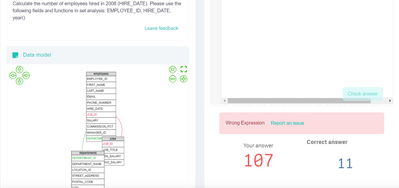
I am unable to see any data from this sheet it just showing me wrong answer that's it.
tresB
- Mark as New
- Bookmark
- Subscribe
- Mute
- Subscribe to RSS Feed
- Permalink
- Report Inappropriate Content
Try like:
Count({<HIRE_DATE={"=Year(HIRE_DATE)=2018"}>} EMPLOYEE_ID )
Note: If your date field data is text/string type, it might not work; then you have to convert strings to date type values in script or change the expression a bit using date#()
mithunr40
- Mark as New
- Bookmark
- Subscribe
- Mute
- Subscribe to RSS Feed
- Permalink
- Report Inappropriate Content
Thank you for your response @tresB but here they given me like one page so on that i want to paste the expression i can't see any datamodel or value
 Pavanvh
- Mark as New
- Bookmark
- Subscribe
- Mute
- Subscribe to RSS Feed
- Permalink
- Report Inappropriate Content
You can use any of the below.
Count({<DATE = {'2008'}>}EMP_ID)
or
Count({<DATE={'$(=year(makedate(2008,1,1)))'}>} EMP_ID )
mithunr40
- Mark as New
- Bookmark
- Subscribe
- Mute
- Subscribe to RSS Feed
- Permalink
- Report Inappropriate Content
Hi @Pavanvh it's not working.
tresB
- Mark as New
- Bookmark
- Subscribe
- Mute
- Subscribe to RSS Feed
- Permalink
- Report Inappropriate Content
If you are going thorugh an assignment/interview, it is also important to ask right questions. In general, the solution I provided earlier - should work, otherwise - you may need to include distinct like:
Count(Distinct {<HIRE_DATE={"=Year(HIRE_DATE)=2018"}>} EMPLOYEE_ID )

- « Previous Replies
-
- 1
- 2
- Next Replies »