Unlock a world of possibilities! Login now and discover the exclusive benefits awaiting you.

- Qlik Community
- :
- Forums
- :
- Analytics & AI
- :
- Products & Topics
- :
- Visualization and Usability
- :
- Re: Show 'Is First Order' in Table
- Subscribe to RSS Feed
- Mark Topic as New
- Mark Topic as Read
- Float this Topic for Current User
- Bookmark
- Subscribe
- Mute
- Printer Friendly Page

 JustinDallas
- Mark as New
- Bookmark
- Subscribe
- Mute
- Subscribe to RSS Feed
- Permalink
- Report Inappropriate Content
Show 'Is First Order' in Table
Hello Folks,
I have data that is composed of Orders and Invoices. The Orders are "children" of the Invoices, and what I'd like to do is mark the first child Order of every Invoice.
My test data looks like so:
Invoice:
LOAD [Invoice Number] AS '%invoice_number',
*
;
LOAD * Inline
[
'Invoice Number', 'Invoice Total'
    'ABC', 300
    'DEF', 400
]
;


Orders:
LOAD * Inline
[
'%invoice_number','Order Number'
    'ABC','1',
    'ABC','2',
    'ABC','3',
    'DEF','8',
    'DEF','9',
    'DEF','10',
]
;


EXIT Script
;
I'm looking to get something like this.
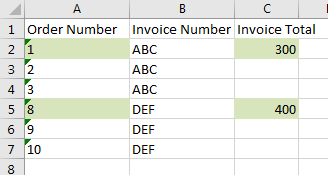
The biggest problem I can't get over in my mental model is that I need the row to ignore the current Order Number, yet keep the set analysis restricted to the Invoice Numbe.r
I've tried something the following with no luck.
SUM({<[Order Number]={"=$(Min([Order Number])"}>} [Invoice Total])
Any help is greatly appreciated.
Accepted Solutions

 Gysbert_Wassena
- Mark as New
- Bookmark
- Subscribe
- Mute
- Subscribe to RSS Feed
- Permalink
- Report Inappropriate Content
You can try with an if-statement:
If( [Order Number] = min(total <[%invoice_numer]> [Order Number]), sum([Invoice Total])
talk is cheap, supply exceeds demand
Gysbert_Wassena- Mark as New
- Bookmark
- Subscribe
- Mute
- Subscribe to RSS Feed
- Permalink
- Report Inappropriate Content
If your order data is already sorted you could do something like this:
Orders:
LOAD *, AutoNumber([OrderNumber], [%invoice_number]) as IndexNumber Inline
[
'%invoice_number','Order Number'
'ABC','1',
'ABC','2',
'ABC','3',
'DEF','8',
'DEF','9',
'DEF','10',
]
;
Then you can use the new IndexNumber field in the set analysis expression: sum({<IndexNumber={1}>}[Invoice Total])
talk is cheap, supply exceeds demand
JustinDallas
- Mark as New
- Bookmark
- Subscribe
- Mute
- Subscribe to RSS Feed
- Permalink
- Report Inappropriate Content
Hello Gysbert,
Unfortunately, the actual datamodel is not as simple as the one I have in my example as there is a join table. I was hoping to solve this with Set Analysis in my table, and not have to put a one-off calculation in my datamodel if at all possible.
Gysbert_Wassena- Mark as New
- Bookmark
- Subscribe
- Mute
- Subscribe to RSS Feed
- Permalink
- Report Inappropriate Content
You can try with an if-statement:
If( [Order Number] = min(total <[%invoice_numer]> [Order Number]), sum([Invoice Total])
talk is cheap, supply exceeds demand
JustinDallas
- Mark as New
- Bookmark
- Subscribe
- Mute
- Subscribe to RSS Feed
- Permalink
- Report Inappropriate Content
Thanks Gysbert. Your solution worked with a little tweaking. However, I'm curious as to why total <[%invoice_numer] doesn't give the expected result, but total <[Invoice Number]> [Order Number] does. The final solution was:
If( [Order Number] = MIN(TOTAL <[Invoice Number]> [Order Number]), SUM([Invoice Total]))
Gysbert_Wassena- Mark as New
- Bookmark
- Subscribe
- Mute
- Subscribe to RSS Feed
- Permalink
- Report Inappropriate Content
Probably because there is no such field as %invoice_number in your data model. That field does exist in the code example you posted, which is why I used it.
talk is cheap, supply exceeds demand
