Unlock a world of possibilities! Login now and discover the exclusive benefits awaiting you.

- Qlik Community
- :
- Forums
- :
- Analytics & AI
- :
- Products & Topics
- :
- Visualization and Usability
- :
- Show KPI as mm:ss
- Subscribe to RSS Feed
- Mark Topic as New
- Mark Topic as Read
- Float this Topic for Current User
- Bookmark
- Subscribe
- Mute
- Printer Friendly Page

 aheavy95
- Mark as New
- Bookmark
- Subscribe
- Mute
- Subscribe to RSS Feed
- Permalink
- Report Inappropriate Content
Show KPI as mm:ss
Hi all
I am trying to show a KPI in a mm:ss (minutes :seconds) manner.
This is the formula that I am using: ' ' &'00:' & left(round (avg(ChatFirstResponse)),2)
and I'm getting:
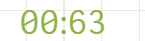
I want to get in this case 01:03
defying the number formatting as duration doesn't work properly
Anyone has a suiable formula for that?
Thanks
Accepted Solutions

 brunobertels
- Mark as New
- Bookmark
- Subscribe
- Mute
- Subscribe to RSS Feed
- Permalink
- Report Inappropriate Content
hi
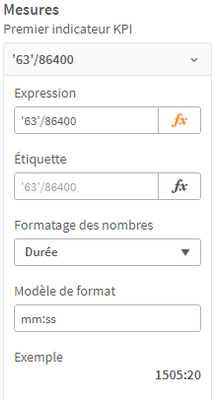
in your KPI just divide the result by 86400 and select format Time :
left(round (avg(ChatFirstResponse)),2) / 86400
then select correct time format :

 BrunPierre
- Mark as New
- Bookmark
- Subscribe
- Mute
- Subscribe to RSS Feed
- Permalink
- Report Inappropriate Content
Since the result is displayed as a time value, then possibly this
Time(' ' &'00:' & left(round (avg(ChatFirstResponse)),2), 'hh-mm' )
brunobertels
- Mark as New
- Bookmark
- Subscribe
- Mute
- Subscribe to RSS Feed
- Permalink
- Report Inappropriate Content
hi
in your KPI just divide the result by 86400 and select format Time :
left(round (avg(ChatFirstResponse)),2) / 86400
then select correct time format :
aheavy95
- Mark as New
- Bookmark
- Subscribe
- Mute
- Subscribe to RSS Feed
- Permalink
- Report Inappropriate Content
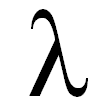
' ' &'00:' & time(left(round (avg(ChatFirstResponse)),2))
I get

 Øystein_Kolsrud
- Mark as New
- Bookmark
- Subscribe
- Mute
- Subscribe to RSS Feed
- Permalink
- Report Inappropriate Content
I'd say you should look into what @brunobertels recommended in his reply. Let the expression be a numeric, and use the duration formatting function for the expression.
Time is handled as a numeric value in Qlik Sense with the integer part representing days. This means that the number 1.5 represents a duration of one and a half days. It looks like the number you want to represent as time represents seconds, and one second is 1/86000 of a day (60*60*24), so simply divide you expression by that number.
So to sum it up: Don't do formatting directly in the expression, but rather turn it into a numeric representation of days. Then you can use the formatting functionality of the measure to format it into a nice string representation.
aheavy95
- Mark as New
- Bookmark
- Subscribe
- Mute
- Subscribe to RSS Feed
- Permalink
- Report Inappropriate Content
That works perfectly, Thanks a lot!
