Unlock a world of possibilities! Login now and discover the exclusive benefits awaiting you.

- Qlik Community
- :
- Forums
- :
- Analytics & AI
- :
- Products & Topics
- :
- Visualization and Usability
- :
- Showing max count in a table.
- Subscribe to RSS Feed
- Mark Topic as New
- Mark Topic as Read
- Float this Topic for Current User
- Bookmark
- Subscribe
- Mute
- Printer Friendly Page

 sanpor1zd
- Mark as New
- Bookmark
- Subscribe
- Mute
- Subscribe to RSS Feed
- Permalink
- Report Inappropriate Content
Showing max count in a table.
Hi guys,
i have a table with employee's name, and their sales transaction.
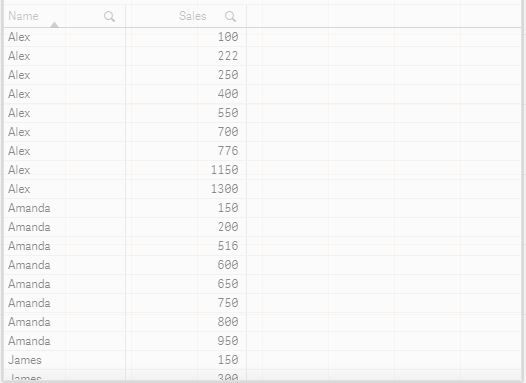
im trying to show only employee with the most number of sales.

so in this case, i just want to show Alex with a count of 9 sales.
may i know the way of doing this
thank you.
Accepted Solutions

 tresB
tresB
- Mark as New
- Bookmark
- Subscribe
- Mute
- Subscribe to RSS Feed
- Permalink
- Report Inappropriate Content
Dimension: Employee
Exp : Count({<Employee={"=Count(Sales)= Max(total Aggr(Count(Sales), Employee))"}>} Sales)
I am not sure if I have over-complicated the expression.
tresB
- Mark as New
- Bookmark
- Subscribe
- Mute
- Subscribe to RSS Feed
- Permalink
- Report Inappropriate Content
Dimension: Employee
Exp : Count({<Employee={"=Count(Sales)= Max(total Aggr(Count(Sales), Employee))"}>} Sales)
I am not sure if I have over-complicated the expression.
sanpor1zd
- Mark as New
- Bookmark
- Subscribe
- Mute
- Subscribe to RSS Feed
- Permalink
- Report Inappropriate Content
Hi Tresesco,
there is an error in the expression youve given.
tresB
- Mark as New
- Bookmark
- Subscribe
- Mute
- Subscribe to RSS Feed
- Permalink
- Report Inappropriate Content
Corrected. (in red).
sanpor1zd
- Mark as New
- Bookmark
- Subscribe
- Mute
- Subscribe to RSS Feed
- Permalink
- Report Inappropriate Content
thank you !
Cheers
