Unlock a world of possibilities! Login now and discover the exclusive benefits awaiting you.

- Qlik Community
- :
- Forums
- :
- Analytics & AI
- :
- Products & Topics
- :
- Visualization and Usability
- :
- Re: Sorting in Qlik Sense
- Subscribe to RSS Feed
- Mark Topic as New
- Mark Topic as Read
- Float this Topic for Current User
- Bookmark
- Subscribe
- Mute
- Printer Friendly Page

 guruprem
- Mark as New
- Bookmark
- Subscribe
- Mute
- Subscribe to RSS Feed
- Permalink
- Report Inappropriate Content
Sorting in Qlik Sense
Hi,
Could you please suggest me a way to get month Jan as first month in the following chart.
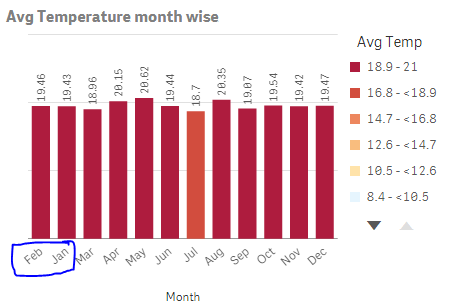
I am not sure why this is happening in this sorting order, When I use month as direct dimension chart is sorting this way. If I use year->month as drill down dimension then month is sorting properly i.e. Jan, Feb, Mar, Apr...
 ogster1974
- Mark as New
- Bookmark
- Subscribe
- Mute
- Subscribe to RSS Feed
- Permalink
- Report Inappropriate Content
Try adding a master calendar into your data model linked to your fact data. Use sort by expression and choose FiscalMonthNum.
This would solve your order issue.
| YYYYMM | Fiscal Period | Fiscal Quarter | Fiscal Year | Fiscal Month | FiscalMonthNum |
| 2009-01 | 2009/Q1 | 1 | 2009 | Jan | 1 |
| 2009-02 | 2009/Q1 | 1 | 2009 | Feb | 2 |
| 2009-03 | 2009/Q1 | 1 | 2009 | Mar | 3 |
| 2009-04 | 2009/Q2 | 2 | 2009 | Apr | 4 |
| 2009-05 | 2009/Q2 | 2 | 2009 | May | 5 |
| 2009-06 | 2009/Q2 | 2 | 2009 | Jun | 6 |
| 2009-07 | 2009/Q3 | 3 | 2009 | Jul | 7 |
| 2009-08 | 2009/Q3 | 3 | 2009 | Aug | 8 |
| 2009-09 | 2009/Q3 | 3 | 2009 | Sep | 9 |
| 2009-10 | 2009/Q4 | 4 | 2009 | Oct | 10 |
| 2009-11 | 2009/Q4 | 4 | 2009 | Nov | 11 |
| 2009-12 | 2009/Q4 | 4 | 2009 | Dec | 12 |
guruprem
- Mark as New
- Bookmark
- Subscribe
- Mute
- Subscribe to RSS Feed
- Permalink
- Report Inappropriate Content
Andy , I tried but not yet resolved. More explanation is I am using Avg Temp as measure and Month as Dimension
Sorting info is
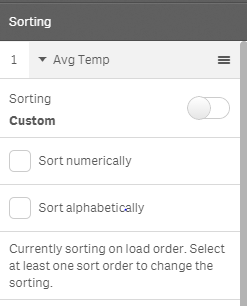
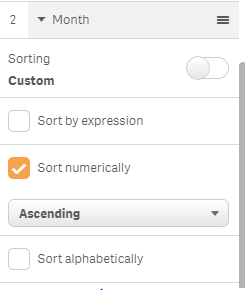
Can you figure out anything from this , please let me know if more info is required?
ogster1974
- Mark as New
- Bookmark
- Subscribe
- Mute
- Subscribe to RSS Feed
- Permalink
- Report Inappropriate Content
In your data load add a calendar that will link to your fact data. I believe you are using Month.
Calendar:
LOAD * INLINE [
Month, MonthNum
Jan, 1
Feb, 2
Mar, 3
Apr, 4
May, 5
Jun, 6
Jul, 7
Aug, 8
Sep, 9
Oct, 10
Nov, 11
Dec, 12
];
In the sort options choose sort by expression and select =MonthNum this will order your Months correctly.
