Unlock a world of possibilities! Login now and discover the exclusive benefits awaiting you.

- Qlik Community
- :
- Forums
- :
- Analytics & AI
- :
- Products & Topics
- :
- Visualization and Usability
- :
- Table: Conditional header colors
Options
- Subscribe to RSS Feed
- Mark Topic as New
- Mark Topic as Read
- Float this Topic for Current User
- Bookmark
- Subscribe
- Mute
- Printer Friendly Page
Turn on suggestions
Auto-suggest helps you quickly narrow down your search results by suggesting possible matches as you type.
Showing results for

 Breezy
Creator II
2022-01-18
03:31 PM
- Mark as New
- Bookmark
- Subscribe
- Mute
- Subscribe to RSS Feed
- Permalink
- Report Inappropriate Content
Table: Conditional header colors
[Qlik Sense]
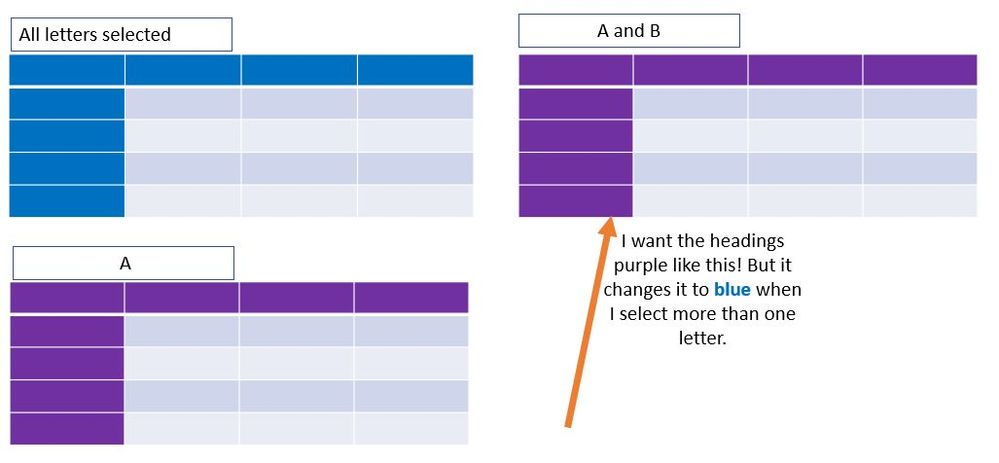
Hi, I am trying to change the header colors based on what is selected. I have ten letters to select from.
I have my code:
=if(count([Letter]) > 9, rgb(17,30,108),rgb(128,0,128))
I assume this code goes in the "Appearance" section but I'm not sure where. Currently, my table colors are correct UNLESS I choose more than one letter. In the example below, I want purple. Unfortunately, if I pick multiple letters at once, it actually shows up as blue. How can I resolve this?
1,152 Views
0 Replies
