Unlock a world of possibilities! Login now and discover the exclusive benefits awaiting you.

- Qlik Community
- :
- Forums
- :
- Analytics & AI
- :
- Products & Topics
- :
- Visualization and Usability
- :
- Table Header color in qlik sense
- Subscribe to RSS Feed
- Mark Topic as New
- Mark Topic as Read
- Float this Topic for Current User
- Bookmark
- Subscribe
- Mute
- Printer Friendly Page

 vinod2086
- Mark as New
- Bookmark
- Subscribe
- Mute
- Subscribe to RSS Feed
- Permalink
- Report Inappropriate Content
Table Header color in qlik sense
Hi All,
am new to Qlik Sense i want to apply color on my table header. am bit confused where can get this option pls help.
i have attached JPEG image for ref, in that i want to apply colors year, director,film id and length
Thanks in advance.
Accepted Solutions
 Sebastian_Dec
- Mark as New
- Bookmark
- Subscribe
- Mute
- Subscribe to RSS Feed
- Permalink
- Report Inappropriate Content
You can't, only value.
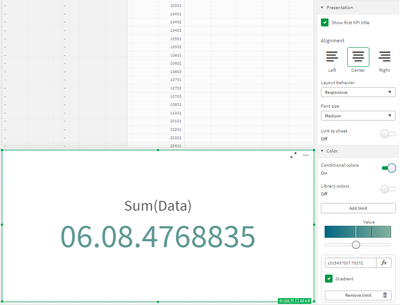
But in the Visualization Bundle you can find the Multi KPI object that does have a setting for the background color.


Please close the thread by marking correct answer & give likes if you like the post.

 agigliotti
- Mark as New
- Bookmark
- Subscribe
- Mute
- Subscribe to RSS Feed
- Permalink
- Report Inappropriate Content
for each table column you have "Background color expression" and "Text color expression" to change the color.
you can't change table header color.
Follow me on my LinkedIn | Know Gamma Informatica at gammainformatica.it

 simondachstr
- Mark as New
- Bookmark
- Subscribe
- Mute
- Subscribe to RSS Feed
- Permalink
- Report Inappropriate Content
Unfortunately this, among many other formatting options, are not supported in native objects in Qlik Sense. Vizlib Table, a supported third party extension for Qlik Sense, however, provides header formatting http://www.vizlib.com/.

 saadpatel
- Mark as New
- Bookmark
- Subscribe
- Mute
- Subscribe to RSS Feed
- Permalink
- Report Inappropriate Content
I can't color my kpi background color plz help me
saadpatel
- Mark as New
- Bookmark
- Subscribe
- Mute
- Subscribe to RSS Feed
- Permalink
- Report Inappropriate Content
how to color KPI background
Sebastian_Dec
- Mark as New
- Bookmark
- Subscribe
- Mute
- Subscribe to RSS Feed
- Permalink
- Report Inappropriate Content
You can't, only value.
But in the Visualization Bundle you can find the Multi KPI object that does have a setting for the background color.
Please close the thread by marking correct answer & give likes if you like the post.
