Unlock a world of possibilities! Login now and discover the exclusive benefits awaiting you.

- Qlik Community
- :
- Forums
- :
- Analytics & AI
- :
- Products & Topics
- :
- Visualization and Usability
- :
- Table formula for previous month data
- Subscribe to RSS Feed
- Mark Topic as New
- Mark Topic as Read
- Float this Topic for Current User
- Bookmark
- Subscribe
- Mute
- Printer Friendly Page

- Mark as New
- Bookmark
- Subscribe
- Mute
- Subscribe to RSS Feed
- Permalink
- Report Inappropriate Content
Table formula for previous month data
Hi,
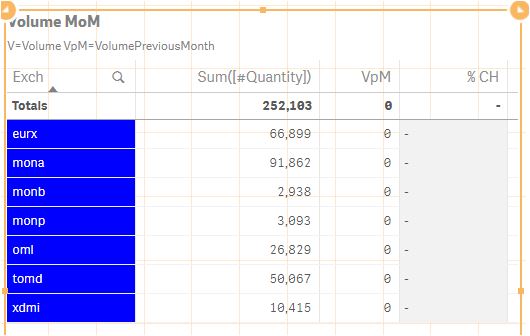
Within this overview I have selected one month of data. In the column Sum([#quantity]) the volumes per sublevel are depicted.
Now, in the next column I want the volume of the previous month. Currently this is set at:
sum({<Month=, Date={">=$(=monthstart(max(Date),-1))<=$(=monthend(max(Date),-1))"}>} [#Quantity])
However, it does not work as you can see. Any idea how to resolve this?
The field is Month, and the data is Sum([#quantity])
- « Previous Replies
-
- 1
- 2
- Next Replies »
- Mark as New
- Bookmark
- Subscribe
- Mute
- Subscribe to RSS Feed
- Permalink
- Report Inappropriate Content
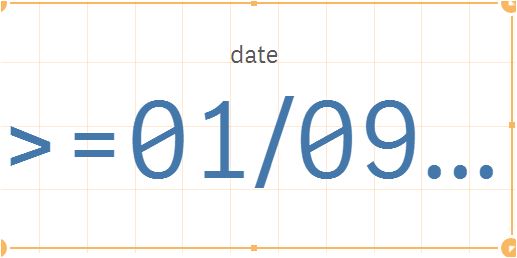
got this (renamed the label to date). Formula still yields zero results 

 sunny_talwar
- Mark as New
- Bookmark
- Subscribe
- Mute
- Subscribe to RSS Feed
- Permalink
- Report Inappropriate Content
Few things come to mind
1) Do you have data for last month?
2) Do you have another selection made besides month which might be causing this issue?
3) Are you sure your date format is right? -> DD/MM/YYYY. Could it be DD/MMM/YYYY or MM/DD/YYYY
- Mark as New
- Bookmark
- Subscribe
- Mute
- Subscribe to RSS Feed
- Permalink
- Report Inappropriate Content
well I changed YYYY to YY and that gives me numbers. But the same as the selected month
EX: EURX says 66899 for VpM now
- Mark as New
- Bookmark
- Subscribe
- Mute
- Subscribe to RSS Feed
- Permalink
- Report Inappropriate Content
forget that last comment
will try to figure out what goes wrong...you helped a lot already
- « Previous Replies
-
- 1
- 2
- Next Replies »