Unlock a world of possibilities! Login now and discover the exclusive benefits awaiting you.

- Qlik Community
- :
- Forums
- :
- Analytics & AI
- :
- Products & Topics
- :
- Visualization and Usability
- :
- Time range
- Subscribe to RSS Feed
- Mark Topic as New
- Mark Topic as Read
- Float this Topic for Current User
- Bookmark
- Subscribe
- Mute
- Printer Friendly Page

 tkcpm951
- Mark as New
- Bookmark
- Subscribe
- Mute
- Subscribe to RSS Feed
- Permalink
- Report Inappropriate Content
Time range
Hello to all of you
I'm looking to create time slots to track the number of calls we've had in these time slots
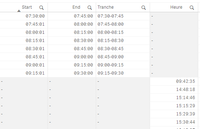
I did this script but the link between the slices and the call times is not made
Thank you in advance for your help
APPELS_ENTRANTS :
LOAD
([Date et heure]),
Time([Date et heure],'hh:mm:ss') as Heure,
[Session d'appel],
FROM [lib://Tickets_Appels_entrants*.csv]
(txt, codepage is 28591, embedded labels, delimiter is ';', msq);
INTERVAL:
LOAD
Time(Frac(Start),'hh:mm:ss') as Start,
Time(Frac(End),'hh:mm:ss') as End,
Tranche
FROM [lib://AttachedFiles/Classeur1.xlsx]
(ooxml, embedded labels, table is Feuil1);
Join
IntervalMatch (Heure) LOAD
Start,
End
Resident INTERVAL;
Accepted Solutions

 marcus_sommer
- Mark as New
- Bookmark
- Subscribe
- Mute
- Subscribe to RSS Feed
- Permalink
- Report Inappropriate Content
You need to apply frac() to Heure too because otherwise it might be a timestamp:
...
Time(frac([Date et heure]),'hh:mm:ss') as Heure,
...
beside this you may also need some kind of rounding to your time-fields (on all sides the same one) because Qlik used a binary number-system which not always match with a decimal-system.
- Marcus
tkcpm951
- Mark as New
- Bookmark
- Subscribe
- Mute
- Subscribe to RSS Feed
- Permalink
- Report Inappropriate Content
Voici une image du resultat
 marcus_sommer
- Mark as New
- Bookmark
- Subscribe
- Mute
- Subscribe to RSS Feed
- Permalink
- Report Inappropriate Content
You need to apply frac() to Heure too because otherwise it might be a timestamp:
...
Time(frac([Date et heure]),'hh:mm:ss') as Heure,
...
beside this you may also need some kind of rounding to your time-fields (on all sides the same one) because Qlik used a binary number-system which not always match with a decimal-system.
- Marcus
tkcpm951
- Mark as New
- Bookmark
- Subscribe
- Mute
- Subscribe to RSS Feed
- Permalink
- Report Inappropriate Content
Thank you very much, it works!
