Unlock a world of possibilities! Login now and discover the exclusive benefits awaiting you.

- Qlik Community
- :
- Forums
- :
- Analytics & AI
- :
- Products & Topics
- :
- Visualization and Usability
- :
- Today() in Set Analysis
- Subscribe to RSS Feed
- Mark Topic as New
- Mark Topic as Read
- Float this Topic for Current User
- Bookmark
- Subscribe
- Mute
- Printer Friendly Page

 Hannah94
- Mark as New
- Bookmark
- Subscribe
- Mute
- Subscribe to RSS Feed
- Permalink
- Report Inappropriate Content
Today() in Set Analysis
Hey guys,
I know there are a lot of posts about this topic but I still can't make my visualization work.
I have a distribution diagram and want to add a position line that shows the averange result of tests of all time (until last month) and ignores the selected time in the time filter. The other part of the diagram is supposed to show the data that is selected in the filter. For example of the current month. The other filters are supposed to change the position line and the other part of the diagram. The time filter has the function: =Year(Testdatum).
Unfortunately all my attempts didn't work. I think it's because of the format of the date.
My current version is this one:
=Avg({$< [Year(Testdatum)]={"$(=num(date(today())))"}>}Ergebnis)
It shows me a line but it doesn't ignore the time selection. And it isn't included that the current month shouln't be included.
Unfortunately I haven't safed the other attempts. I tried to include formats like "MM.YYYY" or "DD.MM.YYYY 00:00:0000" as well. Some functions showed me lines but none ignored the time selection.
I would really appreciate if you could help me. I hope my english is understandable.
Thanks
Hannah
- Tags:
- date
- « Previous Replies
-
- 1
- 2
- Next Replies »
Accepted Solutions

 sunny_talwar
- Mark as New
- Bookmark
- Subscribe
- Mute
- Subscribe to RSS Feed
- Permalink
- Report Inappropriate Content
Do you understand what this is saying?
=Year(Testdatum) < Year(Today())Show all years which are less than Today's year.... which is 2019.... but this is based on selection... if you don't want selection to impact this... than try this
=Year(Only({1} Testdatum)) < Year(Today())By adding Only({1} ... ) you are ignoring selection of any sorts to the Testdatum field within the set analysis... but having said that... did you ever create the year field in the script? if you did... why don't you try this
Year = {"<$(=Year(Today()))"}, TestdatumAlso, make sure to change your filder for Year to be Year field rather than Year(Testdatum)... also suggest to do the same thing for Month by creating a month field in the script rather than using Month(Testdatum) filter on the front end
Hannah94
- Mark as New
- Bookmark
- Subscribe
- Mute
- Subscribe to RSS Feed
- Permalink
- Report Inappropriate Content
In case someone has a similar issue. Here is my solution:
Instead of two filters with Year and Month I have a single one now called TestmonatMJ.
I loaded it in the script with:
Date((Monthstart(Testdatum)), 'MM.YYYY') as TestmonatMJ
It looks like:
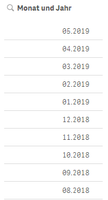
My positionline has this function:
=Avg({< F99 = {0}, KdBtLf={'Referenzlieferant'}, TestmonatMJ={"<$(=date(yearstart(Today()),'MM.YYYY'))"}>}Ergebnis)
It ignores the F99, the KdBtLf and the TestmonatMJ filter and shows to me the averange result (Ergebnis) before 01.01.2019. I think yearstart() works a lot better than year() in this case.
My second positionline is pretty much the same but shows me the averange result before this month:
=Avg({< TestmonatMJ ={"<$(=date(monthstart(Today()), 'MM.YYYY'))"}, F99 = {0}, KdBtLf={'Referenzlieferant'} >}Ergebnis)
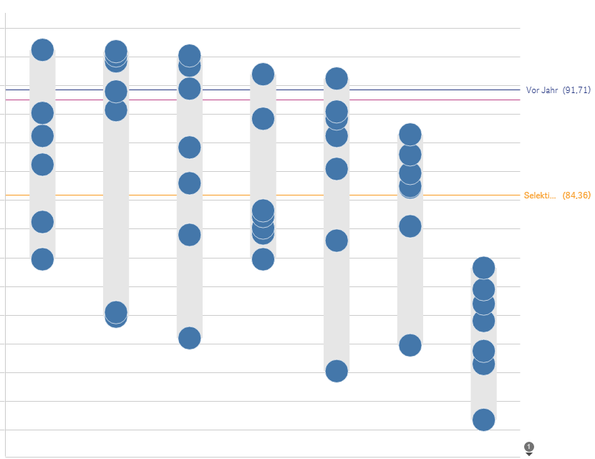
That's a example with 05.2019 selectet. Now I can compare the averange of this month (orange positionline) with the averange of the past perfectly. The blue and the pink line don't move with the date selection. The orange one does.
sunny_talwar
- Mark as New
- Bookmark
- Subscribe
- Mute
- Subscribe to RSS Feed
- Permalink
- Report Inappropriate Content
May be try this
=Avg({<F99 = {1}, Testdatum = {"=Year(Testdatum) = Year(Today())"}>} Ergebnis)Or create a new field in the script like this
LOAD Year(Testdatum) as Year,
and then use this
=Avg({<F99 = {1}, Year = {"$(=Year(Today()))"}>} Ergebnis)- Mark as New
- Bookmark
- Subscribe
- Mute
- Subscribe to RSS Feed
- Permalink
- Report Inappropriate Content
Thanks a lot. I'm going to try this tomorrow at work.
I forgot to mention that I have a Month(Testdatum) Filter as well. It's supposed to have influnence on the other part of the diagram only as well.
I probably need a different solution then?
Hannah94
- Mark as New
- Bookmark
- Subscribe
- Mute
- Subscribe to RSS Feed
- Permalink
- Report Inappropriate Content
Hey,
I tried both and they don't work.
=Avg({<F99 = {1}, Testdatum = {"=Year(Testdatum) = Year(Today())"}>} Ergebnis) shows me only 2019 when I select 2019. When I select 2018 I don't get any line. It's supposed to show me everything but 2019. I could replace = with < but it still Need to select it. Showing me all time would be alright also. But it has to ignore the time selection.
=Avg({<F99 = {1}, Year = {"$(=Year(Today()))"}>} Ergebnis) Shows me a line but it changes with the time selection.
Don't I need to use $ for ignoring selections?
sunny_talwar
- Mark as New
- Bookmark
- Subscribe
- Mute
- Subscribe to RSS Feed
- Permalink
- Report Inappropriate Content
I believe that Year(Today()) = 2019... so why do you expect to see 2018? If you want to see 2018, then why are you even comparing it to Year(Today())?
Hannah94
- Mark as New
- Bookmark
- Subscribe
- Mute
- Subscribe to RSS Feed
- Permalink
- Report Inappropriate Content
diagram. The position line is supposed to be reference to something I
select. So the position line is supposed to show results from the past.
And the other part of the diagram is supposed to show the selected time.
For example april 2019. I hope it's clearer now.
sunny_talwar
- Mark as New
- Bookmark
- Subscribe
- Mute
- Subscribe to RSS Feed
- Permalink
- Report Inappropriate Content
When you say this "=Avg({<F99 = {1}, Year = {"$(=Year(Today()))"}>} Ergebnis) Shows me a line but it changes with the time selection." What time selection do you mean here?
Hannah94
- Mark as New
- Bookmark
- Subscribe
- Mute
- Subscribe to RSS Feed
- Permalink
- Report Inappropriate Content
I mean when I use the =year(Testdatum) filter or the =month(Testdatum) filter. They are supposed to only change the distribution diagram and not the position line.
Hannah94
- Mark as New
- Bookmark
- Subscribe
- Mute
- Subscribe to RSS Feed
- Permalink
- Report Inappropriate Content
For example when I use this function : =Avg({$< F99= {0}>}Ergebnis) for the Position line it works totally fine. It does what I want. When I use the F99 Filter it changes the Distribution diagram but the Position line doesn't change.
I want to do the same for the date.
sunny_talwar
- Mark as New
- Bookmark
- Subscribe
- Mute
- Subscribe to RSS Feed
- Permalink
- Report Inappropriate Content
So, you are looking to ignore selection in Testdatum field? may be this
=Avg({<F99 = {1}, Year = {"$(=Year(Today()))"}, Testdatum>} Ergebnis)
- « Previous Replies
-
- 1
- 2
- Next Replies »