Unlock a world of possibilities! Login now and discover the exclusive benefits awaiting you.

- Qlik Community
- :
- Forums
- :
- Analytics & AI
- :
- Products & Topics
- :
- Visualization and Usability
- :
- Top 3 from the list in TextBox qliksense
- Subscribe to RSS Feed
- Mark Topic as New
- Mark Topic as Read
- Float this Topic for Current User
- Bookmark
- Subscribe
- Mute
- Printer Friendly Page

 sowmi
sowmi
- Mark as New
- Bookmark
- Subscribe
- Mute
- Subscribe to RSS Feed
- Permalink
- Report Inappropriate Content
Top 3 from the list in TextBox qliksense
Hi Everyone,
I'm trying to show top 3 from the list
for example
Field ,Value
a - -9
b--8
c--6
d- 1
Expecting O/p in Text box as
Text box with top 3 should take the top 3 positive values,If there are no positive values anything should be dispalyed,As from the above data my top 3 will show a:1
For Bottom 3 it should always consider the top negative values
a - -9
b--8
c--6
Please share your views
Thanks
Sowmya
- « Previous Replies
-
- 1
- 2
- Next Replies »
Accepted Solutions

 sunny_talwar
- Mark as New
- Bookmark
- Subscribe
- Mute
- Subscribe to RSS Feed
- Permalink
- Report Inappropriate Content
May be try this
=Concat(Aggr(
	If(Rank(TOTAL (Sum({<[Material Brand] = {"=(Sum({<Year = {2019}>} value) - Sum({<Year = {2018}>} value)) > 0"}, Year = {2019}>} [value]) - Sum({<[Material Brand] = {"=(Sum({<Year = {2019}>} value) - Sum({<Year = {2018}>} value)) > 0"}, Year = {2018}>} [value]))) <= 3,
		[Material Brand]
		& ' | ' &
		(Sum({<Year={'2019'}>}value)-Sum({<Year={'2018'}>}value))
		& Chr(10) &
		(Rank(TOTAL (Sum({<[Material Brand] = {"=(Sum({<Year = {2019}>} value) - Sum({<Year = {2018}>} value)) > 0"}, Year = {2019}>} [value]) - Sum({<[Material Brand] = {"=(Sum({<Year = {2019}>} value) - Sum({<Year = {2018}>} value)) > 0"}, Year = {2018}>} [value]))))
	)
, [Material Brand]), Aggr(Rank(TOTAL (Sum({<[Material Brand] = {"=(Sum({<Year = {2019}>} value) - Sum({<Year = {2018}>} value)) > 0"}, Year = {2019}>} [value]) - Sum({<[Material Brand] = {"=(Sum({<Year = {2019}>} value) - Sum({<Year = {2018}>} value)) > 0"}, Year = {2018}>} [value]))), [Material Brand]))
or this
=Concat(Aggr(
	If(Rank(TOTAL (Sum({<[Material Brand] = {"=(Sum({<Year = {2019}>} value) - Sum({<Year = {2018}>} value)) > 0"}, Year = {2019}>} [value]) - Sum({<[Material Brand] = {"=(Sum({<Year = {2019}>} value) - Sum({<Year = {2018}>} value)) > 0"}, Year = {2018}>} [value]))) <= 3,
		[Material Brand]
		& ' | ' &
		(Sum({<Year={'2019'}>}value)-Sum({<Year={'2018'}>}value))
		& Chr(10) &
		(Rank(TOTAL (Sum({<[Material Brand] = {"=(Sum({<Year = {2019}>} value) - Sum({<Year = {2018}>} value)) > 0"}, Year = {2019}>} [value]) - Sum({<[Material Brand] = {"=(Sum({<Year = {2019}>} value) - Sum({<Year = {2018}>} value)) > 0"}, Year = {2018}>} [value]))))
	)
, [Material Brand]), -Aggr(Rank(TOTAL (Sum({<[Material Brand] = {"=(Sum({<Year = {2019}>} value) - Sum({<Year = {2018}>} value)) > 0"}, Year = {2019}>} [value]) - Sum({<[Material Brand] = {"=(Sum({<Year = {2019}>} value) - Sum({<Year = {2018}>} value)) > 0"}, Year = {2018}>} [value]))), [Material Brand])) 
 Channa
- Mark as New
- Bookmark
- Subscribe
- Mute
- Subscribe to RSS Feed
- Permalink
- Report Inappropriate Content
dimension =If(Aggr(Rank(Sum(value)),Name)<=3,Name)
it will bring top 3 names
ur measure =Sum(value)
sowmi
- Mark as New
- Bookmark
- Subscribe
- Mute
- Subscribe to RSS Feed
- Permalink
- Report Inappropriate Content
I dont think it will through the expecting output
Channa
- Mark as New
- Bookmark
- Subscribe
- Mute
- Subscribe to RSS Feed
- Permalink
- Report Inappropriate Content
dimension =If(Aggr(Rank(-Sum(value)),Name)<=3,Name)
Just do this
 JGMDataAnalysis
- Mark as New
- Bookmark
- Subscribe
- Mute
- Subscribe to RSS Feed
- Permalink
- Report Inappropriate Content
Positive Values:
Concat(If(Aggr(Rank(TOTAL Sum({<[Field] = {"=Sum([Value]) > 0"}>} [Value])), [Field]) <= 3, [Field]), ', ', Aggr(Rank(TOTAL Sum({<[Field] = {"=Sum([Value]) > 0"}>} [Value])), [Field]))Negative Values:
Concat(If(Aggr(Rank(TOTAL Sum({<[Field] = {"=Sum([Value]) < 0"}>} -[Value])), [Field]) <= 3, [Field]), ', ', Aggr(Rank(TOTAL Sum({<[Field] = {"=Sum([Value]) < 0"}>} -[Value])), [Field]))
sowmi
- Mark as New
- Bookmark
- Subscribe
- Mute
- Subscribe to RSS Feed
- Permalink
- Report Inappropriate Content
getting only field name need corresponding value to that field and want to display each field and value in new line ,if i have top 2 it should display in 2 lines
JGMDataAnalysis
- Mark as New
- Bookmark
- Subscribe
- Mute
- Subscribe to RSS Feed
- Permalink
- Report Inappropriate Content
Something like this?
Positive Values:
Concat(If(Aggr(Rank(TOTAL Sum({<[Field] = {"=Sum([Value]) > 0"}>} [Value])), [Field]) <= 3, [Field] & ' | ' & Aggr(Sum([Value]), [Field])), Chr(10), Aggr(Rank(TOTAL Sum({<[Field] = {"=Sum([Value]) > 0"}>} [Value])), [Field]))Negative Values:
Concat(If(Aggr(Rank(TOTAL Sum({<[Field] = {"=Sum([Value]) < 0"}>} [Value])), [Field]) <= 3, [Field] & ' | ' & Aggr(Sum([Value]), [Field])), Chr(10), Aggr(Rank(TOTAL Sum({<[Field] = {"=Sum([Value]) < 0"}>} -[Value])), [Field]))- Mark as New
- Bookmark
- Subscribe
- Mute
- Subscribe to RSS Feed
- Permalink
- Report Inappropriate Content
it is not working as expected ,i am writing down the expression like this :
Concat(If(Aggr (Rank(TOTAL Sum({<[Material Brand] = {"=(sum({<Year={2019}>}value)-sum({<Year={2018}>}value)) >0"}>} [value])), [Material Brand]) <=3, [Material Brand] & ' | ' & aggr(Sum({<Year={'2019'}>}value)-Sum({<Year={'2018'}>}value), [Material Brand])), Chr(10), Aggr(Rank(TOTAL Sum({<[Material Brand] = {"=(sum({<Year={2019}>}value)-sum({<Year={2018}>}value)) > 0"}>} [value])), [Material Brand])) By using this expression it is not sorting the values ,I have attached the image of data
sunny_talwar
- Mark as New
- Bookmark
- Subscribe
- Mute
- Subscribe to RSS Feed
- Permalink
- Report Inappropriate Content
Can you check this
=Concat(Aggr(
	If(Rank(TOTAL Sum({<[Material Brand] = {"=(Sum({<Year = {2019}>} value)- Sum({<Year = {2018}>} value)) > 0"}>} [value])) <= 3,
		[Material Brand]
		& ' | ' &
		(Sum({<Year={'2019'}>}value)-Sum({<Year={'2018'}>}value))
		& Chr(10) &
		(Rank(TOTAL Sum({<[Material Brand] = {"=(sum({<Year={2019}>}value)-sum({<Year={2018}>}value)) > 0"}>} [value])))
	)
, [Material Brand])) - Mark as New
- Bookmark
- Subscribe
- Mute
- Subscribe to RSS Feed
- Permalink
- Report Inappropriate Content
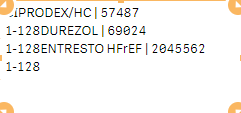
getting below o/p which is not right


- « Previous Replies
-
- 1
- 2
- Next Replies »