Unlock a world of possibilities! Login now and discover the exclusive benefits awaiting you.

- Qlik Community
- :
- Forums
- :
- Analytics & AI
- :
- Products & Topics
- :
- Visualization and Usability
- :
- Top values based on variable
- Subscribe to RSS Feed
- Mark Topic as New
- Mark Topic as Read
- Float this Topic for Current User
- Bookmark
- Subscribe
- Mute
- Printer Friendly Page

- Mark as New
- Bookmark
- Subscribe
- Mute
- Subscribe to RSS Feed
- Permalink
- Report Inappropriate Content
Top values based on variable
Hi,
how to show top salaries based on variable in qliksense
eg-Top 5,10,15,20 based on user input
- Tags:
- new to qliksense
Accepted Solutions

 brunobertels
- Mark as New
- Bookmark
- Subscribe
- Mute
- Subscribe to RSS Feed
- Permalink
- Report Inappropriate Content
Hi
Try like that
See the app attached :
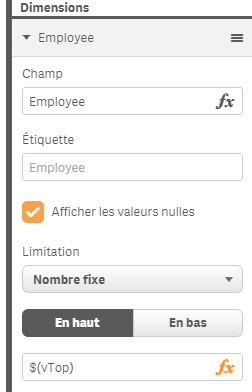
in the employee dimension choose limitation and add this $(vTop) that will put the number set in the variable field
and this in the mesure panel
Sum(Salary)
Regards
Bruno
brunobertels
- Mark as New
- Bookmark
- Subscribe
- Mute
- Subscribe to RSS Feed
- Permalink
- Report Inappropriate Content
Hi
Try like that
See the app attached :
in the employee dimension choose limitation and add this $(vTop) that will put the number set in the variable field
and this in the mesure panel
Sum(Salary)
Regards
Bruno
 reddy-s
- Mark as New
- Bookmark
- Subscribe
- Mute
- Subscribe to RSS Feed
- Permalink
- Report Inappropriate Content
Hi,
you could even use an input box extention: Input Box which updates a Variable in Qlik Sense
and dynamically set the number you need.
This will help you make it even more dynamic!