Unlock a world of possibilities! Login now and discover the exclusive benefits awaiting you.

- Qlik Community
- :
- Forums
- :
- Analytics & AI
- :
- Products & Topics
- :
- Visualization and Usability
- :
- Total for Top n Rows
- Subscribe to RSS Feed
- Mark Topic as New
- Mark Topic as Read
- Float this Topic for Current User
- Bookmark
- Subscribe
- Mute
- Printer Friendly Page

 wlabarca99
- Mark as New
- Bookmark
- Subscribe
- Mute
- Subscribe to RSS Feed
- Permalink
- Report Inappropriate Content
Total for Top n Rows
Hi all,
I have a pivot table in Qlik Sense that is calculating the Sales last quarter and the In Stock % for a given item. I need the totals in this table to only reflect the top 5 row values. I can limit the rows to only show 5 values but the totals still reflect all of the data. I would like to achieve this in an expression as apposed to doing it in the script.
My current expression for the sales is:
SUM({<[ord_dt.autoCalendar.QuartersAgo]={1}>}[ttl_itm_px])
In the example below, the total for Last Quarter Sales is $6.6M (because it includes all values in my sales table) but the goal is for this total to calculate on only the top 5 values equaling $343,772.31. Again, I want to avoid making script changes and I want this to calculate without making a selection to the top 5 results.
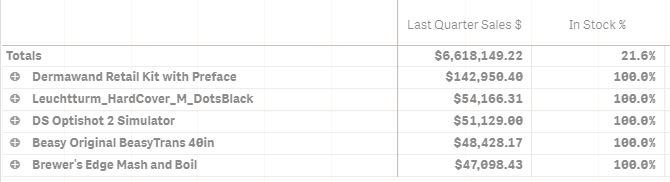
Any help is appreciated! Thanks.
Accepted Solutions

 sunny_talwar
- Mark as New
- Bookmark
- Subscribe
- Mute
- Subscribe to RSS Feed
- Permalink
- Report Inappropriate Content
May be this
Sum(Aggr(If(Rank(Sum({<[ord_dt.autoCalendar.QuartersAgo] = {1}>} [ttl_itm_px])) < 6, Sum({<[ord_dt.autoCalendar.QuartersAgo] = {1}>} [ttl_itm_px])), DimensionName))
sunny_talwar
- Mark as New
- Bookmark
- Subscribe
- Mute
- Subscribe to RSS Feed
- Permalink
- Report Inappropriate Content
May be this
Sum(Aggr(If(Rank(Sum({<[ord_dt.autoCalendar.QuartersAgo] = {1}>} [ttl_itm_px])) < 6, Sum({<[ord_dt.autoCalendar.QuartersAgo] = {1}>} [ttl_itm_px])), DimensionName))
wlabarca99
- Mark as New
- Bookmark
- Subscribe
- Mute
- Subscribe to RSS Feed
- Permalink
- Report Inappropriate Content
Awesome stuff, thanks Sunny!
