Unlock a world of possibilities! Login now and discover the exclusive benefits awaiting you.

- Qlik Community
- :
- Forums
- :
- Analytics & AI
- :
- Products & Topics
- :
- Visualization and Usability
- :
- Understand QlikSense's Arbitrary Color Choices
- Subscribe to RSS Feed
- Mark Topic as New
- Mark Topic as Read
- Float this Topic for Current User
- Bookmark
- Subscribe
- Mute
- Printer Friendly Page

 JustTryingToLea
- Mark as New
- Bookmark
- Subscribe
- Mute
- Subscribe to RSS Feed
- Permalink
- Report Inappropriate Content
Understand QlikSense's Arbitrary Color Choices
So:
I have a project that requires:
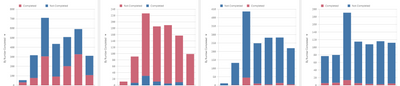
1. These charts - tracking completion of 4 different classes
2. There to be 2 colors and a legend
3. They all have the same formatting
I cannot seem to figure out how to meet all 3. If I do custom formatting , I do not have access to a legend. If I leave the legend, qlik seemingly randomly picks colors and legend order. What can I do in this situation? How do I make them all look the same and include a legend?
Here is a picture so you know what I am frustrated by:
- Tags:
- color

 Gysbert_Wassena
- Mark as New
- Bookmark
- Subscribe
- Mute
- Subscribe to RSS Feed
- Permalink
- Report Inappropriate Content
Use master items. If you're using a dimension for Completed / Not completed then give these dimension values a value color by first adding the field as a master dimension and then modifying it and adding value colors.
If Completed / Not completed are two measures then make master measure of them and assign them a measure color.
The above will make sure the the dimension values of the measures will have a consistent color in all charts that you use them.
talk is cheap, supply exceeds demand
