Unlock a world of possibilities! Login now and discover the exclusive benefits awaiting you.

- Qlik Community
- :
- Forums
- :
- Analytics & AI
- :
- Products & Topics
- :
- Visualization and Usability
- :
- Use aggr() in a set expression
- Subscribe to RSS Feed
- Mark Topic as New
- Mark Topic as Read
- Float this Topic for Current User
- Bookmark
- Subscribe
- Mute
- Printer Friendly Page

 OmarBenSalem
- Mark as New
- Bookmark
- Subscribe
- Mute
- Subscribe to RSS Feed
- Permalink
- Report Inappropriate Content
Use aggr() in a set expression
Hi Qlikers ( stalwar1 )
Suppose I have a column ID and a column Date
example:
ID , Date
1, 2015
1,2016
1,2016
2,2017
3,2017
3,2017
3,2017
I want to know, how many times each ID is present in its max(Date)
I mean:
ID, max(Date) by ID, count ID for its max(Date)
1, 2016 , 2 times
2, 2017 , 1 time
3, 2017, 3 times
To do so:
I created a simple table:
as a dimension:
ID
as measures:
max(Date)
and
count({<Date={"$(=aggr(max(Date),ID))"}>} ID) : but this does not seem to work; am I missing sthing in the syntax/logic?
- « Previous Replies
-
- 1
- 2
- Next Replies »
Accepted Solutions

 sunny_talwar
- Mark as New
- Bookmark
- Subscribe
- Mute
- Subscribe to RSS Feed
- Permalink
- Report Inappropriate Content
Try this
Sum(Aggr(If(Date = Max(TOTAL <ID> Date), Count(ID)), ID, Date))
sunny_talwar
- Mark as New
- Bookmark
- Subscribe
- Mute
- Subscribe to RSS Feed
- Permalink
- Report Inappropriate Content
May be this
Sum(Aggr(If(Date = Max(TOTAL <ID> Date), 1, 0), ID, Date))
OmarBenSalem
- Mark as New
- Bookmark
- Subscribe
- Mute
- Subscribe to RSS Feed
- Permalink
- Report Inappropriate Content
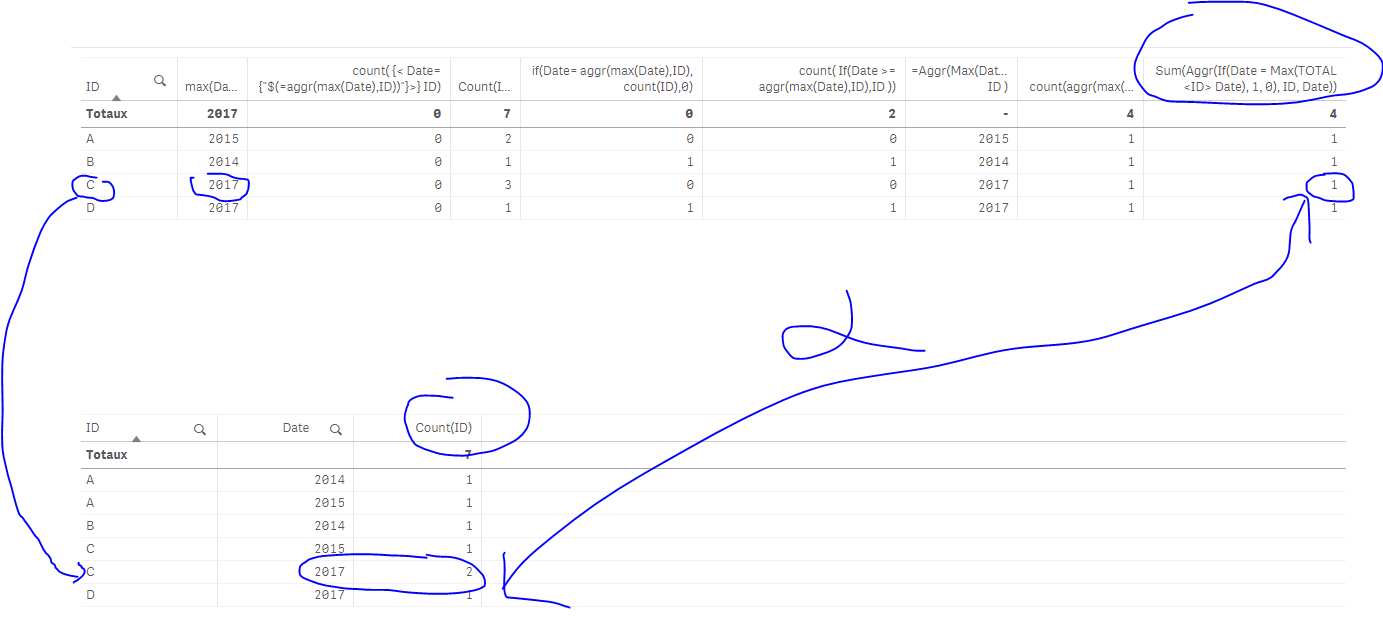
Nope !
Here's an example: C should be 2 :
sunny_talwar
- Mark as New
- Bookmark
- Subscribe
- Mute
- Subscribe to RSS Feed
- Permalink
- Report Inappropriate Content
I guess since we are aggregating over ID and Date, it is causing an issue... how about this
Count(Aggr(If(Date = Max(TOTAL <ID> Date), ID), ID, Date))
OmarBenSalem
- Mark as New
- Bookmark
- Subscribe
- Mute
- Subscribe to RSS Feed
- Permalink
- Report Inappropriate Content
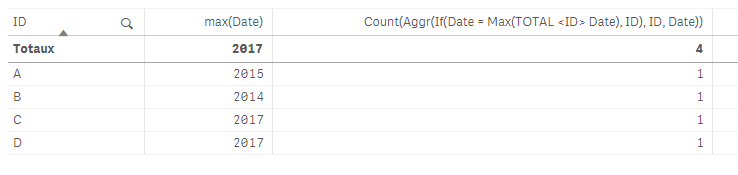
It's always returning 1 for each ID:
sunny_talwar
- Mark as New
- Bookmark
- Subscribe
- Mute
- Subscribe to RSS Feed
- Permalink
- Report Inappropriate Content
Do you have another field in your app? or just these two?
OmarBenSalem
- Mark as New
- Bookmark
- Subscribe
- Mute
- Subscribe to RSS Feed
- Permalink
- Report Inappropriate Content
Just these 2 fields sunny
sunny_talwar
- Mark as New
- Bookmark
- Subscribe
- Mute
- Subscribe to RSS Feed
- Permalink
- Report Inappropriate Content
Try this
Sum(Aggr(If(Date = Max(TOTAL <ID> Date), Count(ID)), ID, Date))
OmarBenSalem
- Mark as New
- Bookmark
- Subscribe
- Mute
- Subscribe to RSS Feed
- Permalink
- Report Inappropriate Content
Finally ! Yes this did it !
Can't we integrate the agg within the set expression? I mean sthing like I did?
count({<Date={"$(=aggr(max(Date),ID))"}>} ID)
sunny_talwar
- Mark as New
- Bookmark
- Subscribe
- Mute
- Subscribe to RSS Feed
- Permalink
- Report Inappropriate Content
You will probably have to create a new field like this
LOAD AutoNumber(ID&Date) as Key
and then this
Count({<Key = {"=Max(Date) = Max(TOTAL <ID> Aggr(Date), ID, Date))"}>}ID)
Have not tested, but have a feeling that it should work

- « Previous Replies
-
- 1
- 2
- Next Replies »