Unlock a world of possibilities! Login now and discover the exclusive benefits awaiting you.

- Qlik Community
- :
- Forums
- :
- Analytics & AI
- :
- Products & Topics
- :
- Visualization and Usability
- :
- Using colors for Master measure for conditional va...
- Subscribe to RSS Feed
- Mark Topic as New
- Mark Topic as Read
- Float this Topic for Current User
- Bookmark
- Subscribe
- Mute
- Printer Friendly Page

 Nive
Nive
- Mark as New
- Bookmark
- Subscribe
- Mute
- Subscribe to RSS Feed
- Permalink
- Report Inappropriate Content
Using colors for Master measure for conditional values
Hello guys!!
Need your help on below case.
I have a requirement where i wanted to show text with measure value and i also want the measure value to be given in colors according to my condition. Since the data is confidential im providing you with sample.
Eg: My sales Increased by 10%( 10million from 5million in May'19 (Take previous month))
now 10% should be shown in green colour when current sale is greater than previous month sale and it should show red when previous sale is greater than current month sale.
I even tried adding as master measure but i can give either the whole text in same color or if i use segment color i must add limit where i need to enter value manually.. ( this value takes few expressions with so many conditions in my case) which will not work.
This must be shown as Single measure only.
Thanks in Advance 🙂
-Nive
 OmarBenSalem
- Mark as New
- Bookmark
- Subscribe
- Mute
- Subscribe to RSS Feed
- Permalink
- Report Inappropriate Content
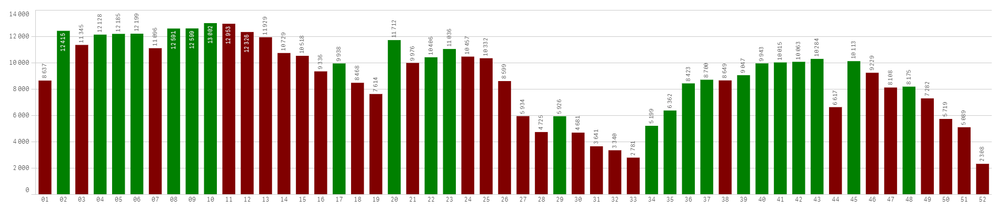
in ur chart, color by expression:
assume ur measure is :sum (Sales)
the color would be sthing like:
if(sum(Sales) >= above(sum(Sales)),green(),red())
per analogy:
 Nive
Nive
- Mark as New
- Bookmark
- Subscribe
- Mute
- Subscribe to RSS Feed
- Permalink
- Report Inappropriate Content
"My sales Increased by 10%( 10million from 5million in May'19)"
only 10% should have the colour changes.
OmarBenSalem
- Mark as New
- Bookmark
- Subscribe
- Mute
- Subscribe to RSS Feed
- Permalink
- Report Inappropriate Content
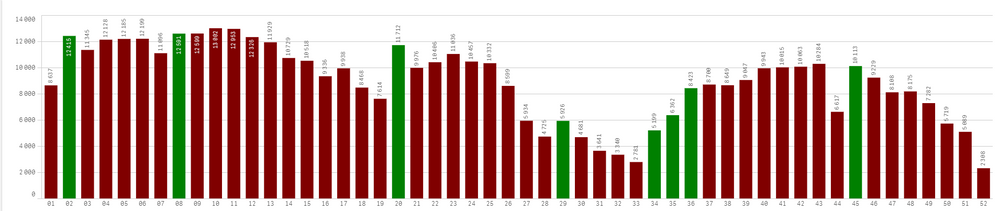
Same logic :
if(
(sum( Sales)
- above(
sum( Sales))) / above(
sum( Sales)) >0.1
,green(),red())
Result:
Or increase by 10% or more : green
0 to 10% : grey
decrease : red
if(
sum(Sales)< above(sum(Sales)),red(),
if((sum( Sales)
- above(
sum( Sales))) / above(
sum( Sales)) >0.1
,green(),'grey'))
Result: