Unlock a world of possibilities! Login now and discover the exclusive benefits awaiting you.

- Qlik Community
- :
- Forums
- :
- Analytics & AI
- :
- Products & Topics
- :
- Visualization and Usability
- :
- Re: Using variables in master items
- Subscribe to RSS Feed
- Mark Topic as New
- Mark Topic as Read
- Float this Topic for Current User
- Bookmark
- Subscribe
- Mute
- Printer Friendly Page

 mkanaa123
- Mark as New
- Bookmark
- Subscribe
- Mute
- Subscribe to RSS Feed
- Permalink
- Report Inappropriate Content
Using variables in master items
hi all i have around 100 master items measures are there ,
For each expression in master item , i am writing the expression as
Expression1:
Sum(IF(XNum= 1,Field1,
if(XNum=2,Field1/SomeField1,
if(XNum=3,Field1-SomeField1))))
Expression2:
Sum(IF(XNum= 1,Field2,
if(XNum=2,Field2/SomeField1,
if(XNum=3,Field2-SomeField1))))
Now i want to automate this expression using one variable for XNum
And use that variable in master item expression .
Can anyone please help me
Going forward i want to add one more XNum=4 and Xnum=5 No need of going everywhere and change the expression everytime in each expression for each masteritem,
Can anyone please help me
I dont want in backend script ,
I need in front end variable .
mkanaa123
- Mark as New
- Bookmark
- Subscribe
- Mute
- Subscribe to RSS Feed
- Permalink
- Report Inappropriate Content
anyoneplease help

 Channa
- Mark as New
- Bookmark
- Subscribe
- Mute
- Subscribe to RSS Feed
- Permalink
- Report Inappropriate Content
load * inline [NUM
1
2
3....]
create variable vNum =NUM
Sum(IF(XNum= 1,Field2,
if(XNum=2,Field2/SomeField1,
if(XNum=3,Field2-SomeField1))))
change expression as below
Sum(IF(XNum= $(vNum),Field$(vNum),
if(XNum=Field$(vNum),Field$(vNum)/SomeField1,
if(XNum=Field$(vNum),Field$(vNum)-SomeField1))))
this is just same will help to change field based on filter selection
use filter as NUM column which is inline load

 AustinSpivey
- Mark as New
- Bookmark
- Subscribe
- Mute
- Subscribe to RSS Feed
- Permalink
- Report Inappropriate Content
I think you're needing dollar-sign expansion with parameters. Here's a Qlik Help article about it. In your case, you can create a new variable that will act like a custom function:
Sum(If(XNum=1, $1,if(XNum=2, $1 / SomeField1,if(XNum=3, $1 - SomeField1))))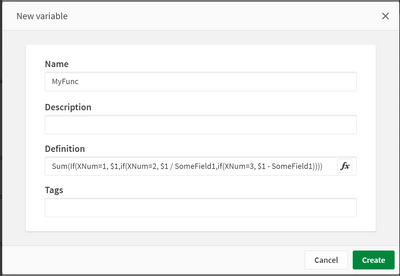
Then you can use the new function like this, by simply using the desired fieldname as a parameter in the new variable:
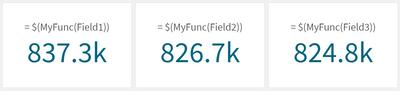
You'll then only need to update the MyFunc variable in the future.
