Unlock a world of possibilities! Login now and discover the exclusive benefits awaiting you.

- Qlik Community
- :
- Forums
- :
- Analytics & AI
- :
- Products & Topics
- :
- Visualization and Usability
- :
- Variable in the front end
- Subscribe to RSS Feed
- Mark Topic as New
- Mark Topic as Read
- Float this Topic for Current User
- Bookmark
- Subscribe
- Mute
- Printer Friendly Page

 aniruddhyadutta
- Mark as New
- Bookmark
- Subscribe
- Mute
- Subscribe to RSS Feed
- Permalink
- Report Inappropriate Content
Variable in the front end
Hi all,
I am trying to provide a variable box in the front end where user can input date manually.
Ist step:
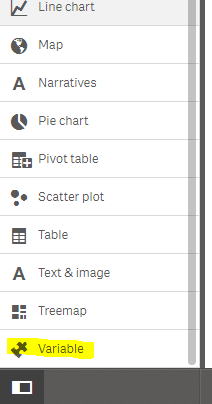
I drag a variable object in the front end
2nd step:
I tried to create a variable which I can bind with the variable to fetch the max date by default.
LASTDT:
LOAD max(DATETIME) as LASTDT
RESIDENT INPROCESS_FINAL_TABLE;
LET vDATE = LEFT(Peek('LASTDT',0,'LASTDT'),8);
//LET vDATE =Date(Date#(Peek('LASTDT',0,'LASTDT'),'MMDDYYYYHHMMSS'),'YYYY-MM-DD');
its working and I am getting my variable text box populated with the max date.
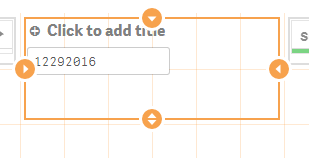
but the issue is when I put some other date the set analysis expression is not working which is as below:
Count({$<Dates_IP={'$(=(Date(Date#('$(vDATE)','YYYYMMDD'),'YYYY-MM-DD'))'},PROC_STATUS = {'success'},DIRECTION_IP={'I'},SERVER_NAME_IP={'SBI_Dev_All_Nodes'}>}CORE_ID_IP)
can some plz help me!!
Thanks in advacnce
aniruddhyadutta
- Mark as New
- Bookmark
- Subscribe
- Mute
- Subscribe to RSS Feed
- Permalink
- Report Inappropriate Content
hi..can anyone give me some hints!! 

 ahaahaaha
- Mark as New
- Bookmark
- Subscribe
- Mute
- Subscribe to RSS Feed
- Permalink
- Report Inappropriate Content
Search for items enclosed in braces, always determined using double quotes. Maybe this?

 Clever_Anjos
- Mark as New
- Bookmark
- Subscribe
- Mute
- Subscribe to RSS Feed
- Permalink
- Report Inappropriate Content
Please try
{"$(=(Date(Date#('$(vDATE)','YYYYMMDD'),'YYYY-MM-DD'))"}
 shraddha_g
- Mark as New
- Bookmark
- Subscribe
- Mute
- Subscribe to RSS Feed
- Permalink
- Report Inappropriate Content
Try this extension Qlik Branch instead
 mkelemen
- Mark as New
- Bookmark
- Subscribe
- Mute
- Subscribe to RSS Feed
- Permalink
- Report Inappropriate Content
Hi,
I think the problem is that you have different date formats
MMDDYYYY in the box
YYYYMMDD in the expression
try putting 20161229 in the box - if it works then you need to fix the formatting
BR,
Matus
