Unlock a world of possibilities! Login now and discover the exclusive benefits awaiting you.

- Qlik Community
- :
- Forums
- :
- Analytics & AI
- :
- Products & Topics
- :
- Visualization and Usability
- :
- Whitespace Qlik Sense
Options
- Subscribe to RSS Feed
- Mark Topic as New
- Mark Topic as Read
- Float this Topic for Current User
- Bookmark
- Subscribe
- Mute
- Printer Friendly Page
Turn on suggestions
Auto-suggest helps you quickly narrow down your search results by suggesting possible matches as you type.
Showing results for

 varunamin2
Contributor III
2022-10-10
08:14 PM
- Mark as New
- Bookmark
- Subscribe
- Mute
- Subscribe to RSS Feed
- Permalink
- Report Inappropriate Content
Whitespace Qlik Sense
How can we add whitespaces within Text & Image object in Qlik Sense?
2 Solutions
Accepted Solutions

 vinieme12
Champion III
2022-10-11
02:08 AM
- Mark as New
- Bookmark
- Subscribe
- Mute
- Subscribe to RSS Feed
- Permalink
- Report Inappropriate Content
copy a blank space character , try copy pasting the below in textbox
='A'&repeat('ㅤ',10)&'B'
Vineeth Pujari
If a post helps to resolve your issue, please accept it as a Solution.
If a post helps to resolve your issue, please accept it as a Solution.
3,266 Views

 OmarBenSalem
Partner - Champion II
2022-10-12
09:59 AM
- Mark as New
- Bookmark
- Subscribe
- Mute
- Subscribe to RSS Feed
- Permalink
- Report Inappropriate Content
5 Replies
vinieme12
Champion III
2022-10-11
02:08 AM
- Mark as New
- Bookmark
- Subscribe
- Mute
- Subscribe to RSS Feed
- Permalink
- Report Inappropriate Content
copy a blank space character , try copy pasting the below in textbox
='A'&repeat('ㅤ',10)&'B'
Vineeth Pujari
If a post helps to resolve your issue, please accept it as a Solution.
If a post helps to resolve your issue, please accept it as a Solution.
3,267 Views
varunamin2
Contributor III
2022-10-11
01:05 PM
Author
- Mark as New
- Bookmark
- Subscribe
- Mute
- Subscribe to RSS Feed
- Permalink
- Report Inappropriate Content
Still unable to add blank space. It shows as below.

3,255 Views
vinieme12
Champion III
2022-10-11
09:59 PM
- Mark as New
- Bookmark
- Subscribe
- Mute
- Subscribe to RSS Feed
- Permalink
- Report Inappropriate Content
just copy what i pasted above
or
visit https://blanktext.net/ to copy the blank space character
Vineeth Pujari
If a post helps to resolve your issue, please accept it as a Solution.
If a post helps to resolve your issue, please accept it as a Solution.
3,249 Views
 saso70
Partner - Creator II
2022-10-12
05:49 AM
- Mark as New
- Bookmark
- Subscribe
- Mute
- Subscribe to RSS Feed
- Permalink
- Report Inappropriate Content
Maybe you can use REPEAT(CHR(160),190)
3,240 Views
OmarBenSalem
Partner - Champion II
2022-10-12
09:59 AM
- Mark as New
- Bookmark
- Subscribe
- Mute
- Subscribe to RSS Feed
- Permalink
- Report Inappropriate Content
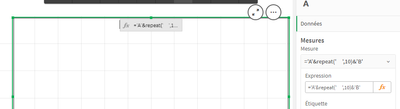
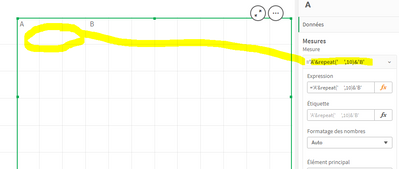
Put it in a measure : and ' ' not '' (u need to have a space..)
