Unlock a world of possibilities! Login now and discover the exclusive benefits awaiting you.

- Qlik Community
- :
- Forums
- :
- Analytics & AI
- :
- Products & Topics
- :
- Visualization and Usability
- :
- Re: YTD based on Selected Month
- Subscribe to RSS Feed
- Mark Topic as New
- Mark Topic as Read
- Float this Topic for Current User
- Bookmark
- Subscribe
- Mute
- Printer Friendly Page

- Mark as New
- Bookmark
- Subscribe
- Mute
- Subscribe to RSS Feed
- Permalink
- Report Inappropriate Content
YTD based on Selected Month
Hello,
I am trying to create YTD sum of revenue using a Date field (EffectiveDate) in the data set.
I tried many expressions posted in community but wasn't able to generate YTD based on month selection.
What I am looking for:
If Feb is selected then sum of revenue for Jan + Feb with a condition of BType = 'New Business'
Do I need to generate master calendar to get this done or it can be done based on a date field?
Any help would be really appreciated.
Thank you
- Tags:
- ytd
- Mark as New
- Bookmark
- Subscribe
- Mute
- Subscribe to RSS Feed
- Permalink
- Report Inappropriate Content
I tried the above expression and all values were 0.
Expression used:
SUM ({< Month_Policy_Eff_and_Acct_Eff_Merged = {"<=$(=num(Month_Policy_Eff_and_Acct_Eff_Merged))"} >} TotalRevenue_INV)

 MK9885
- Mark as New
- Bookmark
- Subscribe
- Mute
- Subscribe to RSS Feed
- Permalink
- Report Inappropriate Content
It should work...
Do you have a sample for your app?
MK9885
- Mark as New
- Bookmark
- Subscribe
- Mute
- Subscribe to RSS Feed
- Permalink
- Report Inappropriate Content
Or try below one
SUM ({< Year=, Month=,YOURDATEFIELDHERE= {'>=$(=YearStart(Max(YOURDATEFIELDHERE)))<=$(=Max(YOURDATEFIELDHERE))'} >} TotalRevenue_INV)
Use your Date field in the bold text...
- Mark as New
- Bookmark
- Subscribe
- Mute
- Subscribe to RSS Feed
- Permalink
- Report Inappropriate Content
Didn't work.
Is there something I am doing wrong?
SUM ({< Year=, Month=,Policy_Eff_and_Acct_Eff_Merged= {'>=$(=YearStart(Max(Policy_Eff_and_Acct_Eff_Merged)))<=$(=Max(Policy_Eff_and_Acct_Eff_Merged))'} >} TotalRevenue_INV)
Date fields in data load editior:
Timestamp(Effective_HR,'MM/DD/YYYY') as Policy_Eff_and_Acct_Eff_Merged,
Year(Effective_HR) as Year_Policy_Eff_and_Acct_Eff_Merged,
Month(Effective_HR) as Month_Policy_Eff_and_Acct_Eff_Merged,
Screenshot of Result:
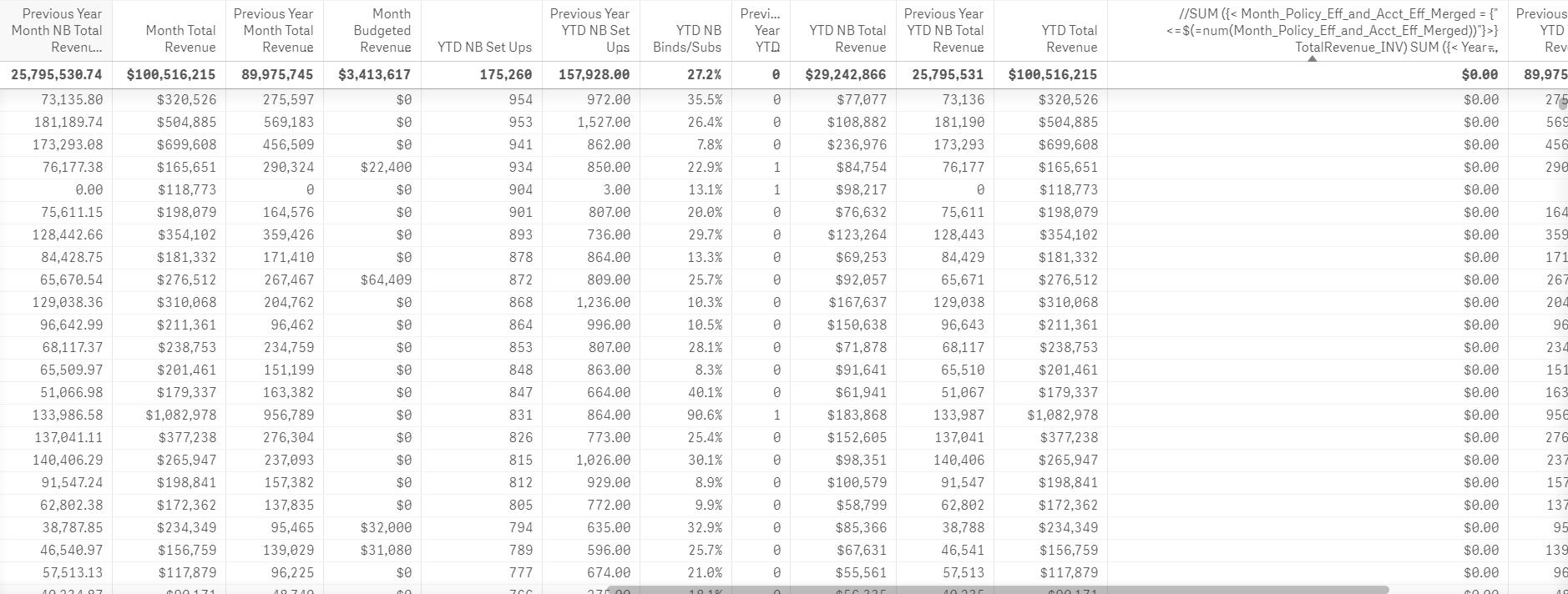
MK9885
- Mark as New
- Bookmark
- Subscribe
- Mute
- Subscribe to RSS Feed
- Permalink
- Report Inappropriate Content
First...
What are the names of your Year , Month & Quarter Fields?
You used Month_Policy_Eff_and_Acct_Eff_Merged as your Month in previous expression
and now you used Month=,Policy_Eff_and_Acct_Eff_Merged=
Do you need a timestamp in your date field?
Maybe just use
date(Effective_HR,'MM/DD/YYYY') as Policy_Eff_and_Acct_Eff_Merged,
SUM ({< Year_Policy_Eff_and_Acct_Eff_Merged=, Month_Policy_Eff_and_Acct_Eff_Merged=, Policy_Eff_and_Acct_Eff_Merged= {'>=$(=YearStart(Max(Policy_Eff_and_Acct_Eff_Merged)))<=$(=Max(Policy_Eff_and_Acct_Eff_Merged))'} >} TotalRevenue_INV)
or
SUM ({< Month_Policy_Eff_and_Acct_Eff_Merged= {"<=$(=num(Month_Policy_Eff_and_Acct_Eff_Merged))"} >} TotalRevenue_INV)
- Mark as New
- Bookmark
- Subscribe
- Mute
- Subscribe to RSS Feed
- Permalink
- Report Inappropriate Content
Year field Name: Year_Policy_Eff_and_Acct_Eff_Merged
Month field name: Month_Policy_Eff_and_Acct_Eff_Merged
I don't have Quarter field.
I need timestamp for some other analysis.
I have tried both the above equations and it didn't work.
I really appreciate your help Shahbaz.
MK9885
- Mark as New
- Bookmark
- Subscribe
- Mute
- Subscribe to RSS Feed
- Permalink
- Report Inappropriate Content
Create a new Date field without stamp field
And use use that field in SUM ({< Year=, Month=,YOURDATEFIELDHERE= {'>=$(=YearStart(Max(YOURDATEFIELDHERE)))<=$(=Max(YOURDATEFIELDHERE))'} >} TotalRevenue_INV)
and it's ok np, a sample app would help
- Mark as New
- Bookmark
- Subscribe
- Mute
- Subscribe to RSS Feed
- Permalink
- Report Inappropriate Content
It is sensitive data therefore I won't be able to share sample.
I am currently in process to create Policy_Eff_and_Acct_Eff_Merged field without Timestamp and using Date field instead.
Once I have that ready, should I try this equation again as Month and Year field don't need any changes
SUM ({< Year_Policy_Eff_and_Acct_Eff_Merged=,Month_Policy_Eff_and_Acct_Eff_Merged=,Policy_Eff_and_Acct_Eff_Merged={'>=$(=YearStart(Max(Policy_Eff_and_Acct_Eff_Merged)))<=$(=Max(Policy_Eff_and_Acct_Eff_Merged))'} >} TotalRevenue_INV)
MK9885
- Mark as New
- Bookmark
- Subscribe
- Mute
- Subscribe to RSS Feed
- Permalink
- Report Inappropriate Content
Yes you can try, along with your newly created date field
SUM ({< Year_Policy_Eff_and_Acct_Eff_Merged=,
Month_Policy_Eff_and_Acct_Eff_Merged=,
Policy_Eff_and_Acct_Eff_Merged_Without Timestamp= {'>=$(=YearStart(Max(Policy_Eff_and_Acct_Eff_Merged_Without Timestamp)))<=$(=Max(Policy_Eff_and_Acct_Eff_Merged_Without Timestamp ))'} >} TotalRevenue_INV)
- Mark as New
- Bookmark
- Subscribe
- Mute
- Subscribe to RSS Feed
- Permalink
- Report Inappropriate Content
Hello Shahbaz,
I tried with new date field but still I am getting zero.
Is there any alternate method to get this done?
Thanks