Unlock a world of possibilities! Login now and discover the exclusive benefits awaiting you.

- Qlik Community
- :
- Forums
- :
- Analytics & AI
- :
- Products & Topics
- :
- Visualization and Usability
- :
- Zeroes values disappear when exporting to Excel
- Subscribe to RSS Feed
- Mark Topic as New
- Mark Topic as Read
- Float this Topic for Current User
- Bookmark
- Subscribe
- Mute
- Printer Friendly Page

 Pedro_Rodriguez
- Mark as New
- Bookmark
- Subscribe
- Mute
- Subscribe to RSS Feed
- Permalink
- Report Inappropriate Content
Zeroes values disappear when exporting to Excel
Hi all,
I have a straight table in qlik sense, one of the columns is percentage values: Num(FieldPerc,'#.###%')

Mi problem is that once I expot this table, '0%' values become just '%' in Excel:
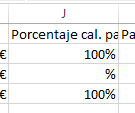
When doing calculations in excel it works as if it's 0 but I'm requested to show this values as 0% also in excel.
This doesn`t happen with other number columns in the table with money format.
Any ideas?
Thanks a lot in advance
Accepted Solutions

 OmarBenSalem
- Mark as New
- Bookmark
- Subscribe
- Mute
- Subscribe to RSS Feed
- Permalink
- Report Inappropriate Content
can u try to put it as a measure? and let the format handled by qlik? (the % one?)
OmarBenSalem
- Mark as New
- Bookmark
- Subscribe
- Mute
- Subscribe to RSS Feed
- Permalink
- Report Inappropriate Content
does it do the same thing when u try to export this column without the num()?
Pedro_Rodriguez
- Mark as New
- Bookmark
- Subscribe
- Mute
- Subscribe to RSS Feed
- Permalink
- Report Inappropriate Content
Hi Omar,
I've tried, and found out something interesting:
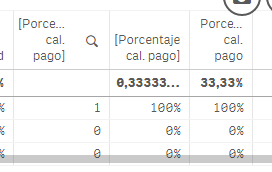
- First column: as Dimension (lose the % format)
- Second column: as you suggest, without the Num(). It works when exporting to excel, the 0% appears as in QS, theroblem is that I lose the % format in the total row in QS
- The third row is as I have it now, with the Num(%), all ok except for the 0% values when exporting.
Thanks ®ards
OmarBenSalem
- Mark as New
- Bookmark
- Subscribe
- Mute
- Subscribe to RSS Feed
- Permalink
- Report Inappropriate Content
can u try to put it as a measure? and let the format handled by qlik? (the % one?)
Pedro_Rodriguez
- Mark as New
- Bookmark
- Subscribe
- Mute
- Subscribe to RSS Feed
- Permalink
- Report Inappropriate Content
Indeed, that worked. I has the format as auto since I was formating the measure in the expression, but setting it to Number, that way worked.
Thanks a lot.
 shloime
- Mark as New
- Bookmark
- Subscribe
- Mute
- Subscribe to RSS Feed
- Permalink
- Report Inappropriate Content
With the LogiExport extension for QlikSense you can control the formatting of the exported file:
https://logiexport.logsys.co.il/documentation/
https://logiexport.logsys.co.il/articles/how-to-easily-control-the-values-formatting/
