Unlock a world of possibilities! Login now and discover the exclusive benefits awaiting you.

- Qlik Community
- :
- Forums
- :
- Analytics & AI
- :
- Products & Topics
- :
- Visualization and Usability
- :
- building Filter into If statement
- Subscribe to RSS Feed
- Mark Topic as New
- Mark Topic as Read
- Float this Topic for Current User
- Bookmark
- Subscribe
- Mute
- Printer Friendly Page

 wttaryde
- Mark as New
- Bookmark
- Subscribe
- Mute
- Subscribe to RSS Feed
- Permalink
- Report Inappropriate Content
building Filter into If statement
In my expression below, Line 1 needs to filter for the answer to a specific question (IT0060_O_1) If I remove line 1 and just filter ALL of my data to that question then the rest of the statement works. But I don't want to filter all of my data and I can't use alternate states to just filter this one graph. So I need the filter to be part of the expression. I've tried many ways and can't find the right syntax.
If(wildmatch(QPermID,'IT0060_O_1*'),
if(Response like '*Oracle*','#0033ff',
if(Response like '*SAP*','#FCC000',
if(Response like '*Cayenta*','#FC0000',
if(Response like '*Accenture*','#00C000',
if(Response like '*In-House*','#777777','#000000'))))))
Thanks
Accepted Solutions
wttaryde
- Mark as New
- Bookmark
- Subscribe
- Mute
- Subscribe to RSS Feed
- Permalink
- Report Inappropriate Content
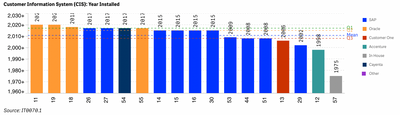
I have taken a different approach. I was trying to color code the bar chart. instead I've created a stacked bar with each piece being given different criteria in the expression. By changing the criteria in line 2 each bar in my chart is a different color. Since the alternative is Null, no one is actually stacked.
=(Avg({1<Year = {$(=Max(num#(Year ,'####')))}>} Aggr(
if(only({1<QPermID = {"IT0060_O_1_*"}>}Response) like '*SAP*',
max({1<QPermID={"IT0070_R_1_*"}>}Response)
,null())
,YearID,Year)))
.png "sasikanth")
 sasikanth
- Mark as New
- Bookmark
- Subscribe
- Mute
- Subscribe to RSS Feed
- Permalink
- Report Inappropriate Content
Try below one,
If( Wildmatch(QPermID,'IT0060_O_1*'),
pick(wildmatch(Response , '*Oracle*', '*SAP*', '*Cayenta*', '*Accenture*', '*In-House*')+1, '#000000',
'#0033ff', '#FCC000', '#FC0000', '#00C000', '#777777'))
wttaryde
- Mark as New
- Bookmark
- Subscribe
- Mute
- Subscribe to RSS Feed
- Permalink
- Report Inappropriate Content
Your expression didn't change the top line which is the one not working. Both expressions will color the graph correctly when a filter is applied, but neither does it with just the Wildmatch(QPermID, ...) embedded
sasikanth
- Mark as New
- Bookmark
- Subscribe
- Mute
- Subscribe to RSS Feed
- Permalink
- Report Inappropriate Content
could you explain your complete requirement??
above expression filters QPermID`s start with ,'IT0060_O_1*' and corresponding Responses,
second expression decode values as specified.
**example below filters all employees related to Central Staff department and then decodes as specified.
=if(WildMatch([Dept Name],'Central Staff*'),pick( WildMatch([EMP Name],'Jonna*','Laila*')+1,'ELSEPART','LAILA','JONNA')
)
wttaryde
- Mark as New
- Bookmark
- Subscribe
- Mute
- Subscribe to RSS Feed
- Permalink
- Report Inappropriate Content
I've included an app so you can see the expression isn't doing what I need. I have set the default bookmark and when the app is filtered the graph looks as desired. But without the filter, the expression doesn't produce the desired results. I appreciate the help.
wttaryde
- Mark as New
- Bookmark
- Subscribe
- Mute
- Subscribe to RSS Feed
- Permalink
- Report Inappropriate Content
I have taken a different approach. I was trying to color code the bar chart. instead I've created a stacked bar with each piece being given different criteria in the expression. By changing the criteria in line 2 each bar in my chart is a different color. Since the alternative is Null, no one is actually stacked.
=(Avg({1<Year = {$(=Max(num#(Year ,'####')))}>} Aggr(
if(only({1<QPermID = {"IT0060_O_1_*"}>}Response) like '*SAP*',
max({1<QPermID={"IT0070_R_1_*"}>}Response)
,null())
,YearID,Year)))
