Unlock a world of possibilities! Login now and discover the exclusive benefits awaiting you.

- Qlik Community
- :
- Forums
- :
- Analytics & AI
- :
- Products & Topics
- :
- Visualization and Usability
- :
- calculation of delta
- Subscribe to RSS Feed
- Mark Topic as New
- Mark Topic as Read
- Float this Topic for Current User
- Bookmark
- Subscribe
- Mute
- Printer Friendly Page

- Mark as New
- Bookmark
- Subscribe
- Mute
- Subscribe to RSS Feed
- Permalink
- Report Inappropriate Content
calculation of delta
I have a table with 3 columns: date, sales rep, amount.
Example:
day1 | John | 4
day1 | Alan | 6
day 2| John | 5
day 2 | Alan | 9
day 2 | Mary | 4
.....
I need calculate the delta of each sales rep, including the amount of the last day and the average every day.
The result may be another table or a crosstable.
Could you help me, please ??

 sunny_talwar
- Mark as New
- Bookmark
- Subscribe
- Mute
- Subscribe to RSS Feed
- Permalink
- Report Inappropriate Content
Are you trying to do this in the script or on the front end?

 swuehl
- Mark as New
- Bookmark
- Subscribe
- Mute
- Subscribe to RSS Feed
- Permalink
- Report Inappropriate Content
Maybe like this in a chart with dimension sales rep.
Three expressions
1)
=Max(amount) -Min(amount)
2)
=FirstSortedValue(amount, -date)
3)
=Avg(amount)
date field needs to have a numeric representation to be used in FirstSortedValue() as sort weight
edit:
In the script, it would be pretty much the same:
LOAD
[sales rep.],
Max(amount) -Min(amount) as Delta,
FirstSortedValue(amount, -date) as LastAmount,
Avg(amount) as Average
RESIDENT YourTable
GROUP BY [sales rep.];
- Mark as New
- Bookmark
- Subscribe
- Mute
- Subscribe to RSS Feed
- Permalink
- Report Inappropriate Content
I'm trying on the front end because i'm beginner !! but I can try any mode.
sunny_talwar
- Mark as New
- Bookmark
- Subscribe
- Mute
- Subscribe to RSS Feed
- Permalink
- Report Inappropriate Content
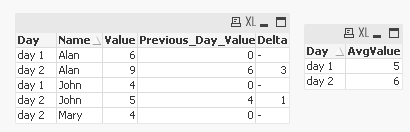
May be using this script:
Table:
LOAD * Inline [
Day| Name| Value
day 1 | John | 4
day 1 | Alan | 6
day 2| John | 5
day 2 | Alan | 9
day 2 | Mary | 4
] (delimiter is |);
Final:
LOAD *,
If(Name = Previous(Name), Peek('Value'), 0) as Previous_Day_Value,
If(Name = Previous(Name), Value - Peek('Value')) as Delta
Resident Table
Order By Name, Day;
AvgPerDay:
LOAD Day,
Avg(Value) as AvgValue
Resident Final
Group By Day;
DROP Table Table;