Unlock a world of possibilities! Login now and discover the exclusive benefits awaiting you.

- Qlik Community
- :
- Forums
- :
- Analytics & AI
- :
- Products & Topics
- :
- Visualization and Usability
- :
- create a monthcounter
- Subscribe to RSS Feed
- Mark Topic as New
- Mark Topic as Read
- Float this Topic for Current User
- Bookmark
- Subscribe
- Mute
- Printer Friendly Page

 beck_bakytbek
- Mark as New
- Bookmark
- Subscribe
- Mute
- Subscribe to RSS Feed
- Permalink
- Report Inappropriate Content
create a monthcounter
Hi Folks,
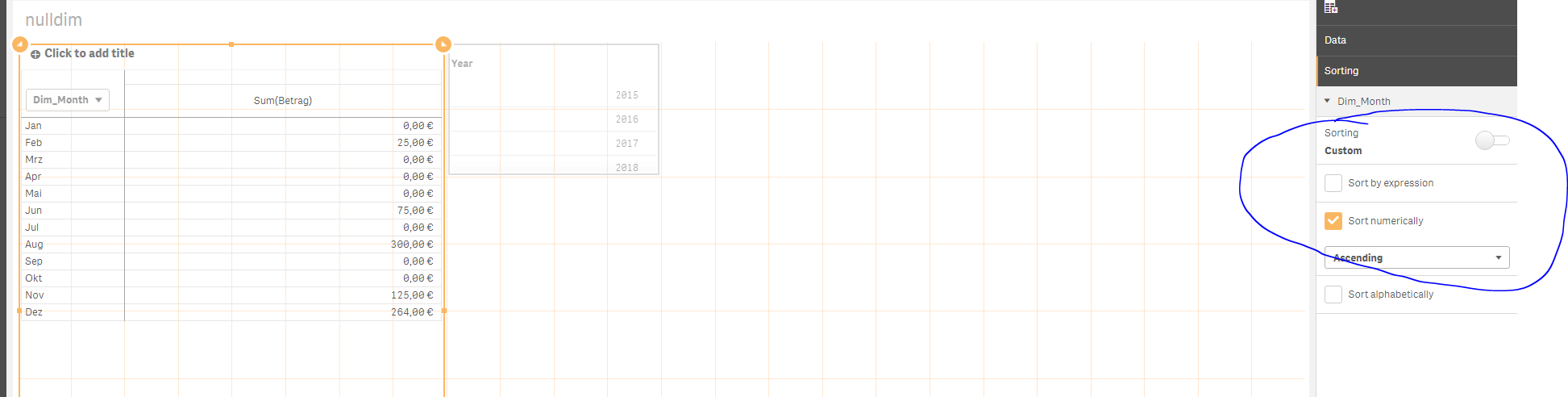
i have one question, namely regarding a mothcounter in master calender, i want to have a numbered consecutively lilke
Jan, Feb, Mrz. Apr, although Jan = 0, Feb= 25,
in my example (see attached) my orders begins with Month: Feb,
for this issue, i use this code:
QuarterMap:
Mapping LOAD
RowNo() as Month,
'Q' & Ceil(RowNo()/3) as Quarter
AutoGenerate (12);
Temp:
LOAD
min(Datum) as minDate,
max(Datum) as maxDate
Resident main;
Let varMinDate = num(Peek('minDate',0,'Temp'));
Let varMaxDate = num(Peek('maxDate',0,'Temp'));
DROP Table Temp;
TempCalendar:
LOAD
$(varMinDate) + IterNo()-1 as Num,
Date($(varMinDate)+IterNo()-1) as TempDate
AutoGenerate 1 While $(varMinDate) + IterNo()-1 <= $(varMaxDate);
[Master Calendar]:
LOAD
TempDate as Datum,
AutoNumber(TempDate) as MonthCounter,
Week(TempDate) as Week,
Year(TempDate) as Year,
Month(TempDate) as Dim_Month,
Day(TempDate) as Day,
ApplyMap('QuarterMap',month(TempDate),Null()) as Quarter,
Week(WeekStart(TempDate)) & '-' & WeekYear(TempDate) as WeekYear,
WeekDay(TempDate) as WeekDay
Resident TempCalendar
Order By TempDate ASC;
Drop Table TempCalendar;
how can i resolve this issue? Thanks a lot in advance
beck

Accepted Solutions

 sunny_talwar
- Mark as New
- Bookmark
- Subscribe
- Mute
- Subscribe to RSS Feed
- Permalink
- Report Inappropriate Content
sunny_talwar
- Mark as New
- Bookmark
- Subscribe
- Mute
- Subscribe to RSS Feed
- Permalink
- Report Inappropriate Content
Sort numerically
beck_bakytbek
- Mark as New
- Bookmark
- Subscribe
- Mute
- Subscribe to RSS Feed
- Permalink
- Report Inappropriate Content
Thanks a lot Sunny
