Unlock a world of possibilities! Login now and discover the exclusive benefits awaiting you.

- Qlik Community
- :
- Forums
- :
- Analytics & AI
- :
- Products & Topics
- :
- Visualization and Usability
- :
- get the last possible value with expression
- Subscribe to RSS Feed
- Mark Topic as New
- Mark Topic as Read
- Float this Topic for Current User
- Bookmark
- Subscribe
- Mute
- Printer Friendly Page

 tomovangel
- Mark as New
- Bookmark
- Subscribe
- Mute
- Subscribe to RSS Feed
- Permalink
- Report Inappropriate Content
get the last possible value with expression
Hello guys, I have been struggling the last few days with the following situation.
We have 2 tables, 1 is with repayments for Loans, and the second table is with Statuses of each loan.
first table is like this
Loan ID, Loan Type, Payment Date, Payment
the second table is like this
Loan Id, Loan status, Date change
So i have build a set analysis expression to get the sum between 2 dates .
In my straight table i have
Loan Id, Payment date and sum of payments. Everything is working great
But when i add FirstSortedValue(LoanStatus,-DateChange) the expression returns results for ALL Loans, and thus i get quite a few empty fields, but it should return the value only for the loans that have payments in this period....
How can I get the last status ?
tomovangel
- Mark as New
- Bookmark
- Subscribe
- Mute
- Subscribe to RSS Feed
- Permalink
- Report Inappropriate Content
Thank you, Sunny, You are trully a Qlik God 
Its correct now, thank you so much !!!
But, now I have another question, for another straight table,
I am using this expression, to get the total loan amount between 2 dates:
Sum({<paymentdate={">=$(=Only(StartDate)) <=$(=Only(EndDate))"}>}total_loan)
But, when I select for example 01.05.2018 to 15.05.2018
It gives me results from 01.05.2018 to 14.05.2018
Why it doesn't get the Less than or equals to sign ' <= ' ?
Thank you so much

 sunny_talwar
- Mark as New
- Bookmark
- Subscribe
- Mute
- Subscribe to RSS Feed
- Permalink
- Report Inappropriate Content
Do you have total_loan available for 15.05.2018?
tomovangel
- Mark as New
- Bookmark
- Subscribe
- Mute
- Subscribe to RSS Feed
- Permalink
- Report Inappropriate Content
Yes, When I give the Ending Date to 16.05, it gives me data up to 15.05, I have 4 records on that date...
sunny_talwar
- Mark as New
- Bookmark
- Subscribe
- Mute
- Subscribe to RSS Feed
- Permalink
- Report Inappropriate Content
I am confused... on other charts when you use the same set analysis you see payment_date from 01.05.2018 to 15.05.2018, but on this chart you see payment_date 01.05.2018 to 14.05.2018? Not sure how that is possible unless the expression has 0 value for 15.05.2018....
Unfortunately, I would need more information to answer the above question.
tomovangel
- Mark as New
- Bookmark
- Subscribe
- Mute
- Subscribe to RSS Feed
- Permalink
- Report Inappropriate Content
Its the same for me, I don't know why this is happening only on this chart.
I have more than 50 charts utilizing this expression and only in this it gives me wrong results,
Can I add 1 day, to the enddate, like
Sum({<paymentdate={">=$(=Only(StartDate)) <=$(=Only(EndDate)Adddays(1))"}>}total_loan)
or
Sum({<paymentdate={">=$(=Only(StartDate)) <=$(=Only(EndDate)+1)"}>}total_loan)
???
I am using this expression in a KPI, but it still returns values for EndDate-1 ....

 swuehl
- Mark as New
- Bookmark
- Subscribe
- Mute
- Subscribe to RSS Feed
- Permalink
- Report Inappropriate Content
Is payment date in fact a timestamp instead of a Date (without a decimal part)?
sunny_talwar
- Mark as New
- Bookmark
- Subscribe
- Mute
- Subscribe to RSS Feed
- Permalink
- Report Inappropriate Content
May be try this with Date formatting
Sum({<paymentdate={">=$(=Only(StartDate)) <=$(=Date(Only(EndDate)+1, 'DD.MM.YYYY'))"}>}total_loan)
sunny_talwar
- Mark as New
- Bookmark
- Subscribe
- Mute
- Subscribe to RSS Feed
- Permalink
- Report Inappropriate Content
Stefan - But the fact that the same set analysis work in other places, doesn't tell us that Date is only date and not a timestamp?
tomovangel
- Mark as New
- Bookmark
- Subscribe
- Mute
- Subscribe to RSS Feed
- Permalink
- Report Inappropriate Content
Okay,
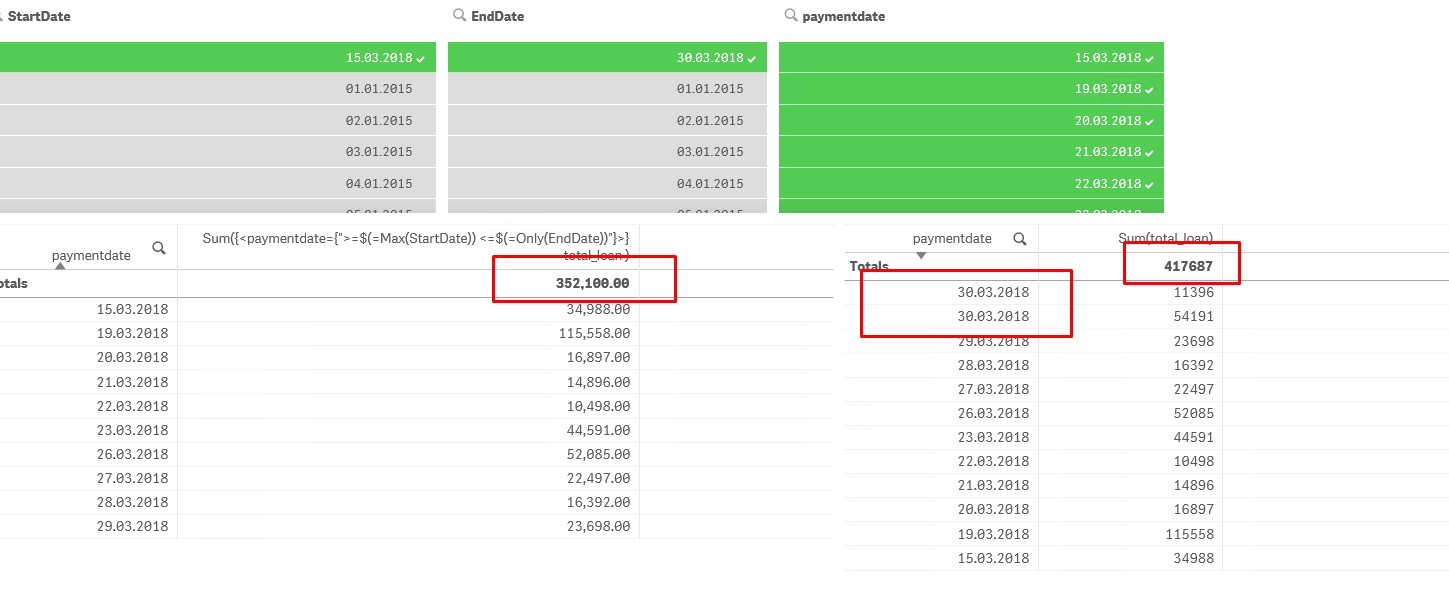
this is a screenshot with 2 tables, on the left is the table with expression and selected dates.
On the right is a simple straight table with payment date and sum(total_loan), and I have selected all dates in the paymentdate field from 15.03 to 30.03.
So I guess, One thing might be, that there is 2 payments made on 30.03.2018, and my formula uses Only, so It takes Nothing, because there are 2 dates on this date?
tomovangel
- Mark as New
- Bookmark
- Subscribe
- Mute
- Subscribe to RSS Feed
- Permalink
- Report Inappropriate Content
no, its just a date formatted with DD.MM.YYYY
