Unlock a world of possibilities! Login now and discover the exclusive benefits awaiting you.

- Qlik Community
- :
- Forums
- :
- Analytics & AI
- :
- Products & Topics
- :
- Visualization and Usability
- :
- Re: highlight a row in pivot table based on time
- Subscribe to RSS Feed
- Mark Topic as New
- Mark Topic as Read
- Float this Topic for Current User
- Bookmark
- Subscribe
- Mute
- Printer Friendly Page

- Mark as New
- Bookmark
- Subscribe
- Mute
- Subscribe to RSS Feed
- Permalink
- Report Inappropriate Content
highlight a row in pivot table based on time
Is it possible to have Qlik automatically highlight a row in a pivot table 60 minutes before delivery ID run time?

Accepted Solutions

 Josh_Good
- Mark as New
- Bookmark
- Subscribe
- Mute
- Subscribe to RSS Feed
- Permalink
- Report Inappropriate Content
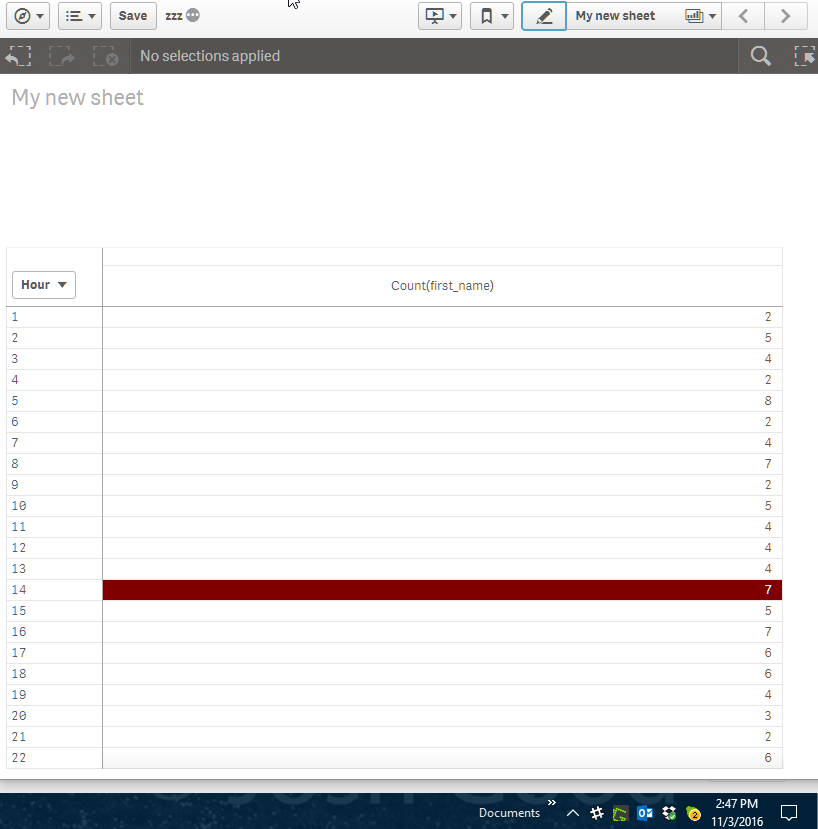
An expression like this will work:
if(Hour = text(time(Now(),'HH')), Red())
However my expression doesn't account for AM/PM but uses a 24hr clock. My screen shot below was taken at 2:47 PM local, which is also 14:47.
Hopefully this puts you on the right track.
Josh
Qlik

 robertogm
- Mark as New
- Bookmark
- Subscribe
- Mute
- Subscribe to RSS Feed
- Permalink
- Report Inappropriate Content
Not sure if I understood but you can definitely highlight cells in a Pivot table based on the measure value.
In Data on your Measures there is a field called "Background color expression" here you can set conditions to highlight cells.
Use an expression like: if(FIELD='3PM',rgb(176,196,222))
Inside rgb you can set the color code.
Hope this helps.
R
- Mark as New
- Bookmark
- Subscribe
- Mute
- Subscribe to RSS Feed
- Permalink
- Report Inappropriate Content
I need to base it on time of day. Like the example about for the 3PM deliveryID I wan to make it change color starting at 2 if there are still items needing worked
Josh_Good
- Mark as New
- Bookmark
- Subscribe
- Mute
- Subscribe to RSS Feed
- Permalink
- Report Inappropriate Content
An expression like this will work:
if(Hour = text(time(Now(),'HH')), Red())
However my expression doesn't account for AM/PM but uses a 24hr clock. My screen shot below was taken at 2:47 PM local, which is also 14:47.
Hopefully this puts you on the right track.
Josh
Qlik
- Mark as New
- Bookmark
- Subscribe
- Mute
- Subscribe to RSS Feed
- Permalink
- Report Inappropriate Content
Thank you for your help