Unlock a world of possibilities! Login now and discover the exclusive benefits awaiting you.

- Qlik Community
- :
- Forums
- :
- Analytics & AI
- :
- Products & Topics
- :
- Visualization and Usability
- :
- Re: how to disable snapshot and full screen icons
- Subscribe to RSS Feed
- Mark Topic as New
- Mark Topic as Read
- Float this Topic for Current User
- Bookmark
- Subscribe
- Mute
- Printer Friendly Page

 Nagaraju_KCS
- Mark as New
- Bookmark
- Subscribe
- Mute
- Subscribe to RSS Feed
- Permalink
- Report Inappropriate Content
how to disable snapshot and full screen icons
Hi Community,
is there any possibility to disable snapshot and full screen options, I did check few threads in community - they mentioned not possible.
Did any one get the solution ??
Thanks in Advance!
 ArnadoSandoval
- Mark as New
- Bookmark
- Subscribe
- Mute
- Subscribe to RSS Feed
- Permalink
- Report Inappropriate Content
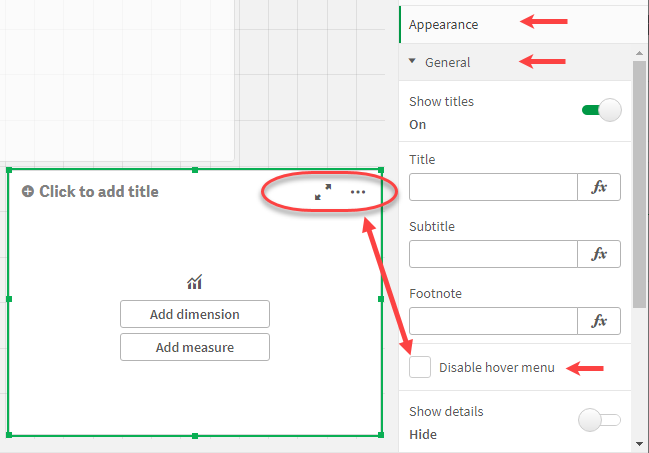
Several of the Chart controls in your canvas features the Disable Hover Menu in their Appearance -> General properties; you check this property to disable the Hover Menu; the Hover Menu includes the Full Screen and Snapshot features.
You did not elaborate your question, so I hope this helps.
A journey of a thousand miles begins with a single step.
Nagaraju_KCS
- Mark as New
- Bookmark
- Subscribe
- Mute
- Subscribe to RSS Feed
- Permalink
- Report Inappropriate Content
Thanks for reply Arnaldo,
Mainly I need to exclude those options to Textbox, buttons. (There is no make sense for full screen for buttons/textbox).
When the button is pressed the user goes full screen - which irritates them.

 supriyamalla
- Mark as New
- Bookmark
- Subscribe
- Mute
- Subscribe to RSS Feed
- Permalink
- Report Inappropriate Content
Wow, this worked! Thank you!
