Unlock a world of possibilities! Login now and discover the exclusive benefits awaiting you.

- Qlik Community
- :
- Forums
- :
- Analytics & AI
- :
- Products & Topics
- :
- Visualization and Usability
- :
- Re: how to multiply one field data into another fi...
- Subscribe to RSS Feed
- Mark Topic as New
- Mark Topic as Read
- Float this Topic for Current User
- Bookmark
- Subscribe
- Mute
- Printer Friendly Page

 gkcchowdary
- Mark as New
- Bookmark
- Subscribe
- Mute
- Subscribe to RSS Feed
- Permalink
- Report Inappropriate Content
how to multiply one field data into another field data?
Table1
Product,id,location,value
Apple,1,Hyderabad,10
LG,2,Bangalore,20.
Table2
Product,pincode,sales
Apple,523109,1000
LG,523107,2000
I want multiply first table value field into second table sales,
finally requir output
10*1000=10000
20*2000=20000, how

 ogster1974
- Mark as New
- Bookmark
- Subscribe
- Mute
- Subscribe to RSS Feed
- Permalink
- Report Inappropriate Content
If load your tables Qlik Sense data model will automatically join on your Product so:
AGGR(SUM(value)*SUM(sales), Product) will output what you need.
Or
You could also use a table chart and add Product as a dimension and =SUM(value)*SUM(sales) as a Measure to produce what you need.
Regards
Andy
 jonathandienst
- Mark as New
- Bookmark
- Subscribe
- Mute
- Subscribe to RSS Feed
- Permalink
- Report Inappropriate Content
I think you actually need something slightly different:
in a chart/table with product as a dimension: Sum(value * sales) as a measure
or, Sum(Aggr(value * sales, Product))

 sasiparupudi1
- Mark as New
- Bookmark
- Subscribe
- Mute
- Subscribe to RSS Feed
- Permalink
- Report Inappropriate Content
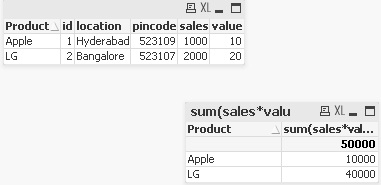 Please see attached
 alibd225
- Mark as New
- Bookmark
- Subscribe
- Mute
- Subscribe to RSS Feed
- Permalink
- Report Inappropriate Content
you can use Mapping table command in load script
SalesValue:
Mapping LOAD Productid,
sales;
SQL SELECT *
FROM Table2;
SalesDetails:
LOAD
Productid,
location,
ApplyMap('SalesValue',Productid,0)*value as TotalSales
SQL SELECT *
FROM Table1;
or use Sum(value * sales) in expression in design mode
 jagan
jagan
- Mark as New
- Bookmark
- Subscribe
- Mute
- Subscribe to RSS Feed
- Permalink
- Report Inappropriate Content
Just simply use
SUm(value * sales)
Regards,
Jagan.
