Unlock a world of possibilities! Login now and discover the exclusive benefits awaiting you.

- Qlik Community
- :
- Forums
- :
- Analytics & AI
- :
- Products & Topics
- :
- Visualization and Usability
- :
- last one week data
- Subscribe to RSS Feed
- Mark Topic as New
- Mark Topic as Read
- Float this Topic for Current User
- Bookmark
- Subscribe
- Mute
- Printer Friendly Page

- Mark as New
- Bookmark
- Subscribe
- Mute
- Subscribe to RSS Feed
- Permalink
- Report Inappropriate Content
last one week data
Hi all,
I need to display last one week data.
For example: Today is 25th i need to show last one week means from 18th to 24th.
Currently I am using,
Dimension as : Week_group
Measures as:
1.COUNT({<weekstart={">$(=date(max(weekstart)-7))<=$(=max(weekstart))"}, DateType={invitation}>}invitation_id)
2. COUNT({<weekstart={">$(=date(max(weekstart)-7))<=$(=max(weekstart))"}, DateType={signed}, user_signed={1}>}invitation_id)
but this is displaying the data of last week taking monday as weekstart.
anyone explain how can i display last 7 days/last week in single bar.
Thanks,
Pramod
- Tags:
- bar chart

 Gysbert_Wassena
- Mark as New
- Bookmark
- Subscribe
- Mute
- Subscribe to RSS Feed
- Permalink
- Report Inappropriate Content
Can you post a Qlik Sense app that demonstrates the problem?
talk is cheap, supply exceeds demand

 gardenierbi
- Mark as New
- Bookmark
- Subscribe
- Mute
- Subscribe to RSS Feed
- Permalink
- Report Inappropriate Content
Why do you use 'Weekstart'? I think you want to compare with the date of today?
For example:
COUNT({<weekstart={">$(=date(TODAY()-7))<=$(=TODAY()-1)"}, DateType={invitation}>}invitation_id)
 cjohnson
- Mark as New
- Bookmark
- Subscribe
- Mute
- Subscribe to RSS Feed
- Permalink
- Report Inappropriate Content
Hi Kumar,
Why don't you try introducing variables into your application as shown below:
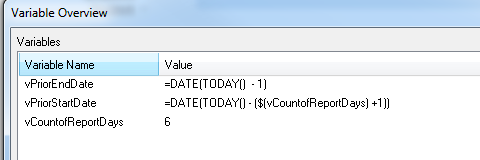
You can then use those variables in set analysis as shown below:
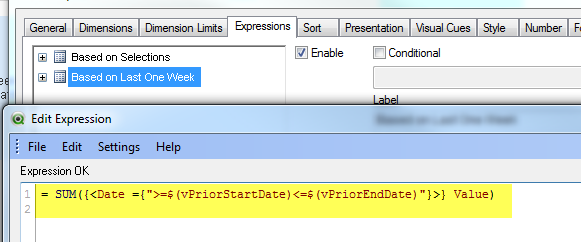
Please see attached for more detail.
Thanks,
Camile