Unlock a world of possibilities! Login now and discover the exclusive benefits awaiting you.

- Qlik Community
- :
- Forums
- :
- Analytics & AI
- :
- Products & Topics
- :
- Visualization and Usability
- :
- Re: last year data in Qlik Sense using expression
- Subscribe to RSS Feed
- Mark Topic as New
- Mark Topic as Read
- Float this Topic for Current User
- Bookmark
- Subscribe
- Mute
- Printer Friendly Page

 vanand3535
- Mark as New
- Bookmark
- Subscribe
- Mute
- Subscribe to RSS Feed
- Permalink
- Report Inappropriate Content
last year data in Qlik Sense using expression
Hi all,
I need to find the Sales in prior season .
Season= 2013,2014,2015,2016,2016
Logic :-
Prior season sales(2016)= total sales(2013,2014,2015)
Prior season sales(2015)=total sales(2013,2014)
same for others...
How can I do this?
vanand3535
- Mark as New
- Bookmark
- Subscribe
- Mute
- Subscribe to RSS Feed
- Permalink
- Report Inappropriate Content
Sample demo:-
| SEASON | SALES | PRIOR_SEASON_Sales | Calculation hint |
| 2013 | 10 | 0 | (Sales in 2012 but here is no data for 2012 so it is 0) |
| 2014 | 20 | 10(10) | (Sales in 2013) |
| 2015 | 30 | 30(20+10) | (sales in 2014,2013) |
| 2016 | 40 | 60(30+20+10) | (Sales in 2015,2014,2013) |
| 2017 | 50 | 100(40+30+20+10) | (Sales in 2016,2015,2014,2013) |

 pedrolyra
- Mark as New
- Bookmark
- Subscribe
- Mute
- Subscribe to RSS Feed
- Permalink
- Report Inappropriate Content
In your script create a date dimension like this:
date(makedate(num(Season),1,1)) as SeasonDate
this will create a date field for your season
after that use SeasonDate as Dimension
SUM({$<SeasonDate= {"<=$(=date(makedate(year(addmonths(max(SeasonDate),-12)),12,31)))"}>} Value)
vanand3535
- Mark as New
- Bookmark
- Subscribe
- Mute
- Subscribe to RSS Feed
- Permalink
- Report Inappropriate Content
Sample demo:-
| SEASON | SALES | PRIOR_SEASON_Sales | Calculation hint |
| 2013 | 10 | 0 | (Sales in 2012 but here is no data for 2012 so it is 0) |
| 2014 | 20 | 10(10) | (Sales in 2013) |
| 2015 | 30 | 30(20+10) | (sales in 2014,2013) |
| 2016 | 40 | 60(30+20+10) | (Sales in 2015,2014,2013) |
| 2017 | 50 | 100(40+30+20+10) | (Sales in 2016,2015,2014,2013) |
vanand3535
- Mark as New
- Bookmark
- Subscribe
- Mute
- Subscribe to RSS Feed
- Permalink
- Report Inappropriate Content
Sample demo:-
| SEASON | SALES | PRIOR_SEASON_Sales | Calculation hint |
| 2013 | 10 | 0 | (Sales in 2012 but here is no data for 2012 so it is 0) |
| 2014 | 20 | 10(10) | (Sales in 2013) |
| 2015 | 30 | 30(20+10) | (sales in 2014,2013) |
| 2016 | 40 | 60(30+20+10) | (Sales in 2015,2014,2013) |
| 2017 | 50 | 100(40+30+20+10) | (Sales in 2016,2015,2014,2013) |

 MK9885
- Mark as New
- Bookmark
- Subscribe
- Mute
- Subscribe to RSS Feed
- Permalink
- Report Inappropriate Content
=sum({< Season={$(=(Max(Season))-1)}
>+< Season={$(=(Max(Season))-2)}
>+< Season={$(=(Max(Season))-3)}
>+< Season={$(=(Max(Season))-4)}>}Sales)
The above expression should give you PRIOR_SEASON_Sales numbers
vanand3535
- Mark as New
- Bookmark
- Subscribe
- Mute
- Subscribe to RSS Feed
- Permalink
- Report Inappropriate Content
I am getting the same data
if sales in 2017 =50 then after applying the formulae
sales in 2017=50
It is not giving the sum of sales in 2016+2015+2014+2013
same as it is
vanand3535
- Mark as New
- Bookmark
- Subscribe
- Mute
- Subscribe to RSS Feed
- Permalink
- Report Inappropriate Content
I have used this formulae that you told:--
=
Sales({< Season={$(=(Max(SEASON))-1)}>
+
< Season={$(=(Max(SEASON))-2)}>
+
< Season={$(=(Max(SEASON))-3)}>
+
< Season={$(=(Max(SEASON))-4)}>
+
< Season={$(=(Max(SEASON))-5)}>
}Sales)
But I'm not able to get the sum sales all previous year for a particular year:-
ex;-
for 2017 I'm not able to get sales of 2016+2015+2014+2013
this formulae is just showing me only data for same year like if sales in 2013 =50
then after applying the formulae sales in 2013 = 50
no changes
vanand3535
- Mark as New
- Bookmark
- Subscribe
- Mute
- Subscribe to RSS Feed
- Permalink
- Report Inappropriate Content
I have used this formulae that you told:--
=
Sum({< Season={$(=(Max(SEASON))-1)}>
+
< Season={$(=(Max(SEASON))-2)}>
+
< Season={$(=(Max(SEASON))-3)}>
+
< Season={$(=(Max(SEASON))-4)}>
+
< Season={$(=(Max(SEASON))-5)}>
}Sales)
But I'm not able to get the sum sales all previous year for a particular year:-
ex;-
for 2017 I'm not able to get sales of 2016+2015+2014+2013
this formulae is just showing me only data for same year like if sales in 2013 =50
then after applying the formulae sales in 2013 = 50
no changes
MK9885
- Mark as New
- Bookmark
- Subscribe
- Mute
- Subscribe to RSS Feed
- Permalink
- Report Inappropriate Content
2017 = 100 won't show up until you have your TOTALS option on in table...
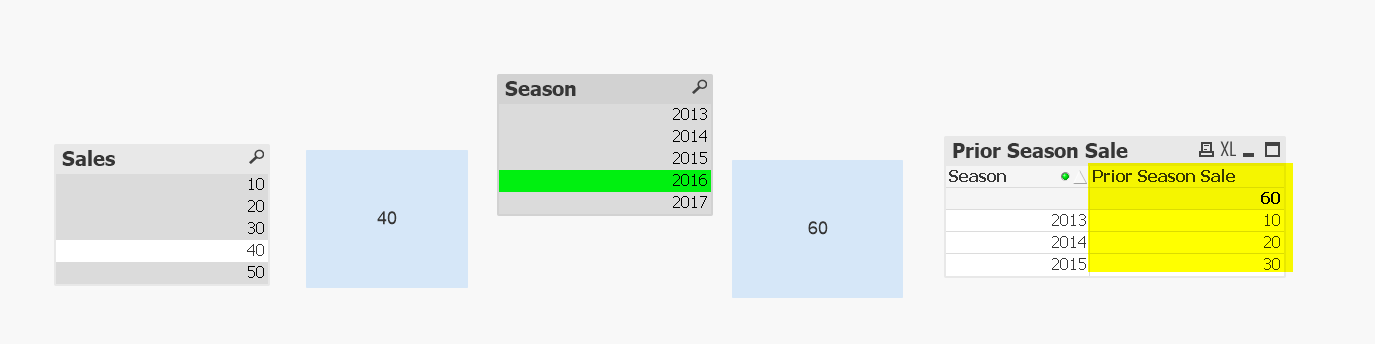
Anyway, thats the only solution I know and its working on my end...
Unless someone else helps you.
vanand3535
- Mark as New
- Bookmark
- Subscribe
- Mute
- Subscribe to RSS Feed
- Permalink
- Report Inappropriate Content
This is original value without using formulae:-

after applying the formulae:-
=
SUM({< SEASON={$(=(Max(SEASON))-1)}>
+
< SEASON={$(=(Max(SEASON))-2)}>
+
< SEASON={$(=(Max(SEASON))-3)}>
+
< SEASON={$(=(Max(SEASON))-4)}>
+
< SEASON={$(=(Max(SEASON))-5)}>
}Sales)
I'm getting output:-
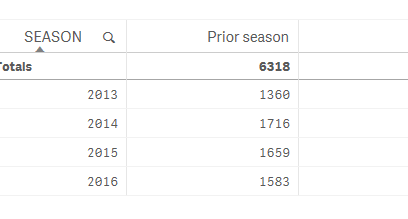
2017 value is missing and it is same as earlier no effect of using this formulae
