Unlock a world of possibilities! Login now and discover the exclusive benefits awaiting you.

- Qlik Community
- :
- Forums
- :
- Analytics & AI
- :
- Products & Topics
- :
- Visualization and Usability
- :
- map: count
- Subscribe to RSS Feed
- Mark Topic as New
- Mark Topic as Read
- Float this Topic for Current User
- Bookmark
- Subscribe
- Mute
- Printer Friendly Page

 fmazzarelli
- Mark as New
- Bookmark
- Subscribe
- Mute
- Subscribe to RSS Feed
- Permalink
- Report Inappropriate Content
map: count
Hi Community,
just an extra.
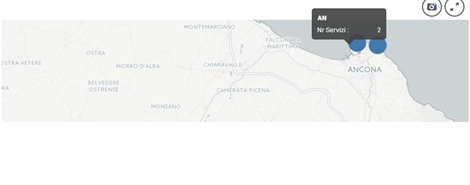
On the map I'm making service count
Formula is: count(Services)
I would like to also display the number of vehicles used and foolishly I thought I would add the need with a ,
New Formula is:
count(Services, Vehicles) or count(Services) , count (Vehicles)
but it doesn't work.
Do you have a suggestion?

 MK9885
- Mark as New
- Bookmark
- Subscribe
- Mute
- Subscribe to RSS Feed
- Permalink
- Report Inappropriate Content
In Qlik Sense map unfortunately you cannot. As it allows only single expression.
You can +,-,/ the expression or use Set analysis but it will not show you multiple values.
'<b> Service</b>= ' & Count(Service)& '<br>' &
'<b> Vehicles</b>= ' & Count(Vehicles)& '<br>'
or
'Service : ' & Count(Service)& chr(10)
& 'Vehicles: ' & Count(Vehicles)& chr(10)
Usually this will work but it doesn't in Map you've
