Unlock a world of possibilities! Login now and discover the exclusive benefits awaiting you.

- Qlik Community
- :
- Forums
- :
- Analytics & AI
- :
- Products & Topics
- :
- Visualization and Usability
- :
- "Keep" filter selections after clearing
- Subscribe to RSS Feed
- Mark Topic as New
- Mark Topic as Read
- Float this Topic for Current User
- Bookmark
- Subscribe
- Mute
- Printer Friendly Page

 william_fu
- Mark as New
- Bookmark
- Subscribe
- Mute
- Subscribe to RSS Feed
- Permalink
- Report Inappropriate Content
"Keep" filter selections after clearing
Let's say I'd like to filter the sample table below for all the ID's that had were late on 01/01/2018.
| Date | ID | Status |
|---|---|---|
| 01/12/2017 | A | Pending |
| 01/12/2017 | B | Pending |
| 01/12/2017 | C | Pending |
| 01/01/2018 | A | Late |
| 01/01/2018 | B | On Time |
| 01/01/2018 | C | Late |
| 01/02/2018 | A | Late |
| 01/02/2018 | B | On Time |
| 01/02/2018 | C | On Time |
| 01/03/2018 | A | On Time |
| 01/03/2018 | B | On Time |
The steps to do it manually in Qlik are pretty straightforward:
1. Filter Status = 'Late' and Date='01/01/2018'
2. Filter eligible IDs (A and C)
3. Clear selections on Status and Date fields to get the required rows:
| Date | ID | Status |
|---|---|---|
| 01/12/2017 | A | Pending |
| 01/12/2017 | C | Pending |
| 01/01/2018 | A | Late |
| 01/01/2018 | C | Late |
| 01/02/2018 | A | Late |
| 01/02/2018 | C | On Time |
| 01/03/2018 | A | On Time |
I'm looking for a way to do this without the manual steps, where the user can just choose the desired date and status and view the filtered table.
I can't seem to figure out how to apply these filters a measure without including unwanted data
The SQL analogy would be:
SELECT * FROM Table WHERE ID IN (SELECT ID FROM Table WHERE Date = '01/01/2018' AND Status = 'Late')
 thakkarrahul01
- Mark as New
- Bookmark
- Subscribe
- Mute
- Subscribe to RSS Feed
- Permalink
- Report Inappropriate Content
Hi William,
Based on your stated steps, I have tried to apply selection using Actions on Button(QlikView). Please find attached app & snap.
Regards,
Rahul


 jonathandienst
- Mark as New
- Bookmark
- Subscribe
- Mute
- Subscribe to RSS Feed
- Permalink
- Report Inappropriate Content
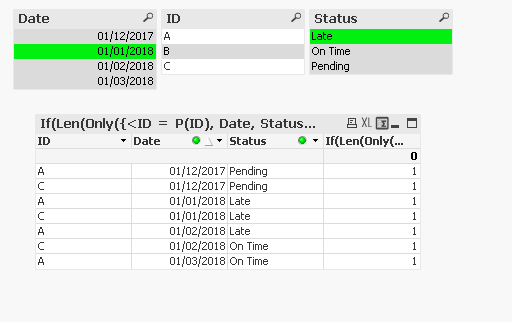
Create a table with ID, Date, Status as dimensions
Then use the expression
=If(Len(Only({<ID = P(ID), Date, Status>} ID)) > 0, 1, 0)
Make sure that suppress zeroes is enabled. In QV you can hide the expression. I am not sure about how you do that in QS.

 YoussefBelloum
- Mark as New
- Bookmark
- Subscribe
- Mute
- Subscribe to RSS Feed
- Permalink
- Report Inappropriate Content
new feature of hiding expression only available on pivot table

 agigliotti
- Mark as New
- Bookmark
- Subscribe
- Mute
- Subscribe to RSS Feed
- Permalink
- Report Inappropriate Content
are you talking about qlik sense april 2018 version?
YoussefBelloum
- Mark as New
- Bookmark
- Subscribe
- Mute
- Subscribe to RSS Feed
- Permalink
- Report Inappropriate Content
I'm talking about the latest versions, not specifically April version, because I saw Michael's tarallo keynote and I read the relases notes and it wasn't mentioned there, so I think It was present before April release
agigliotti
- Mark as New
- Bookmark
- Subscribe
- Mute
- Subscribe to RSS Feed
- Permalink
- Report Inappropriate Content
because i can't find that feature (hiding pivot dimension/measure) even in april 2018 version.
YoussefBelloum
- Mark as New
- Bookmark
- Subscribe
- Mute
- Subscribe to RSS Feed
- Permalink
- Report Inappropriate Content
From the office, for Qliksense, I use Qliksense Cloud..
it is called: Object table column visibility condition (unser the measure properties)
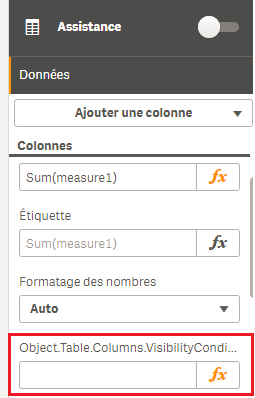
Maybe it is not yet available in Desktop versions...
agigliotti
- Mark as New
- Bookmark
- Subscribe
- Mute
- Subscribe to RSS Feed
- Permalink
- Report Inappropriate Content
yes I checked on Qlik Cloud right now and I have for all table columns as below:
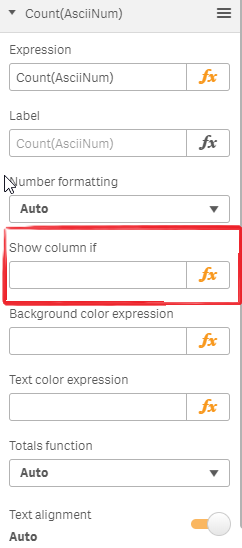
this feature is not included in april 2018 desktop version yet.
did anyone check on Sense Server april 2018 version ?
william_fu
- Mark as New
- Bookmark
- Subscribe
- Mute
- Subscribe to RSS Feed
- Permalink
- Report Inappropriate Content
Hey jontydkpi
Thanks for the response;
I've tested your suggestion and, correct me if I'm wrong, but this seems to stop working if "ID" is not one of the dimensions in the table (e.g. if I wanted a summary of status per date, for example)
