Unlock a world of possibilities! Login now and discover the exclusive benefits awaiting you.

- Qlik Community
- :
- Forums
- :
- Analytics & AI
- :
- Products & Topics
- :
- Visualization and Usability
- :
- show only current month record
- Subscribe to RSS Feed
- Mark Topic as New
- Mark Topic as Read
- Float this Topic for Current User
- Bookmark
- Subscribe
- Mute
- Printer Friendly Page

- Mark as New
- Bookmark
- Subscribe
- Mute
- Subscribe to RSS Feed
- Permalink
- Report Inappropriate Content
show only current month record
in table i have a data like this
| Head | Price | Month | Sub heads |
|---|---|---|---|
| Marketing | 200 | 12-Jan-17 | Mark1 |
| Marketing | 200 | 13-Feb-17 | Mark2 |
| Marketing | 200 | 14-Feb-17 | Mark3 |
| Misc | 1200 | 3-Jan-18 | Mark4 |
| Misc | 1300 | 1-Jan-18 | Mark5 |
| Misc | 1300 | 13-Jan-18 | Mark6 |
| Misc | 1100 | 5-Mar-18 | Mark7 |
| Ins | 1200 | 5-Mar-18 | Mark8 |
| Ins | 1300 | 5-Mar-18 | Mark9 |
| Ins | 1500 | 5-Mar-18 | Mark10 |
now here i want to display only current month records and hide all previous old data.. like want to show + button and disable that and want to show current month record

 jerryyang756
- Mark as New
- Bookmark
- Subscribe
- Mute
- Subscribe to RSS Feed
- Permalink
- Report Inappropriate Content
load the data to get the month number
LOAD
Head,
Price,
Month,
Num(Month(Date#(Month,'DD-MMM-YY'))) as MonthNum,
[Sub heads]
FROM
(biff, embedded labels, table is Sheet1$);
--------------------------------------------------------------------------------------------
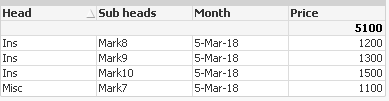
Now in a straight table add
dimension: Head,[Sub Heads], Month
Expression : sum({<MonthNum={$(=Max(MonthNum))}>}Price)
- Mark as New
- Bookmark
- Subscribe
- Mute
- Subscribe to RSS Feed
- Permalink
- Report Inappropriate Content
hi ...
i tried this but not working ..
i have records like this
head price month
abc 234 3/9/2018
def 112 3/9/2018
dfdf 244 3/9/2018
239 124 2//1/2018
and so on
now i want like this data
head price month
abc 234 3/9/2018
def 112 3/9/2018
dfdf 244 3/9/2018
what expression should i use for display all current month records .. i used this
 chinnuchinni
- Mark as New
- Bookmark
- Subscribe
- Mute
- Subscribe to RSS Feed
- Permalink
- Report Inappropriate Content
abc:
load * Inline [
head, price, month
abc, 234, 3/9/2018
def, 112, 3/9/2018
dfdf, 244, 3/9/2018
239, 124, 2/1/2018
];
xyz:
load head,price, month,
num(month( Date#(month,'D/M/YYYY')))as Month1 Resident abc ;
DROP Table abc ;
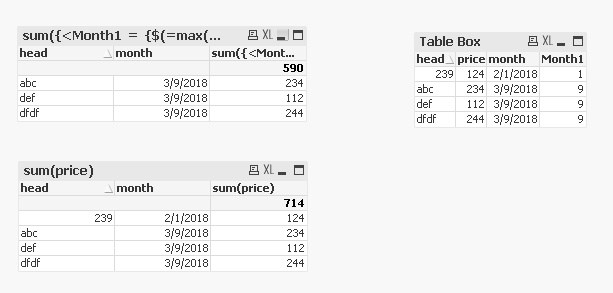
and in Straight table DImensions are: head and Month
Expression is : sum({<Month1 = {$(=max(Month1))}>}price)
You will get below o/p :