Unlock a world of possibilities! Login now and discover the exclusive benefits awaiting you.

- Qlik Community
- :
- Forums
- :
- Analytics & AI
- :
- Products & Topics
- :
- Visualization and Usability
- :
- suppress dimensions with zero value
- Subscribe to RSS Feed
- Mark Topic as New
- Mark Topic as Read
- Float this Topic for Current User
- Bookmark
- Subscribe
- Mute
- Printer Friendly Page

- Mark as New
- Bookmark
- Subscribe
- Mute
- Subscribe to RSS Feed
- Permalink
- Report Inappropriate Content
suppress dimensions with zero value
hi all
I would like to suppress dimensions with zero value in a bar chart (too many dimensions).
Dimension: [Inventory Movement Type]
Measure: Sum([Value (Custom)]
I would only like the dimensions where Sum([Value (Custom)] <> 0 to appear.
I have tried with if(Sum([Value (Custom)]) = 0, null(),[Inventory Movement Type]) but it gives me an error - Invalid dimension.
Is there any other way to do it?
Thank you for your help.
Kind regards
Jernej

 ali_hijazi
- Mark as New
- Bookmark
- Subscribe
- Mute
- Subscribe to RSS Feed
- Permalink
- Report Inappropriate Content
put instead that Value (Custom) <> 0 in your set analysis of the expression
sum({< [Value (Custom)]={'*'}-{0}>} ....

 simondachstr
- Mark as New
- Bookmark
- Subscribe
- Mute
- Subscribe to RSS Feed
- Permalink
- Report Inappropriate Content
ali_hijazi hits is incorrect, as he would like the aggregation of Value (Custom) to exclude zeros, not the dimensional value.
simondachstr
- Mark as New
- Bookmark
- Subscribe
- Mute
- Subscribe to RSS Feed
- Permalink
- Report Inappropriate Content
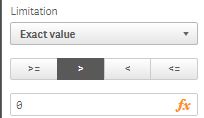
I believe you will need to apply a dimension limitation:
- Mark as New
- Bookmark
- Subscribe
- Mute
- Subscribe to RSS Feed
- Permalink
- Report Inappropriate Content
thank you for your reply Martin.
This works in general, however, I also have negative values, which get hidden as a result of the limitation.
 alextimofeyev
- Mark as New
- Bookmark
- Subscribe
- Mute
- Subscribe to RSS Feed
- Permalink
- Report Inappropriate Content
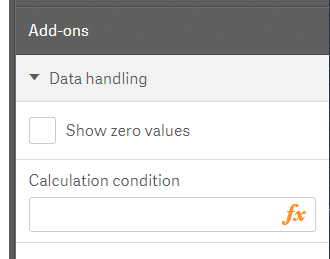
In the Bar Chart properties, unselect Show zero values.
simondachstr
- Mark as New
- Bookmark
- Subscribe
- Mute
- Subscribe to RSS Feed
- Permalink
- Report Inappropriate Content
Then probably un-selecting "Show zero values" will help.
Another mathematical idea would be to expand the expression so it can be included in the denominator e.g.:
2*Sum([Value (Custom)]/Sum([Value (Custom)]
This way 0s will evaluate to null and hence be suppressed.
- Mark as New
- Bookmark
- Subscribe
- Mute
- Subscribe to RSS Feed
- Permalink
- Report Inappropriate Content
thank you Alex. In the end I went with showing only the top 15 absolute values.
- Mark as New
- Bookmark
- Subscribe
- Mute
- Subscribe to RSS Feed
- Permalink
- Report Inappropriate Content
thank you Martin. In the end I went with showing only the top 15 absolute values.