Unlock a world of possibilities! Login now and discover the exclusive benefits awaiting you.

- Qlik Community
- :
- All Forums
- :
- QlikView
- :
- How to show List box values conditional?
- Subscribe to RSS Feed
- Mark Topic as New
- Mark Topic as Read
- Float this Topic for Current User
- Bookmark
- Subscribe
- Mute
- Printer Friendly Page

 Suus
Suus
- Mark as New
- Bookmark
- Subscribe
- Mute
- Subscribe to RSS Feed
- Permalink
- Report Inappropriate Content
How to show List box values conditional?
Hi,
Hope someone can help with the following.
I have created a list box on a dimension Klantnaam in my app.
In this I show the expression value sum([Te Factureren Bedrag NC])+sum([Te Factureren Bedrag FP])
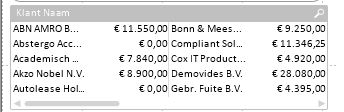
As you can see 'Abstergo' and 'Autolease' show a value of 0.
I would like them to turn 'grey', of exclude from the selection.
How do I achieve this?
Regards, Suzan
- « Previous Replies
-
- 1
- 2
- Next Replies »
Accepted Solutions

 rustyfishbones
- Mark as New
- Bookmark
- Subscribe
- Mute
- Subscribe to RSS Feed
- Permalink
- Report Inappropriate Content
 alexandros17
- Mark as New
- Bookmark
- Subscribe
- Mute
- Subscribe to RSS Feed
- Permalink
- Report Inappropriate Content
The best option is to use a table or a Chart, not a list box,
with a chart you may exclude by dimension or setting "exclude 0 values"

 simondachstr
- Mark as New
- Bookmark
- Subscribe
- Mute
- Subscribe to RSS Feed
- Permalink
- Report Inappropriate Content
Did you try to suppress null values on the dimension property or suppress zero values on the presentation property?
rustyfishbones
- Mark as New
- Bookmark
- Subscribe
- Mute
- Subscribe to RSS Feed
- Permalink
- Report Inappropriate Content
Create a List Box Expression to only show values greater than 0
IF(SUM([Te Factureren Bedrag NC]) + SUM([Te Factureren Bedrag FP]) >0 , [Klant Naam])
 jonathandienst
- Mark as New
- Bookmark
- Subscribe
- Mute
- Subscribe to RSS Feed
- Permalink
- Report Inappropriate Content
Hi
You don't have many options when you display data like this in a list box. You could hide the elements containing 0 values by using a conditional expression in the list box - but this removes them so they are no longer visible. You could also trigger a selection change that deselects those values - this will give them a grey unavailable background but this will prevent the display of the amount expression and cause the others to all turn green (selected).
Alternatively, change to pivot or straight table, but you will lose the horizontal flow...
HTH
Jonathan
rustyfishbones
- Mark as New
- Bookmark
- Subscribe
- Mute
- Subscribe to RSS Feed
- Permalink
- Report Inappropriate Content
Sorry try this


 veidlburkhard
- Mark as New
- Bookmark
- Subscribe
- Mute
- Subscribe to RSS Feed
- Permalink
- Report Inappropriate Content
Hi Suzan,
seems the list box is not the adaquate object for these kind of things. What you can try, if you will stick to the list box, is to go to the 'Sort' tab and mark sorting by 'Expression' where you enter your expression sum([Te Factureren Bedrag NC])+sum([Te Factureren Bedrag FP]) and click on 'Descending'. So only the high values are shown and normally you should not see the zero values.
If this is not feasible for you, please try a straight table.
Hope this helps
Burkhard
Suus
- Mark as New
- Bookmark
- Subscribe
- Mute
- Subscribe to RSS Feed
- Permalink
- Report Inappropriate Content
Thanks, your expression gave an error.
I put this with altered brackets on Expression Tab, field 'Conditional', but nothing happens.
aggr(if(sum(([Te Factureren Bedrag NC])+sum([Te Factureren Bedrag FP]))>0,[Klant Naam]),[Klant Naam])
Suus
- Mark as New
- Bookmark
- Subscribe
- Mute
- Subscribe to RSS Feed
- Permalink
- Report Inappropriate Content
Thanks, tried this before asking the question on Community... Is ok, but not a real beauty ;-), so hope I find an even nicer answer...
rustyfishbones
- Mark as New
- Bookmark
- Subscribe
- Mute
- Subscribe to RSS Feed
- Permalink
- Report Inappropriate Content
Hi Suzan,
not on the Expression Tab
Create a List Box Expression and add
aggr(if(sum(([Te Factureren Bedrag NC])+sum([Te Factureren Bedrag FP]))>0,[Klant Naam]),[Klant Naam])
you would do it by selecting Expression from the drop down list on the list box properties, like below


- « Previous Replies
-
- 1
- 2
- Next Replies »