Unlock a world of possibilities! Login now and discover the exclusive benefits awaiting you.

- Qlik Community
- :
- Forums
- :
- Analytics & AI
- :
- Products & Topics
- :
- Visualization and Usability
- :
- Qlik sense straight table dimension color expressi...
- Subscribe to RSS Feed
- Mark Topic as New
- Mark Topic as Read
- Float this Topic for Current User
- Bookmark
- Subscribe
- Mute
- Printer Friendly Page

 kumarnatarajan
- Mark as New
- Bookmark
- Subscribe
- Mute
- Subscribe to RSS Feed
- Permalink
- Report Inappropriate Content
Qlik sense straight table dimension color expression
Hi All, I have doubt in straight table cells coloring option. I want to give background color in table rows based on condition. i can background color in expression columns. How can i color dimension columns based on condition.
- Tags:
- stright_table
Accepted Solutions

.png "Former Employee") JonnyPoole
JonnyPoole
- Mark as New
- Bookmark
- Subscribe
- Mute
- Subscribe to RSS Feed
- Permalink
- Report Inappropriate Content
There isn't a way currently.
But one tip to add some flexibility is to add 1 or more dimensions as Measures with an expression like the following
=aggr( only(Customer),Customer)
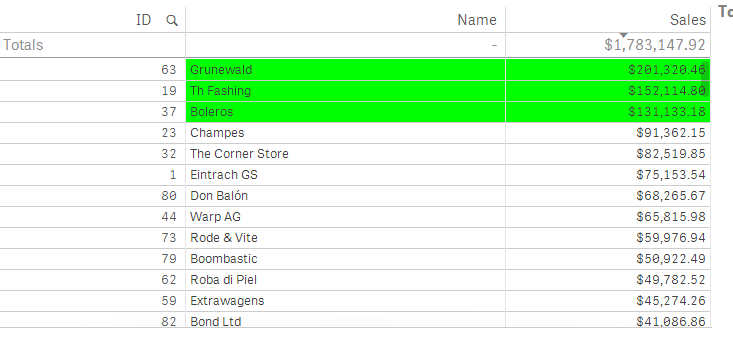
Below ID is a dimension (not colored), but Name has been added as a Measure with the above expression
JonnyPoole
- Mark as New
- Bookmark
- Subscribe
- Mute
- Subscribe to RSS Feed
- Permalink
- Report Inappropriate Content
There isn't a way currently.
But one tip to add some flexibility is to add 1 or more dimensions as Measures with an expression like the following
=aggr( only(Customer),Customer)
Below ID is a dimension (not colored), but Name has been added as a Measure with the above expression
