Unlock a world of possibilities! Login now and discover the exclusive benefits awaiting you.

- Qlik Community
- :
- All Forums
- :
- QlikView
- :
- Apply group header to rows.
- Subscribe to RSS Feed
- Mark Topic as New
- Mark Topic as Read
- Float this Topic for Current User
- Bookmark
- Subscribe
- Mute
- Printer Friendly Page

- Mark as New
- Bookmark
- Subscribe
- Mute
- Subscribe to RSS Feed
- Permalink
- Report Inappropriate Content
Apply group header to rows.
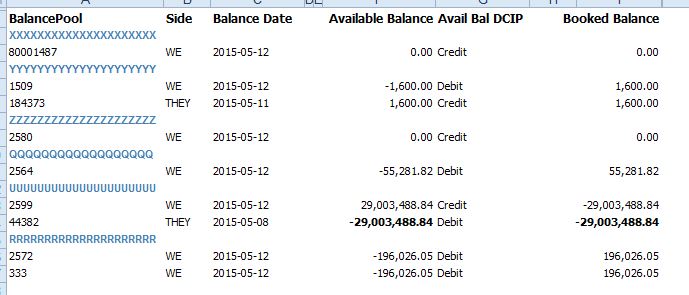
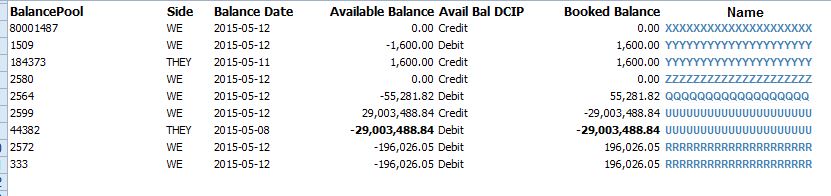
Need to fetch the names in blue and apply them to each row in a new column.
Any ideas?
RAW DATA
DESIRED RESULT IN QlikVieW

 marcus_sommer
- Mark as New
- Bookmark
- Subscribe
- Mute
- Subscribe to RSS Feed
- Permalink
- Report Inappropriate Content
With peek() or previous() you could grab previous rows - see also: Peek() vs Previous() – When to Use Each
and just written down without testing:
Load * where len(Side) >= 1;
Load *, if(len(peek('Side') = 0, peek('BalancePool')) as Name From RawData;
- Marcus

 jonathandienst
- Mark as New
- Bookmark
- Subscribe
- Mute
- Subscribe to RSS Feed
- Permalink
- Report Inappropriate Content
Looks a good start - you may also need this:
Load * where len(Side) >= 1;
Load *, if(len(peek(Side) = 0, peek(BalancePool), peek(Name)) as Name From RawData;
to populate Name if there is more than one row under one heading.
- Mark as New
- Bookmark
- Subscribe
- Mute
- Subscribe to RSS Feed
- Permalink
- Report Inappropriate Content
Looks promising!
Im a bit of a nube, so how would you implement this?
Something like the below?
Also, can you see what might be wrong with the IF-statement?
Directory;
LOAD BalancePool,
Side,
[Balance Date],
[Available Balance],
[Avail Bal DCIP],
[Booked Balance]
FROM
testBalances.xls
(biff, embedded labels, table is [(020)Balance Report$]);
Load * where len(Side) >= 1;
Load *, if(len(peek(Side) = 0, peek(BalancePool), peek(Name)) as Name;
- Mark as New
- Bookmark
- Subscribe
- Mute
- Subscribe to RSS Feed
- Permalink
- Report Inappropriate Content
Can you pls give me a QV-file example?
Would make my day! 
 MayilVahanan
- Mark as New
- Bookmark
- Subscribe
- Mute
- Subscribe to RSS Feed
- Permalink
- Report Inappropriate Content
Hi
Try like this
TestBalances:
Load *, if(len(peek('Side')) = 0, peek('BalancePool'), Peek('Name')) as Name;
LOAD BalancePool,
Side,
[Balance Date],
[Available Balance],
[Avail Bal DCIP],
[Booked Balance]
FROM
testBalances.xls
(biff, embedded labels, table is [(020)Balance Report$]);
NoConcatenate
LOAD * Resident TestBalances Where IsNum(BalancePool);
DROP Table TestBalances;
Please close the thread by marking correct answer & give likes if you like the post.