Unlock a world of possibilities! Login now and discover the exclusive benefits awaiting you.

- Qlik Community
- :
- All Forums
- :
- QlikView
- :
- Multiple Entries
- Subscribe to RSS Feed
- Mark Topic as New
- Mark Topic as Read
- Float this Topic for Current User
- Bookmark
- Subscribe
- Mute
- Printer Friendly Page

- Mark as New
- Bookmark
- Subscribe
- Mute
- Subscribe to RSS Feed
- Permalink
- Report Inappropriate Content
Multiple Entries
T1:
| PID | Name | Status | Date | Text |
| 1 | XXx | Open | 12/8/2014 | |
| 2 | wer | Open | 15/07/2015 | |
| 3 | t5tt | Closed | 13/08/2015 | |
| 3 | t5tt | Closed | 13/08/2015 | Exit |
| 4 | test | Open | 16/01/2016 | |
| 4 | test | Open | 16/01/2016 | Nexit |
T1 has got multiple entries when I added the new field Text to it.
I would like to display a sigle entry which have the value for the field Text for each PID like below.
Help me to get the below output:
output:
| PID | Name | Status | Date | Text |
| 1 | XXx | Open | 12/8/2014 | |
| 2 | wer | Open | 15/07/2015 | |
| 3 | t5tt | Closed | 13/08/2015 | Exit |
| 4 | test | Open | 16/01/2016 | Nexit |
- Tags:
- qlik account
- qlik support
- qlik uk
- qlik-desktop
- qlik-tour
- qlikview deve
- qlikview object
- qlikview_app_development
- qlikview_scripting
- scripting_developing

 sunny_talwar
- Mark as New
- Bookmark
- Subscribe
- Mute
- Subscribe to RSS Feed
- Permalink
- Report Inappropriate Content
Try this:
Table:
LOAD PID,
Name,
Status,
Date,
Text
FROM
[https://community.qlik.com/thread/200924]
(html, codepage is 1252, embedded labels, table is @1);
FinalTable:
NoConcatenate
LOAD PID,
Only(Name) as Name,
Only(Status) as Status,
Only(Date) as Date,
FirstValue(Text) as Text
Resident Table
Group By PID
Order By PID, Text desc;
DROP Table Table;
- Mark as New
- Bookmark
- Subscribe
- Mute
- Subscribe to RSS Feed
- Permalink
- Report Inappropriate Content
Can You please get same in front end
sunny_talwar
- Mark as New
- Bookmark
- Subscribe
- Mute
- Subscribe to RSS Feed
- Permalink
- Report Inappropriate Content
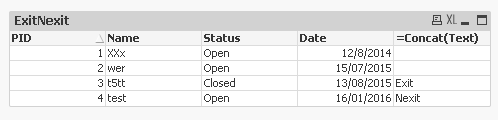
Front end:
Create a straight table with:
Dimension: PID, Name, Status, Date
Expression: Concat(Text)
 maxgro
- Mark as New
- Bookmark
- Subscribe
- Mute
- Subscribe to RSS Feed
- Permalink
- Report Inappropriate Content
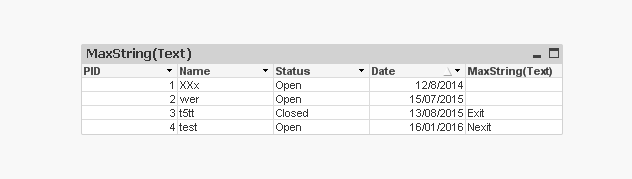
maybe maxstring(Text)